EasyManua.ls Logo

Tommee Tippee dreamee - User Manual

Tommee Tippee dreamee
10 pages
Print Icon
To Next Page IconTo Next Page
Loading...
dreamee
sleep & nursery monitor system
the
u
ltimate
video sound movement monitor
Getting set up
1. Plug the cable into the Parent unit, then plug it into the mains power socket and switch the socket on.
Note: The first time you use the unit or if you haven’t used it for a long time, it may take longer to charge.
2. Leave to charge for 4 hours or until the red light indicator turns o.
3. Place the Baby unit near a power socket in the room where you’re going to be monitoring your baby most of
the time. It should be at least one metre away from your baby.
4.
Plug the cable into the Baby unit, then plug it into the mains power socket and switch the socket on.
5. Keep the Parent unit at least 3ft/0.9m metre away from the Baby unit to avoid audio feedback.
6.
Once the Parent unit has charged, turn it and the Baby unit on and you’re ready to start monitoring.
7. To prepare the Movement sensor mat, set the lock lever to “open”, slide open the battery door in direction as
shown. Install 3 AA (UM-3) alkaline batteries in the correct orientation. Slide the battery cover back on and set
the lever to lock. Note: The battery life of the movement sensor mat lasts up to 90 days.
CAMERA
Place the camera onto a stable surface or mounted on the wall at least 3ft/0.9m away from baby.
Press and hold the power button (1) to turn on.
Adjust the microphone sensitivity to your desirable sound level.
The camera will only transmit when baby makes a noise.
Once the camera starts to transmit, the transmit indicator (3) will light up blue. When baby is silent, the
microphone (5) will not pick up any sound, the camera will stop transmitting and go into standby mode.
The night light can be set to ON, OFF or VOX (when detecting sound) using the Parent Unit.
The light intensity can be adjusted using +/- buttons (7).
How to use the Baby unit (camera)
CONTROLS
1. Power ON/OFF button
2. Power ON indicator
3. Transmit indicator
4.
Night light
5. Microphones
6. USB socket
7. Night light intensity (up and down)
8. Speaker
9. Pairing button
25. Temperature sensor
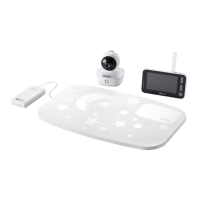
Baby unit
Parent unit
Movement sensor mat
1
2
3
4
5
25
6
7
9
8
23

Question and Answer IconNeed help?

Do you have a question about the Tommee Tippee dreamee and is the answer not in the manual?

Summary

Getting Set Up

Using the Parent Unit

Talk Back Function

Step-by-step guide to using the talk back feature to communicate with the baby.

Using the Movement Sensor Mat

Pairing Units and Settings Overview

Pairing Parent Unit with Camera;Sensor Mat

Instructions on how to pair the Parent unit with the camera and sensor mat.

Temperature Monitoring and Alerts

Explains the temperature icon and how temperature alarms work.

Parent Unit Settings and Modes

VOX (Voice Activated) Mode

Explains VOX mode for screen activation by sound.

Advanced Settings and Features

VOX Mode Details

Details screen activation and delay in VOX mode.

Feeding Alarm Setup

How to set a feeding reminder countdown timer.

Lullaby and Nature Sounds

How to play lullabies and nature sounds.

Operational Settings and Adjustments

Movement Sensor Mat Activation

Setting the movement sensor mat to ON or OFF.

Troubleshooting Common Issues

Important Safety Warnings

Product Information and Compliance

Product Supervision and Use

Guidelines for adult supervision and product limitations.

Summary

Getting Set Up

Using the Parent Unit

Talk Back Function

Step-by-step guide to using the talk back feature to communicate with the baby.

Using the Movement Sensor Mat

Pairing Units and Settings Overview

Pairing Parent Unit with Camera;Sensor Mat

Instructions on how to pair the Parent unit with the camera and sensor mat.

Temperature Monitoring and Alerts

Explains the temperature icon and how temperature alarms work.

Parent Unit Settings and Modes

VOX (Voice Activated) Mode

Explains VOX mode for screen activation by sound.

Advanced Settings and Features

VOX Mode Details

Details screen activation and delay in VOX mode.

Feeding Alarm Setup

How to set a feeding reminder countdown timer.

Lullaby and Nature Sounds

How to play lullabies and nature sounds.

Operational Settings and Adjustments

Movement Sensor Mat Activation

Setting the movement sensor mat to ON or OFF.

Troubleshooting Common Issues

Important Safety Warnings

Product Information and Compliance

Product Supervision and Use

Guidelines for adult supervision and product limitations.

Tommee Tippee dreamee Specifications

General IconGeneral
BrandTommee Tippee
Modeldreamee
CategoryDigital Camera
LanguageEnglish