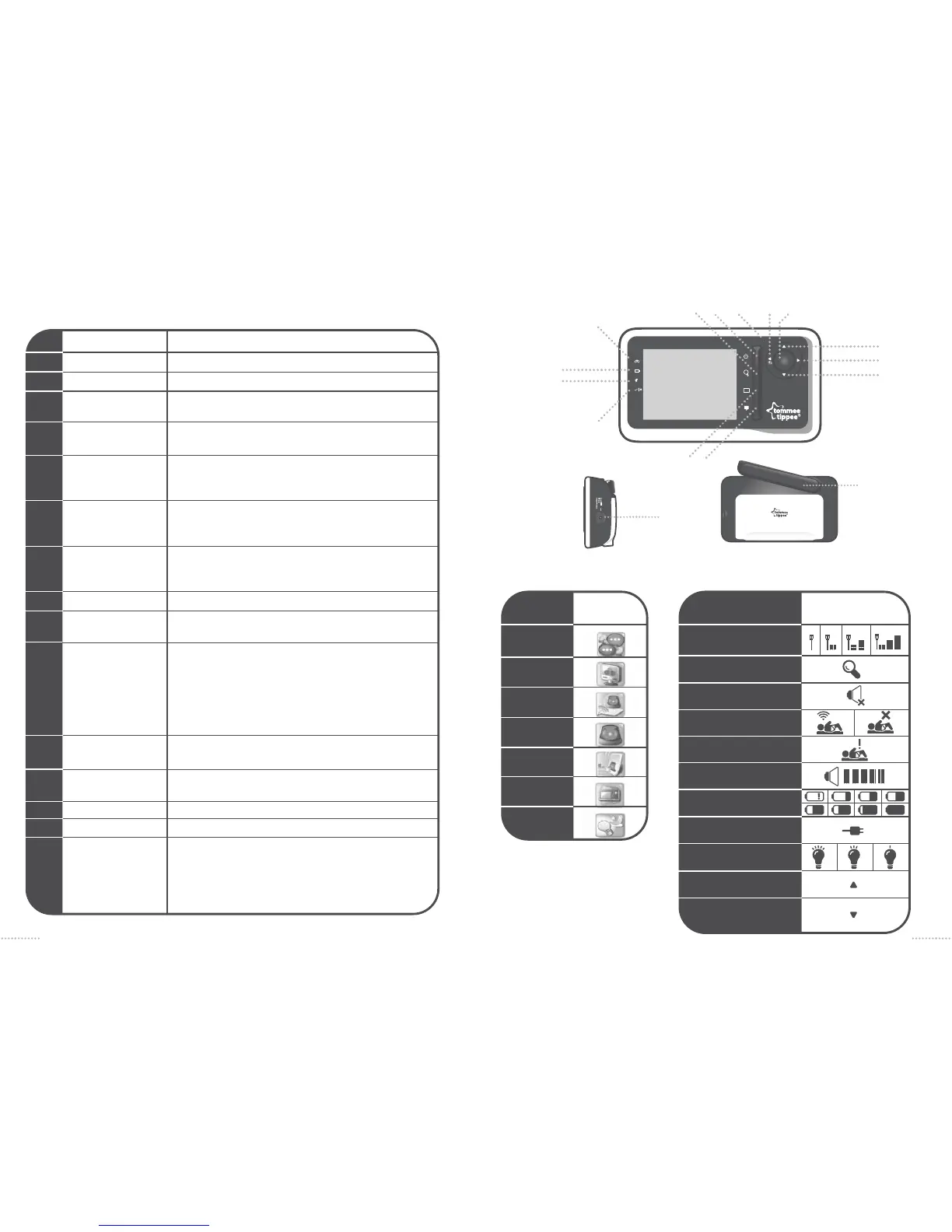
parent unit (=PU) 1094SP
3
2
1
1
2
3
4
5
6
7
8
9
10
11
12
13
14
15
16
Mains power on/off
Zoom
Power indicator
Talkback
Menu
Volume Up
Volume Down
Left/back
Right
Mains adaptor /
recharging input socket
Link Indicator
Mute Indicator
LCD on/Off
Antenna
Microphone
Sensor Pad Alarm
In monitoring mode: Press to power on or off the unit.
In monitoring mode: Press to zoom in. Press again to zoom out
GREEN = charging
In monitoring mode: Press and hold to talk back with baby
unit. Release to quit the talk mode
In monitoring mode: Press to access the main menu.
In menu mode: Press to confirm function selected.
In monitoring mode: Press to increase the speaker volume.
In menu mode: Press to scroll the menu options.
In zoom mode : Press to navigate the zoom panel up.
In monitoring mode: Press to decrease the speaker volume.
In menu mode: Press to scroll the menu options.
In zoom mode: Press to navigate the zoom panel down.
In menu mode: Press to view the previous menu level. Press
and hold to move back to the monitoring mode directly.
In zoom mode: Press to navigate the zoom panel left.
In zoom mode: Press to navigate the zoom panel right.
STEADY ORANGE = link between parent unit and baby unit is
excellent.
SLOW FLASHING ORANGE = link between parent unit and
baby unit is good.
QUICK FLASHING ORANGE = link is out of range. ‘NO LINK’ is
displayed.
OFF = parent unit is not powered on.
ON = Blue when parent unit speaker is muted
OFF in all other cases
In monitoring mode : Press to turn ON or OFF.
In menu mode : Press to go to the monitoring mode.
Position upright when in use.
FLASHING GREEN - movement is detected
RED - NO movement is detected at least in the last 20 seconds
FLASHING RED - If alarmed and child then starts to move
again.
800
10
M
6
9
7
2 1 15 8 5
13 4
3
12
11
16
14
Language
Display
Tick Tone
Alert Tone
Sensitivity
Vibration
Nightlight
parent unit icons status icons
ICON
DESCRIPTION
Antenna
Zoom
Speaker off/Mute
Sensor Pad Connect
No Movement alarm
Volume control
Battery
Power plug
Nightlight
Up arrow of scroll bar
Down arrow of scroll bar
ICON
DESCRIPTION
5
4


 To Next Page