ENG - 6
CONTROLS & CHARGING
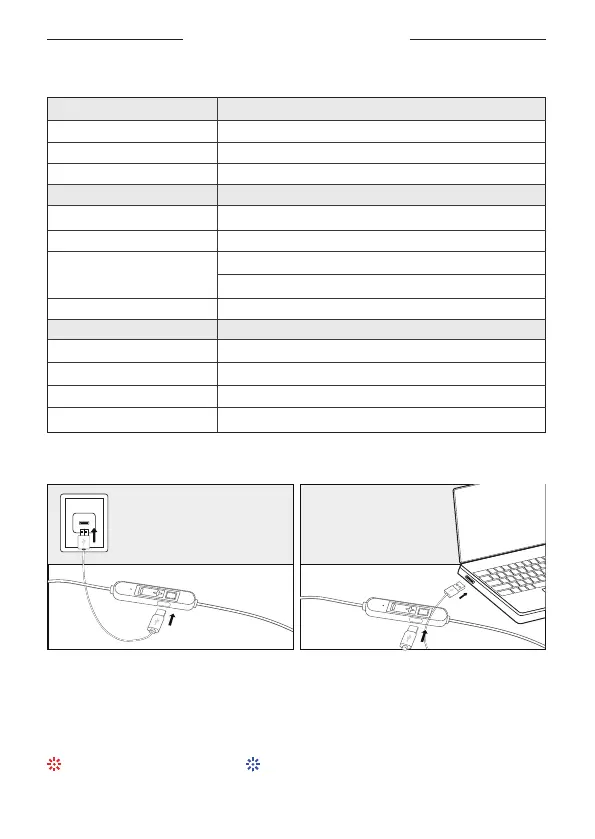
Connect the small end of the USB-C Charging Cable to the USB-C port on the
headphones.
Connect the other end to a USB charger or powered-on computer.
1.
2.
Micro-USB Charger
(not supplied)
Powered-on
Computer
CONTROLS
CHARGING
Charing: Keep lighng red Full charged: Keep lighng blue
Playback Actions
Play / Pause:
Per. / Next Track:
Volume Up / Down:
Phone Call Actions
Answer / End a Call:
Decline a Call:
Switch call:
Device Actions
Power On / Off:
Switch Mode:
Voice Assistant:
Reset Headphones:
Button Control
Click the mul-funcon once
Press the volume + / -2 seconds
Click volume + / - once
Button Control
Click the mul-funcon once
Press and hold the mul-funcon 2 seconds
Click the mul-funcon once (end the first call)
Click the mul-funcon twice (keep the first call)
Click the mul-funcon twice
Button Control
Press and hold the mul-funcon 3-5 seconds
Triple-Click the mul-funcon quickly
Press and hold the mul-funcon 2 seconds
Press and hold the volume + & - 5 seconds
Answer the second Call


 To Next Page