Control Panel:
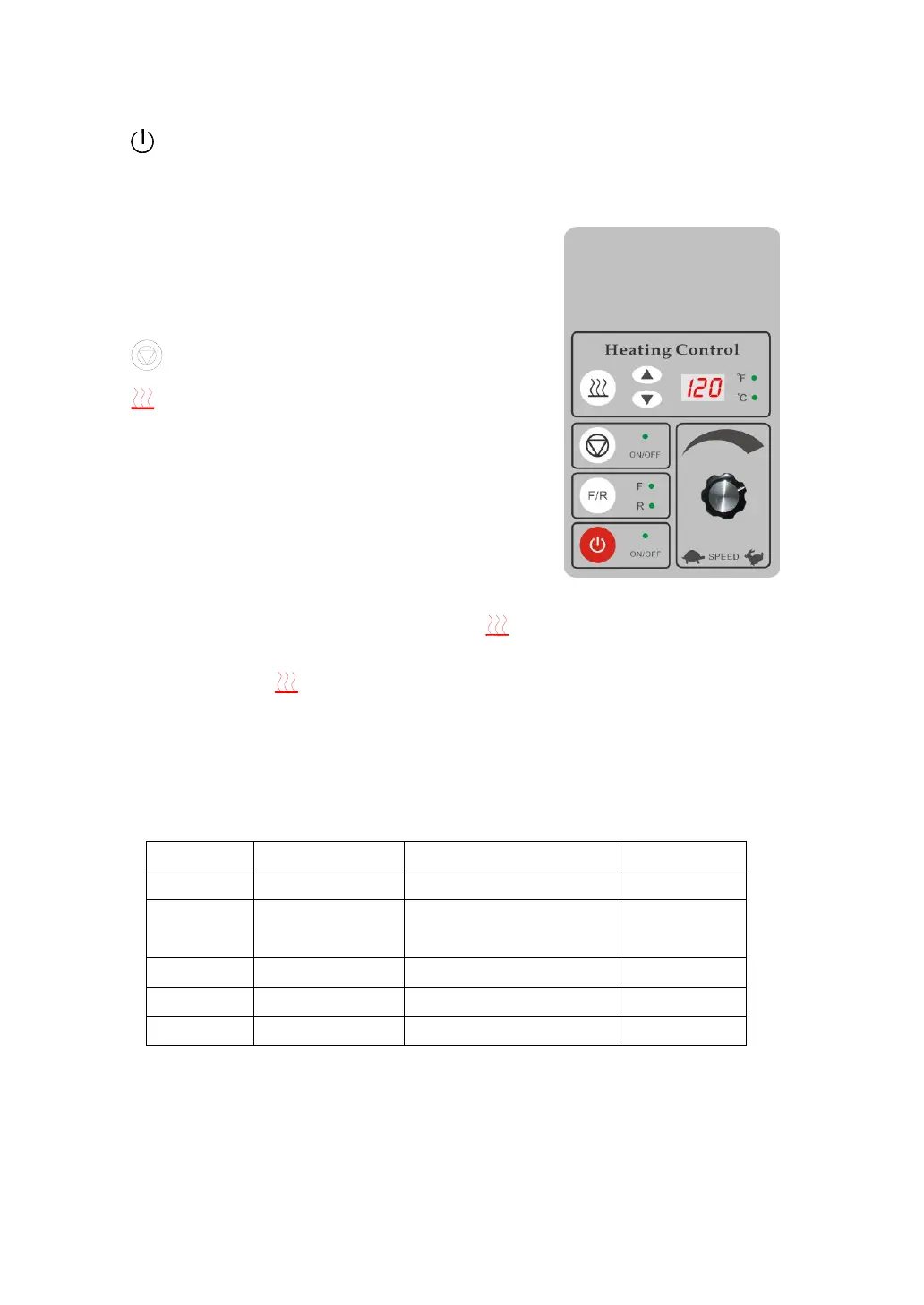
- Power on/off:Press the button to turn on or turn off the machine.
When the machine is turned off, the motor and electricity heating
will shut down automatically, the roller will be lifted automatically.
F/R-Direction Switching Button:
Control the rotation direction of the
roller.
-Motor on/off:Start or stop the motor
-Heating Button: Start or stop the heating
function.
1)Temperature setting: Pressure the up
or down button to set the
temperature of the roller.
6 seconds after setting the actual
temperature will be displayed.
Figure 2
Specifications setting:Press and hold:“ ” for 3 second to enter in the
specification setting;
Press to show D-1, D-2, D-3, D-4, D-5 in order.;
END to indicate the end of setting;
Press up and down button to regulate the value of specification;
If the buttons are not pressed in minute, the specification setting
state will be automatically ended.
Installation Warnings:
1) Pressure transducer debugging: When the upper roller touches the down roller,
observe the temperature increase display, regulate the position of the transducer to
reach the value of the lifting height to (). Then fix the position of the transducer.


 To Next Page
 Loading...