Customer Helpline 1300 889 028
6
Charging Procedure
NOTE: Before using the tool, read the instruction book carefully.
BEFORE PUTTING INTO OPERATION
A) CHARGING THE BATTERY
The battery charger supplied is matched to the Li-Ion battery listed in this manual. Do not
use another battery charger.
The Li-Ion battery is protected against deep discharging. When the battery is empty, the
tool is switched off by means of a protective circuit: The tool holder no longer rotates.
In a warm environment or after heavy use, the battery pack may become too hot to permit
charging. Allow time for the battery to cool down before recharging.
When the battery pack is charged for the first time and after prolonged storage, the battery
pack will accept a 100% charge after several charge and discharge cycles.
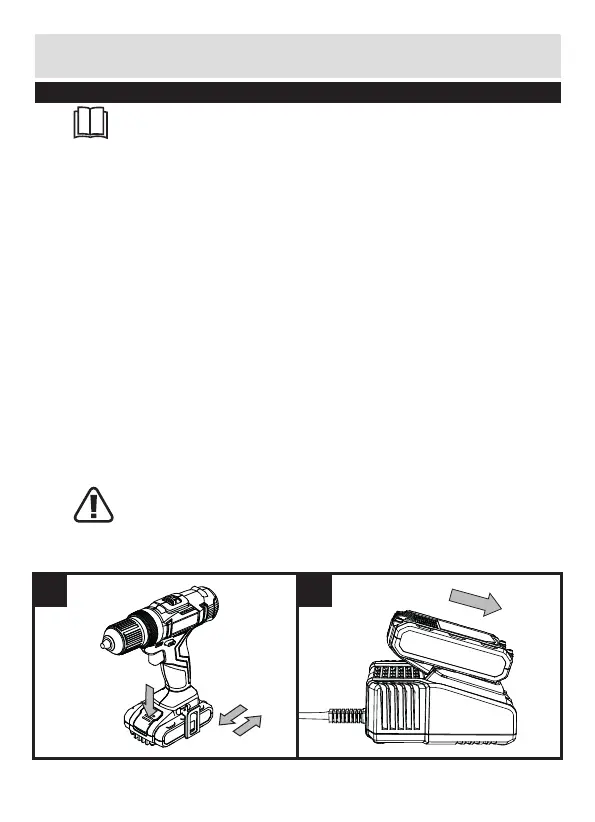
B) TO REMOVE THE BATTERY PACK (SEE FIG A1)
Press the Battery Pack Release Button firmly first and then slide the Battery Pack out
from your tool.
C) HOW TO CHARGE YOUR BATTERY PACK (SEE FIG A2)
Charging procedure
1) Plug the charger into an appropriate outlet. The light will be green.
2) Slide the battery pack into the charger, the light will turn to red to indicate the
charging process has started.
3) When charging is completed, the light will turn to green. The pack is now fully
charged, unplug the charger and remove the battery pack.
WARNING: When battery charge runs out after continuously use or exposure to
direct sunlight or heat, allow time for the tool to cool down before re-charging
to achieve the full charge.
A1 A2


 To Next Page