5.3 Armrest Adjustment
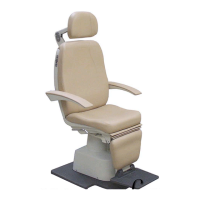
The armrests may require periodic adjustment to maintain proper function.
Remove the three arm upholstery mounting screws, and then remove the arm
upholstery to gain access to the arm adjustment screw. Turn the flat head
adjustment screw in the back side of the armrest casting with an Allen wrench to
adjust the amount of play in the armrest latching mechanism (clockwise for more
play, counter-clockwise for less play). The armrest latching mechanism is
adjusted properly when the mechanism engages properly when the armrest is
down, but has minimal vertical play once engaged. Reinstall the arm upholstery
after performing the adjustment.
The armrest height and relative position can be adjusted. Remove the backrest
upholstery to gain access to the adjustment screws. Tighten/loosen the opposing
set screws in the appropriate armrest stop to align the armrests with one another.
Reinstall the backrest upholstery after performing the adjustment.
5.4 Changing Control Switch from Right Hand to Left Hand
Unplug the chair from the AC power source. Remove the back upholstery.
Disconnect the 5-pin connector from the chair membrane switch. Remove the
nylon acorn nut and the 2 mounting nuts, which hold the switch in place in the
back casting. Pull the snap ring off which holds the release button into the
membrane switch. Remove the membrane switch from the back casting. Next
remove the switch blank from the opposite side of the back casting and install it
into the other side. Reroute the cables to the other side of the chair and secure
them in the back casting. Insert the membrane switch into the back casting. Feed
the release button into the membrane switch, and then re-install the snap ring to
secure the button in place. Re-connect the 5-pin connector. Power the chair up
and test for normal operation. If the up and down functions are reversed, rotate the
5-pin connector 180° then re-test. Re-install the back upholstery.
6.0 MAINTENANCE
It is recommended that the exterior surfaces of the OC-2200 chair be cleaned periodically
to preserve the chair's appearance. Cleaning should be performed at least every six
months.
6.1 Cleaning Painted and Nonmetallic Parts
Dirt and oils can be easily removed from painted or nonmetallic chair components
with a mild soap and water solution and a clean damp cloth. Use a soft, clean,
cloth to wipe the chair dry after cleaning.
6.2 Upholstery Cleaning
Use the same procedure as described above.



 To Next Page