3
provided. Read this manual carefully to determine the mounting hardware
required for your condition.
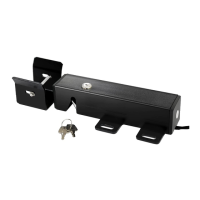
5. For dual gate, the lock must be installed on the Master Gate (gate 1)
which is near the Control Box, and the lock receiver must be installed on the
Slave Gate (gate 2).
( If the gate near the control box has been set up as slave gate, you can
change the settings following “User’s Manual” → “Control Board Settings”
→ “Master/Slave Gate Set” )
Installation for Single Gate
Step 1: Disengage the clutch of the opener with the Release Key. You
can move the gate by hand, so the gate can swing freely during
installation of the Electric Lock.
Step 2: With the gate in the closed position, determine the best location for
the lock and receiver. The lock and receiver must be level and aligned with
the opener. The lock and receiver should have a solid surface or tube fence
to provide stability.
Step 3: For Metallic Tube gate, if the thickness of the fence post is bigger
than or equal to 3mm, you can thread on the fence post, and fasten the lock
and receiver only using bolts (without nuts). Otherwise, drill holes through
out the fence post, and fasten the lock and receiver with bolts, lock washers
and nuts.
Of course, you can weld them directly.
For Chain Link gate, you will need U-Bolts, saddles, lock washers and nuts
for the lock and receiver.
Step 4: Recheck the lock’s position and alignment, make sure the electric
lock work correctly.
Step 5: Connect the lock’s power cables to E-Plus board or the control
board of TOPENS swing gate opener refers to the chapter “Wire
Connection of the LOCK” .
Note: Be sure that the clutch of the opener is engaged before you
prepare to activate your opener (Use the Release Key).


 To Next Page
 Loading...