EasyManua.ls Logo

TopflyTech TLP2-SFB - User Manual

TopflyTech TLP2-SFB
15 pages
Print Icon
To Next Page IconTo Next Page
Loading...
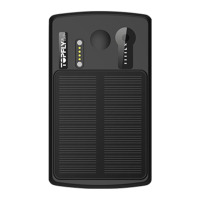
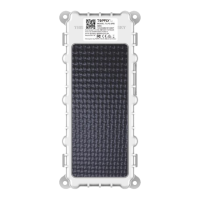
TOPFLYtech TLP2-SFB Asset GPS Tracker
User Manual
20200908

Questions and Answers

  • Z
    zbrownAug 5, 2025
    Why is my TopflyTech TLP2-SFB tracker showing offline?
    • M
      Ms. Cheryl Bowers DDSAug 5, 2025
      Your TopflyTech GPS tracker might be showing offline due to several reasons: the battery may be low, the device may have entered a network blind area, or the SIM card may not have enough balance. Also, if the connection loss occurs near the end of the month, the network service might be terminated by the carrier due to exceeding the maximum data usage.
  • L
    Laura HarrisAug 12, 2025
    What to do if I am unable to connect my TopflyTech TLP2-SFB GPS to the tracking platform?
    • R
      Robert KaneAug 12, 2025
      If you're unable to connect your TopflyTech GPS device to the tracking platform, consider these possible solutions: Verify the APN and IP settings. Ensure the SIM card's data service is enabled. If using a M2M SIM card, confirm there are no IP whitelisting restrictions. Check that the SIM card has sufficient balance or data.
  • K
    Kathleen HorneAug 20, 2025
    Why is my TopflyTech TLP2-SFB GPS unable to locate?
    • R
      Richard SextonAug 20, 2025
      If your TopflyTech GPS device is unable to locate, it might be shielded by metallic objects, or it may have entered an area without satellite signal coverage.
  • B
    Brian GoodwinAug 28, 2025
    What to do if my TopflyTech TLP2-SFB gives no command reply?
    • K
      Katherine CortezAug 28, 2025
      If your TopflyTech GPS is not replying to commands, check the command format to ensure it is correct. Also, the device may be in a network blind area, or the SIM card might not be properly inserted.

Summary

Quick Reference

Usage and Battery Attention

Key usage notes and battery considerations for optimal device performance and longevity.

Product Specifications

Network and GNSS Specifications

Details on data transmission capabilities and GNSS chipset, system, and receiver types.

Intelligent Power Management

Algorithm for extending battery life by adjusting reporting rates based on battery voltage and motion.

FOTA Notification

Explanation of the automatic firmware update feature and its management.

Standard Accessories Introduction

USB Cable

Details about the magnetic USB cable used for charging and data communication.

LED Indicator

Indicator Lights Guide

Explanation of GNSS, Network, and Battery Level indicator lights and their meanings.

Installation Guide

SIM Card Pre-installation

Prerequisites for SIM card data service, PIN unlocking, and balance check before installation.

SIM Card Installation and Power

Step-by-step guide for inserting the SIM card and operating the tracker's power switch.

Tracker Operation

Installation Site Selection

Recommendations for placing the tracker away from emission sources for optimal performance.

Physical Power Control

Instructions for turning the tracker physically on or off using the power switch.

Motion Operations

Procedure for performing a standard turning operation to check device status via LED.

Battery Management

Guidance on charging the device and battery level indicators for optimal use.

Getting Current Position

Methods for retrieving the device's current location via SMS or tracking platform.

Alarm Configuration

Alarm Notification Methods

Configuration for sending alarm notifications via network or SMS, requiring specific settings.

Quick Trouble Shooting

Common Troubleshooting Scenarios

Steps for resolving connectivity, offline, and location issues with the tracker.

Warranty and Stock

Warranty Period

Information regarding the standard 12-month warranty period for the device.

Frequently Used Commands

APN and Server Configuration

Commands for setting the Access Point Name (APN) and server details for network connectivity.

Upload and Heartbeat Settings

Commands for configuring device reporting intervals and heartbeat frequency.

PIN and Manager Phone Settings

Commands for managing the device PIN and configuring manager phone numbers for alerts.

Location and PIN Retrieval

Commands for searching location via Google Maps and retrieving forgotten PINs.

Optional Accessories List

Temperature and Humidity Sensor

Details for the TSTH1-B accessory: BLE 5.0 Wireless Temperature and Humidity Sensor.

Wireless Door and Temperature Sensor

Details for the TSDT1-B accessory: BLE 5.0 Wireless Door and Temperature Sensor.

Wireless Relay

Details for the TSR1-B accessory: BLE 5.0 Wireless Relay.

Magnet Set

Details for the TA39 accessory: Magnet Set comprising 4 units.

FCC Caution

Compliance Requirements

General caution regarding modifications and device compliance with FCC rules.

Important Note

Interference Mitigation

Guidelines for preventing and correcting harmful interference with radio communications.

FCC Radiation Exposure Statement

Statement on compliance with FCC radiation exposure limits and minimum installation distance.

TopflyTech TLP2-SFB Specifications

General IconGeneral
BrandTopflyTech
ModelTLP2-SFB
CategoryGPS
LanguageEnglish

Related product manuals