ON
MO TU WE TH FR SA SU
OFF
FR
A
COUNTDOWN
INDICATOR
ON
ADJUSTING THE DUSK/DAWN TIME
PROGRAMMING ON/OFF TIMES
COUNTDOWN TIMER
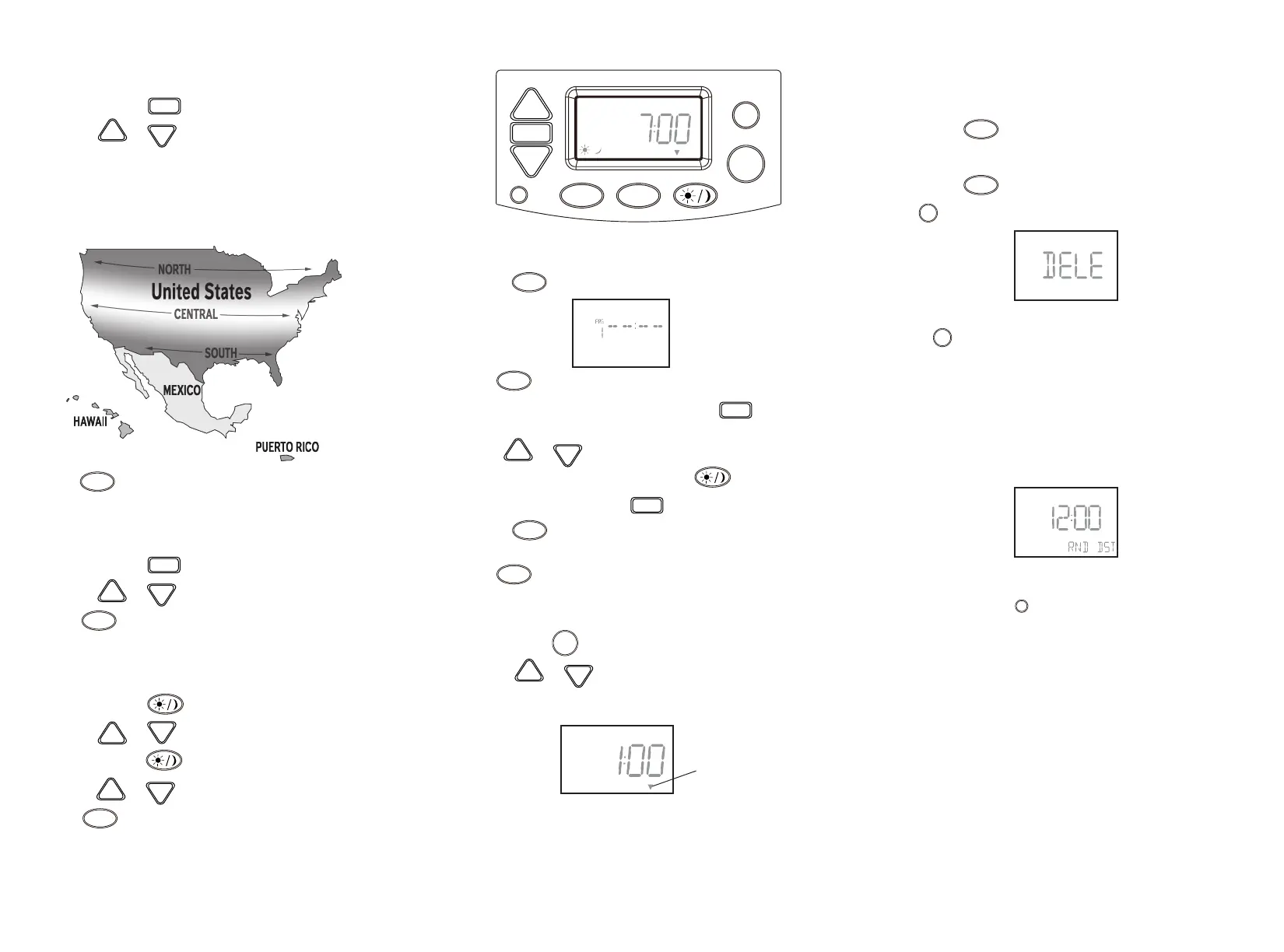
SETTING THE REGION
1. Press and release the button 5 times.
2. Press the or butttons to change the region.
Choices are: NOR = North United States
CENT = Central United States
SOU = South United States
MEX = Mexico
PRI = Puerto Rico
HAW = Hawaii
3. Press to exit and return to home screen.
SET
DOWN
UP
HOME
SETTING THE DAYLIGHT SAVINGS TIME (DST)
1. Press and release the button 6 times.
2. Press the or buttton to toggle the DST on/off.
3. Press to exit and return to home screen.
SET
DOWN
UP
HOME
1. Press and release the button once to adjust the Dusk time.
2. Press the or buttton to adjust the time.
3. Press and release the button again to adjust the Dawn time.
4. Press the or buttton to adjust the time.
5. Press to exit and return to home screen.
R
PRG
HOME
MAN
P
ON
WE
AUTOMANURND DST
M/D
DOWN
UP
SET
DOWN
UP
DOWN
UP
HOME
1. Press the button to program times into the schedule. The display will show "ON
PG 1" as illustrated.
2. Press to scroll through the remaining On/Off programs until you reach an
available program. There are 7 On/Off programs total. Press when you are on the
program number you want to change.
3. Use the or buttons to set the time, taking note of the AM/PM on the display.
• To use the astronomic feature, press the button to select the preset
Dusk or Dawn times.
4. Once you have the desired time, press again to set the day
5. Press the button to program times into the schedule. The display will show "OFF
PG 1". Then repeat steps 3 and 4 to program the desired time and day.
6. Press to exit and return to home screen.
PRG
PRG
SET
DOWN
UP
SET
PRG
HOME
1. Press and hold the button for 3 seconds to enter countdown timer mode.
2. Press the or buttton to adjust the run time.
3. Wait 8 seconds and the countdown will start.
MAN
DOWN
UP
OTHER PROGRAMMING
REVIEWING PROGRAMS
• Press the button to scroll through all On/Off programs.
DELETING PROGRAMS
• Press the button to scroll to the program to be deleted and press
button to delete. The screen will show the program has been deleted.
SETTING AUTO, MANUAL OR RANDOM MODE
Press button to scroll through the available modes:
• AUTO – (Automatic) Timer is in Automatic mode and will operate by
the programmed times
• MANU – (Manual) This overrides the programmed times an the lights
can only be turned On and Off by pressing the ON/OFF button
• RND – (Random) The timer will randomly turn ON/OFF times within 30
minutes of the programmed times
RESET DEVICE TO FACTORY DEFAULTS
• Press and release the button
PRG
PRG
M/D
M/D
R


 To Previous Page
 Loading...