6
TECHNICIAN SETUP MENU
Technician Setup Menu
This thermostat has a technician setup menu
for easy installer configuration. To set up the
thermostat for your particular application:
Configure the installer options as
desired using the table below.
Use the or keys to
change settings and the NEXT key
to move from one option to the next.
Note: Only press DONE key when
you want to exit the Technician Setup
options.
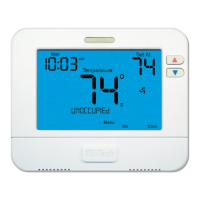
Press MENU button
Press and hold the TECH SET button for
3 seconds. This 3 second delay is
designed so that homeowners do not
accidentally access the installer settings.
1.
2.
3.
This feature will flash
FILT in the display
after the elapsed run
time to remind the
user to change the
filter. A setting of
OFF will disable this
feature.
This feature allows
the installer to change
the calibration of the
room temperature
display. For example,
if the thermostat
reads 70° and you
would like it to read
72° then select +2.
The compressor short
cycle delay protects the
compressor from “short
cycling”. This feature will
not allow the compressor
to be turned on for 5
minutes after it was last
turned off.
The swing setting, often
called “cycle rate”,
“differential” or
“anticipation” is
adjustable. A smaller
swing setting will cause
more frequent cycles and
a larger swing setting will
cause fewer cycles.
The swing setting, often
called “cycle rate”,
“differential” or
“anticipation” is
adjustable. A smaller
swing setting will cause
more frequent cycles and
a larger swing setting
will cause fewer cycles.
The heating swing
setting is adjustable
from ±0.2°F to ±2°F.
For example: A swing
setting of 0.5°F will
turn the heating on at
approximately 0.5°F
below the setpoint and
turn the heating off at
approximately 0.5°F
above the setpoint.
The cooling swing
setting is adjustable
from ±0.2°F to ±2°F.
For example: A swing
setting of 0.5°F will turn
the cooling on at
approximately 0.5°F
above the setpoint and
turn the cooling off at
approximately 0.5°F
below the setpoint.
Selecting ON will not
allow the compressor to
be turned on for 5
minutes after the last
time the compressor was
on. Select OFF to
remove this delay.
You can select the
minimum compressor
run time from “off”,
“3”, “4”, or “5” minutes.
If 3, 4, or 5 is selected,
the compressor will run
for at least the selected
time before turning off.
You can adjust the
room temperature
display to ready -4°F
to +4°F above or
below the factory
calibrated reading.
You can adjust the
filter change
reminder from OFF
to 2000 hours of
runtime in 50 hour
increments.
OFF 0 ºF OFF ON 0.5 ºF 0.4 ºF
TECH SETUP
STEPS CONTINUED
ON THE NEXT PAGE
This feature allows the
installer to select the
minimum run time for
the compressor.
For example, a setting of
4 will force the
compressor to run for at
least 4 minutes every
time the compressor
turns on, regardless of
the room temperature.
Tech Setup Steps
Minimum
Compressor
On Time
Compressor
Short Cycle Delay
Cooling
Swing
Heating
Swing
Room
Temperature
Calibration
Filter
Change
Reminder


 To Next Page