EN - 13EN - 13
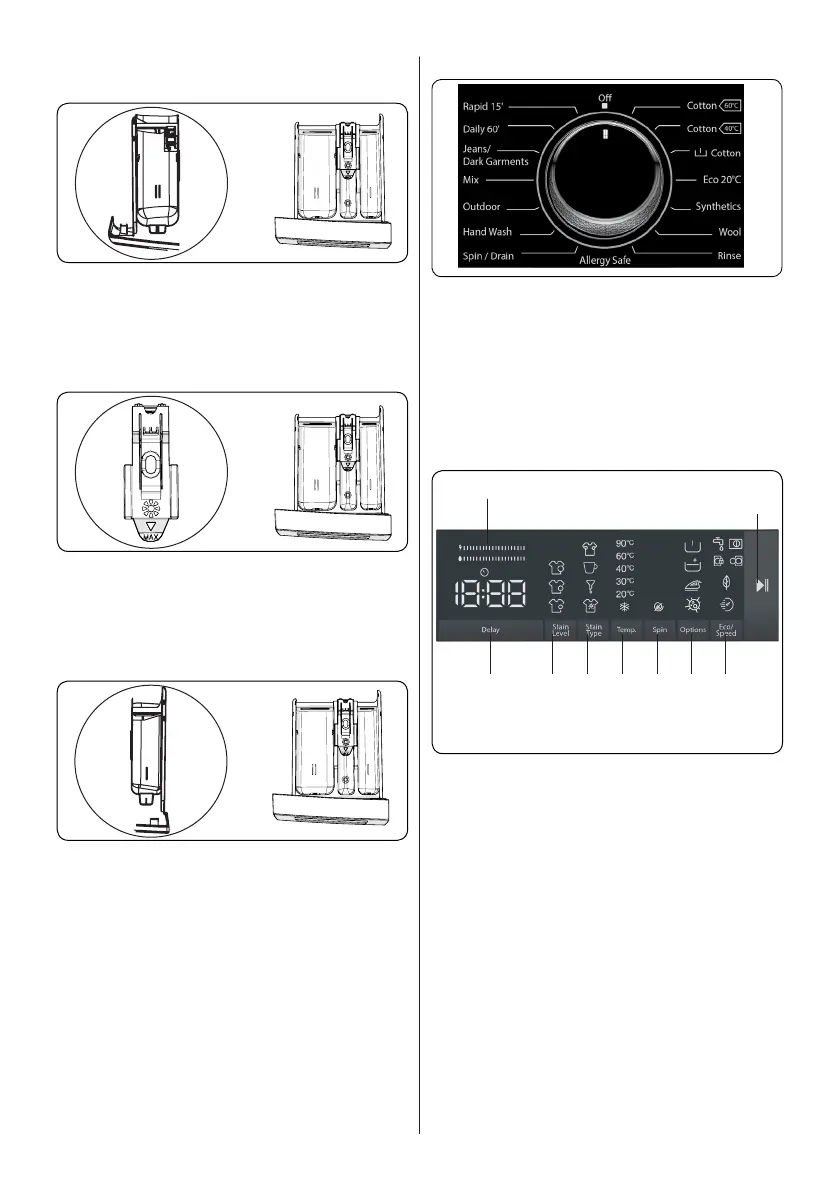
4.2 Sections
Main wash detergent compartment:
This compartment is for liquid or powder
detergents or limescale remover. The fluid
detergent level plate will be supplied inside
your machine. (*)
Fabric conditioner, starch, detergent
compartment:
This compartment is for softeners,
conditioners or starch. Follow the
instructions on the packaging. If softeners
leave residue after use, try diluting them or
using a liquid softener.
Pre-wash detergent compartment:
This compartment should be used only
when the pre-wash feature is selected. We
recommend that the pre-wash feature is
used only for very dirty laundry.
(*) Specifications may vary depending on
the machine purchased.
4.3 Program Dial
• To select the desired programme, turn
the programme dial either clockwise or
anti-clockwise until the marker on the
programme dial points to the chosen
programme.
• Make sure that the programme dial is
set exactly to the programme you want.
4.4 Electronic Display
9
8
21 3 5
4 6
7
1. Delayed start auxiliary function
2. Selecting the level of soiling
3. Stain selection
4. Selecting the washing water
temperature
5. Spin speed selection
6. Options(prewash, Extra rinse, Easy
ironing, Anti-allergy, auxiliary function)
7. Eco/Quick(Eco washing, Quick Wash
auxiliary function)
8. Start Pause Button
9. Energy/Water Efficiency Bar


 To Next Page
 Loading...