22
Adding Water to the Battery
The best time to add distilled water to the battery is just
before you operate the machine. This lets the water mix
thoroughly with the electrolyte solution.
1. Remove the battery from the tractor; refer to Removing
the Battery, page 21.
2. Clean the top of the battery with a paper towel.
Important Never fill the battery with distilled water
while the battery is installed in the tractor. Electrolyte could
be spilled on other parts and cause corrosion.
3. Remove the vent caps from the battery (Fig. 16).
4. Slowly pour distilled water into each battery cell until
the electrolyte level is up to the Upper line (Fig. 16) on
the battery case.
Important Do not overfill the battery because
electrolyte (sulfuric acid) can cause severe corrosion and
damage to the chassis.
5. Wait five to ten minutes after filling the battery cells.
Add distilled water, if necessary, until the electrolyte
level is up to the Upper line (Fig. 16) on the battery
case.
6. Install the battery vent caps.
Charging the Battery
Charging the battery produces gasses that can
explode.
Never smoke near the battery and keep sparks and
flames away from battery.
Warning
Important Always keep the battery fully charged
(1.260 specific gravity). This is especially important to
prevent battery damage when the temperature is below
32°F (0°C).
1. Remove the battery from the chassis; refer to Removing
the Battery, page 21.
2. Check the electrolyte level; refer to Checking the
Electrolyte Level, page 21.
3. Make sure that the vent caps are installed in the battery.
Charge the battery for 1 hour at 25 to 30 amps or 6
hours at 4 to 6 amps. Do not overcharge the battery.
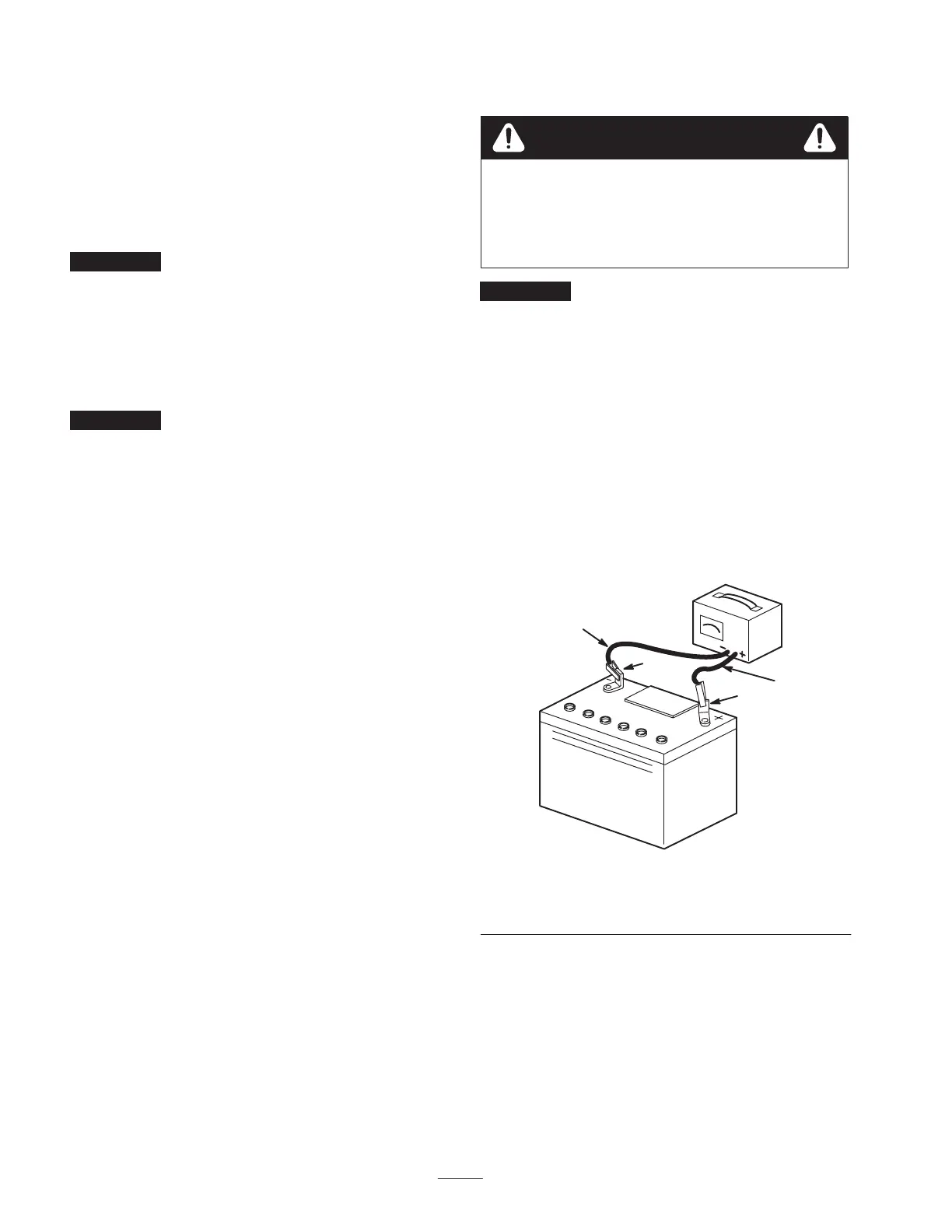
4. When the battery is fully charged, unplug the charger
from the electrical outlet, then disconnect the charger
leads from the battery posts (Fig. 17).
4
1
2
3
m–4970
Figure 17
1. Positive battery post
2. Negative battery post
3. Red (+) charger lead
4. Black (–) charger lead
5. Install the battery in the tractor and connect the battery
cables; refer to Installing the Battery, page 21.
Note: Do not run the tractor with the battery disconnected.
Electrical damage may occur.



 To Next Page