03 04
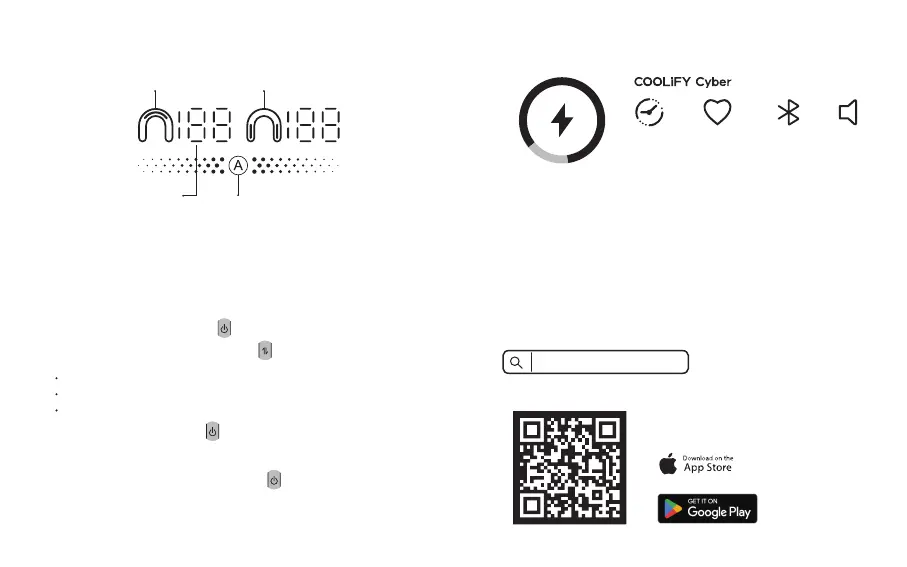
Right Display Instructions
Front Fan StatusRear Fan Status
Gears
Automatic Mode
(Right display is on the same side as the buttons, and the
corresponding mode status is shown on the screen when the buttons
are operated.)
Operation Instructions
1. Short press the power button to turn on the device.
2. Short press/long press the mode button to switch to your desired
mode.
Green Indicator - Fan Mode
Blue Indicator - Cool Mode
Orange Indicator - Heat Mode
3. Short press the power button to adjust to the gear you want.
Turn on(1st gear-30)→2nd gear-60→3rd gear-100→Turn off, cycle
switching.
4. Short press / long press the power button to turn off the device.
(To turn off the device with a short press, cycle through to the highest
gear in the current mode, then short press again to power off.)
Left Display Instructions
Battery Status Indicator
Favorite Mode
Timer
Bluetooth
Mute
(All of the above can be adjusted by APP/Application,
please check the Bluetooth pairing guide to download
the APP.)
Auto Memory
1. The device will automatically save the existing mode and resume the mode in
Eco setting once turned on again.
2. When the device is turned off, short press the mode button to select a
preferred mode. The device will start operating in the selected mode when
turned on.
Operations
TORRAS COOLIFY | Connect
1. Search “TORRAS COOLIFY | Connect” in the app store and click to download the app.
Scan to Download the TORRAS App


 To Next Page