Torso T-1
Quick Reference Guide
Page 1
General Function Buttons
Play / Stop Button
Bank / Save Button
Pattern / Select Button
Clear / Copy Button
Mute Performance Button
Temp Performance Button
1. Select tracks to edit [VBx]
2. Hold [TEMP] + Turn (Knob) to
temporarily change track parameter.
3. Hold [TEMP] + [PATTERN] + Turn
(Knob) to make relative parameter
changes to all tracks.
4. Release [Temp] to restore values.
Temporarily applies parameter
changes for note and CC tracks.
Ctrl Button
1. Press [PLAY] button to play or stop
the pattern. The button will ash white
every quarter note when playing.
Button is orange if a Link session is
connected and synchronised.
2. Press [CTRL] + [PLAY] excludes MIDI
devices, Link send and analog reset
commands.
3. Hold [CLEAR] + [PLAY] to kill any
stuck MIDI notes.
1. Hold [BANK] + [VBx] to select 1 of 16
available banks. Active bank is white.
2. Hold [CTRL] + [BANK] + [VBx] to save
the bank to a slot.
1. Hold [PATTERN] + [VBx].
2. Hold [CTRL] + [SELECT] + [VBx] to
select pattern without playing.
1. Example: Copy Pattern to clipboard.
Hold [CTRL] + [COPY] + Tap the [VBx]
for source pattern.
2. Example: Paste Parameter from
clipboard. Hold [CLEAR] + [VBx] for
destination pattern.
3. Press [CLEAR] to clear clipboard.
1. Hold [MUTE] + [VBx], then release to
silence the selected tracks.
2. Hold [CTRL] + [MUTE] + [VBx] to
silence the selected tracks instantly.
Example: [CTRL] + [SAVE] on Bank Button
Stop and Start playback of the
sequencer transport.
Select 1 of 16 banks. Various Save
actions with secondary option.
Bank also has a special backup function.
Press to [BANK] return to T-1 ‘Home’ page.
Select 1 of 16 Patterns from within
the current bank.
Copy to / Paste from clipboard
using Copy/Clear. Clear clipboard.
Mutes one or more tracks.
Use together with other buttons to
access the secondary function.
MIDI Gear Setup
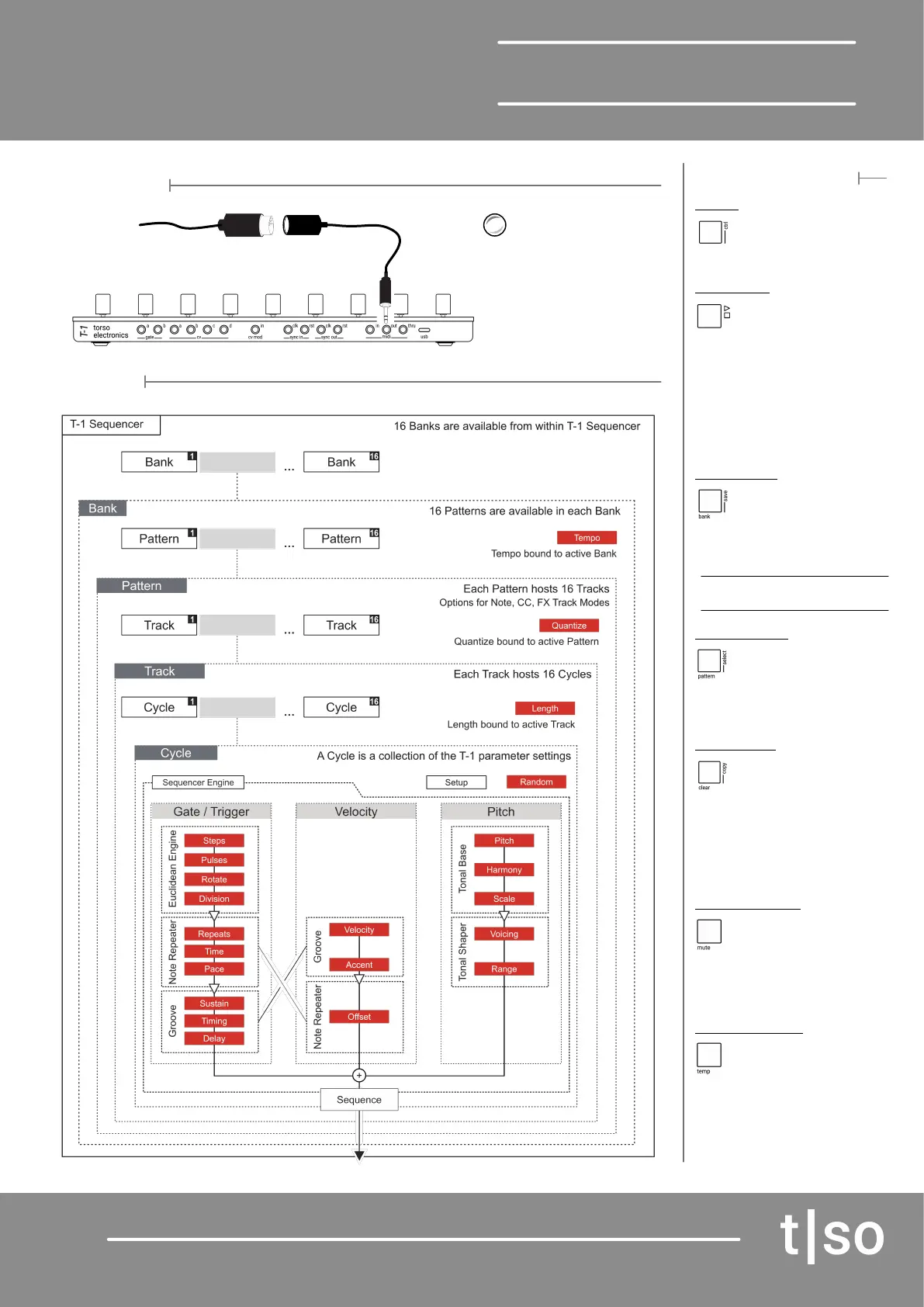
Architecture
Turn (CHANNEL) to assign a MIDI
Channel to the selected Track
MIDI can be connected via the
USB connection but this must also
deliver power to the T-1
For conguration of CV, Gate,
Sync Input and Outputs a Torso
App is available for T-1.
MIDI Out
Using the 5 Pin to
3.5mm adapter
External MIDI
Device


 To Next Page
 Loading...

