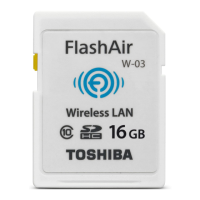
The Toshiba FlashAir™ III Wireless SD™ Memory Card is a device designed to provide wireless LAN functionality for file transfer and network settings management. It functions as a standard SD™ Memory Card while also offering wireless connectivity, allowing users to access and manage files from the card via a computer or smartphone app.
Function Description:
The FlashAir™ III Wireless SD™ Memory Card integrates wireless LAN capabilities into a standard SD™ card form factor. This allows for the wireless transfer of files from the card to other devices, such as computers or smartphones, without the need to physically remove the card or connect it via a cable. The card creates its own wireless LAN network, which other devices can connect to.
Key functionalities include:
- Wireless File Transfer: Enables users to transfer photos, videos, and other files from the card to a connected device over a wireless LAN connection. This is particularly useful for cameras, allowing immediate sharing of media.
- Network Settings Configuration: Users can configure the card's wireless network settings, including the SSID (network name) and password, using the FlashAirTool software on a computer or a dedicated smartphone app.
- Wireless LAN Startup Modes: The card supports two wireless LAN startup modes:
- Automatic Startup Mode: The wireless LAN functionality starts automatically when the device (e.g., camera, computer) the card is inserted into is powered on. This mode also includes an "Auto Start Timeout Setting," where the wireless LAN functionality automatically turns off if there's no connection attempt within a designated time.
- Manual Startup Mode: The wireless LAN functionality can be enabled or disabled by changing the write-protection status of a designated "wireless LAN startup image file" stored on the card. Setting the image to unprotected enables the wireless LAN, while protecting it disables it. Users can set a favorite photo as this startup image.
- Card Initialization/Formatting: The FlashAirTool software allows users to format the card, which resets it to factory default settings and clears all stored data. This also resets the wireless LAN functionality to its initial state.
- Firmware Version Display: The FlashAirTool provides information about the card's firmware version.
- Help Documentation: The software includes a manual for the FlashAir™ III wireless SD™ Memory Card.
Important Technical Specifications:
While specific technical specifications like storage capacity or wireless standards (e.g., Wi-Fi 802.11n) are not explicitly detailed in the provided text, the manual indicates the following:
- SD™ Memory Card Compatibility: The FlashAir™ III is an SD™ Memory Card, implying compatibility with devices that support SD™ or SDHC™ Memory Cards.
- SSID Length: The SSID (network name) can be up to thirty-two (32) alphanumeric characters.
- Password Length: The password should be between eight (8) and sixty-three (63) characters.
- FlashAir III W-02 Specific Feature: The option to "Use the same network settings, even after the card is formatted" is available for FlashAir™ III W-02 models. This suggests there might be different sub-models or versions of the FlashAir™ III with slight variations in features.
- Firmware Version: The FlashAirTool displays the firmware version (e.g., Ver.3.00, FW Ver.FA9CAW3AW3.00.00).
- Software Version: The FlashAirTool itself has a version (e.g., version 3.00 or later is required for certain functions).
Usage Features:
- Ease of Setup: The FlashAirTool software provides a graphical interface for easy configuration of network settings and startup modes.
- Smartphone App Integration: The card can be configured to allow network settings to be changed using a smartphone app, enhancing mobile usability.
- Flexible Wireless Activation: The choice between automatic and manual startup modes offers flexibility in how and when the wireless functionality is active, catering to different user preferences and power-saving needs.
- Customizable Startup Image (Manual Mode): Users can personalize the wireless LAN startup image, which also serves as the control mechanism for enabling/disabling wireless functionality in manual mode.
- Digital Still Camera Compatibility: The manual provides instructions for using the card with digital still cameras, including how to set the wireless LAN startup image file to protected or unprotected using camera menus.
- File Management Software Integration: The card can be configured to allow file transfer to a computer via wireless LAN connection using standard file management software.
Maintenance Features:
- Card Formatting: The FlashAirTool allows for complete formatting of the card, resetting it to factory defaults. This is a crucial maintenance step for troubleshooting or preparing the card for new use. Users are strongly advised to back up all data before formatting.
- SSID and Password Management: The software facilitates easy modification of the SSID and password, allowing users to update security credentials or change network names as needed.
- Firmware Updates (Implied): While not explicitly detailed, the display of the firmware version suggests that firmware updates might be possible, which is a common maintenance practice for electronic devices to improve performance or fix bugs.
- Safety Guidelines: The manual includes general safety instructions, such as keeping the product away from small children, not disassembling or modifying it, disposing of it properly, and avoiding extreme temperatures, dust, or moisture. These guidelines contribute to the longevity and safe operation of the device.
- Troubleshooting Assistance: Contact information for Toshiba Customer Support (phone numbers and website) is provided for users needing assistance with interference or other issues.
- Regulatory Compliance: The device complies with FCC and Industry Canada regulations, ensuring it meets safety and interference standards. Users are advised on how to address potential radio frequency interference.

 Need help?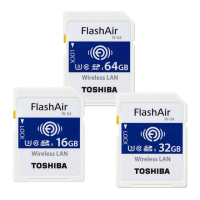



 To Next Page
 General