
 Need help?
Do you have a question about the Toshiba GN-4030-A3 and is the answer not in the manual?
Guidance on understanding symbols, target audience, model names, options, and trademarks used in the manual.
Information on regulatory classification and prohibitions against modifying the product's interior.
Details on wireless interoperability for LAN and Bluetooth, health considerations, and specifications.
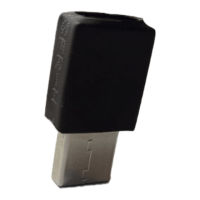
This document, titled "Wireless LAN/Bluetooth Precautions for Use" and identified by the model number GN-4030-A3, serves as a comprehensive guide for users and administrators of Toshiba's multifunctional digital color systems and multifunctional digital systems. It outlines essential precautions and information regarding the integrated Wireless LAN and Bluetooth functionalities, ensuring safe and effective operation.
The manual begins with a preface that thanks the user for purchasing the product and emphasizes the importance of reading the document before utilizing the Wireless LAN/Bluetooth Module GN-4030-A3. It then details how to interpret the manual, specifically highlighting the symbols used to convey critical information. A "WARNING" symbol indicates potentially hazardous situations that could lead to death, serious injury, severe damage, or fire. A "CAUTION" symbol points to situations that might result in minor or moderate injury, partial equipment damage, or data loss. A "Note" symbol signifies information requiring attention during operation, while a "Tip" symbol offers useful operational advice. Finally, a symbol resembling an open book indicates references to related items, encouraging users to consult these as needed. This structured approach ensures that users can quickly identify and understand the significance of various pieces of information throughout the manual.
The document also clarifies the target audience, stating that it is intended for both general users and administrators, implying that it covers a range of topics from basic operation to more advanced administrative settings. To streamline readability, the manual specifies that each model name is replaced with its corresponding series name. For instance, e-STUDIO2020AC/2520AC models are referred to as the e-STUDIO6525AC Series, and e-STUDIO2528A/3028A/3528A/4528A/5528A/6528A models are grouped under the e-STUDIO6528A Series. This simplification helps users navigate the information more easily without getting bogged down by a multitude of specific model numbers. For information on available options, the manual directs users to the "Information About Equipment - Information About Equipment - Options" section, ensuring that users can find details relevant to their specific configuration. Trademarks are referenced in the "Safety Information" section, maintaining legal compliance and providing clarity on intellectual property.
A significant portion of the manual is dedicated to "Precautions for Wireless LAN/Bluetooth Adapter." It begins by classifying the product as "wireless equipment for stations of low-power data transmissions systems" under the Wireless Telegraphy Act. A crucial point highlighted here is that the product does not require a radio transmission license, but the law strictly prohibits any modification of the product's interior. This warning is vital for user safety and regulatory compliance, preventing unauthorized alterations that could compromise the device's functionality or legal status.
The "About Our Wireless Solution" section provides detailed insights into the interoperability of the Wireless LAN and Bluetooth functionalities. For Wireless Interoperability, it states that the Wireless LAN is designed to be compatible with wireless LAN technology based on DSSS/OFDM radio technology. Key features include Wi-Fi (Wireless Fidelity) certification by the Wi-Fi Alliance, ensuring that the wireless hardware can communicate with other vendors' IEEE 802.11 a/b/g/n/ac compliant wireless LAN products. Furthermore, it confirms full compatibility with any other wireless LAN system based on Direct Sequence Spread Spectrum (DSSS) or Orthogonal Frequency Division Multiplexing (OFDM) radio technology that complies with the IEEE802.11 standard on wireless LANs (Revision a/b/g/n/ac). This extensive compatibility ensures seamless integration into existing network infrastructures and broad connectivity options for users.
Regarding Bluetooth Interoperability, the manual explains that the Bluetooth module is designed to be interoperable with any product featuring Bluetooth wireless technology that utilizes Adaptive Frequency Hopping (AFH) radio technology. It specifies that the profile version 4.2, as defined and approved by the Bluetooth Special Interest Group, is supported. Additionally, the product boasts logo certification with Bluetooth wireless technology, also as defined by the Bluetooth Special Interest Group. These details assure users of the device's adherence to established Bluetooth standards, guaranteeing reliable and secure connections with a wide array of Bluetooth-enabled devices.
The manual also touches upon the important topic of "Wireless and your Health," directing users to the "Safety Information" section for comprehensive details on this subject. This indicates a commitment to user well-being and transparency regarding potential health considerations related to wireless technology. For specific wireless specifications, such as frequency band and transmitter power, users are referred to the "Specifications - SPECIFICATIONS OF OPTIONS - System Options - Wireless LAN and Bluetooth units" section. This structured referencing ensures that all technical details are readily accessible without cluttering the main precautionary sections.
In summary, the GN-4030-A3 manual is an indispensable resource for anyone operating Toshiba's multifunctional digital systems with Wireless LAN/Bluetooth capabilities. It meticulously covers essential precautions, clarifies technical specifications, and guides users through the intricacies of wireless interoperability. The clear organization, use of symbols, and detailed explanations make it an effective tool for ensuring safe, compliant, and efficient use of the device's advanced wireless features. By adhering to the guidelines provided, users can maximize the utility of their Toshiba equipment while maintaining safety and regulatory standards.
 General
| Manufacturer | Toshiba |
|---|---|
| Model | GN-4030-A3 |
| Category | Control Unit |
| Input Voltage | 100-240 VAC |
| Frequency | 50/60 Hz |
| Power Consumption | 30 W |
| Dimensions | 200 x 150 x 50 mm |
| Storage Temperature | -20°C to 60°C |
| Humidity | 20% to 80% (non-condensing) |



 To Next Page