28
Basic playback
Viewing JPEG Files
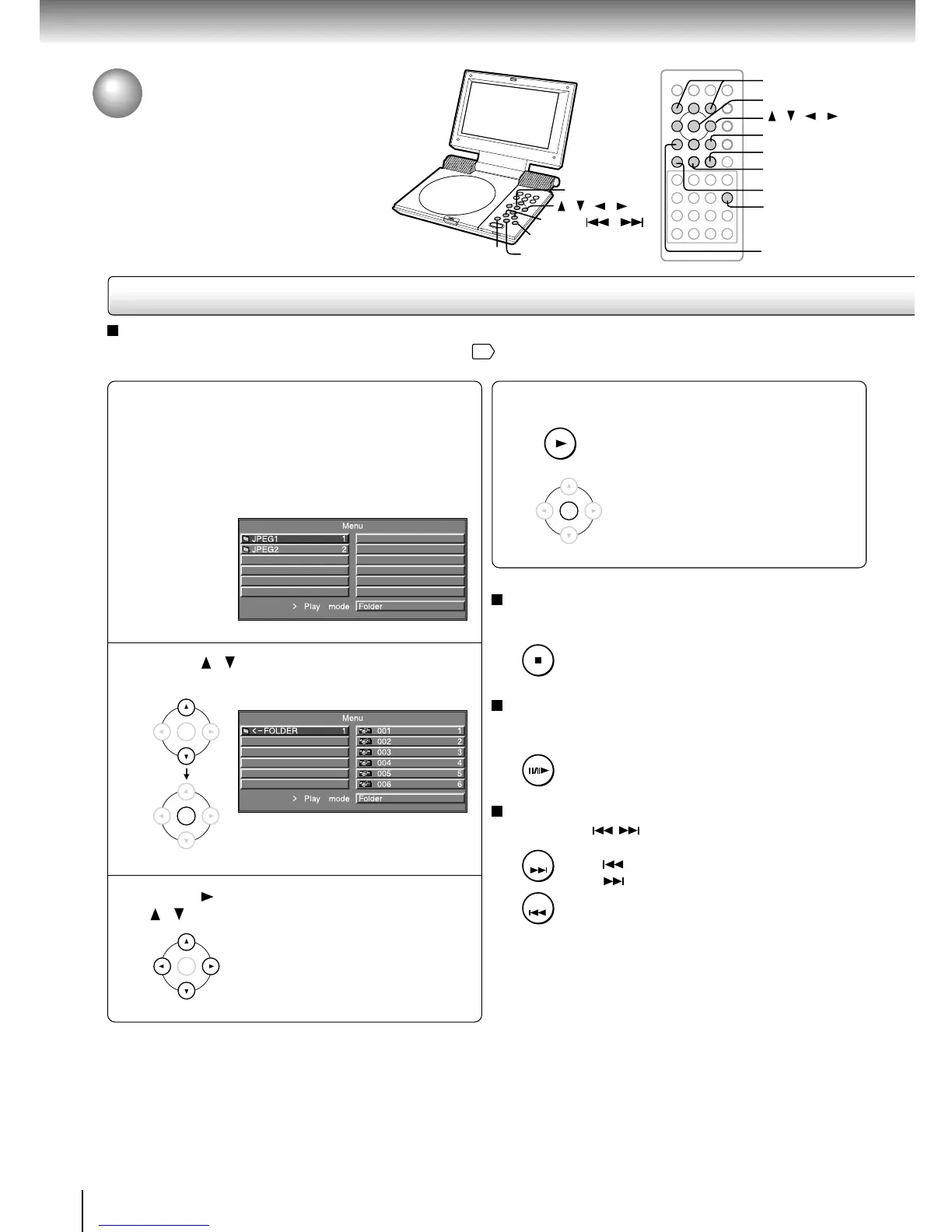
Set a disc contains JPEG files and
close the disc cover.
A menu appears.
If you insert a KODAK Picture CD, automatically
starts the slide show. With a KODAK Picture CD, the
menu is not displayed. (See the next page.)
Press / to select a folder, then press
ENTER.
Press , then select a file by pressing
/ .
1
2
3
Viewing JPEG Files
You can play JPEG files that have been recorded
on a CD-R on this player.
To stop the slide show
Press STOP.
Thumbnail mode (9-picture display) will
be entered.
To pause the slide show
Press PAUSE/STEP during playback.
To resume the slide show, press the
PLAY button.
To switch pictures
Press SKIP ( / ) during playback.
: Switch to the previous picture
: Switch to the next picture
Notes
• You may not be able to load a JPEG file exceeding 2MB.
• If you press the MENU button when no menu is displayed, a
menu is displayed.
Press PLAY or ENTER.
A slide show begins from the selected
picture. Upon reaching the end, it will
be back to the top menu.
4














 To Next Page