GB
22
Recording a Programme Immediately
Protecting a Recorded Cassette
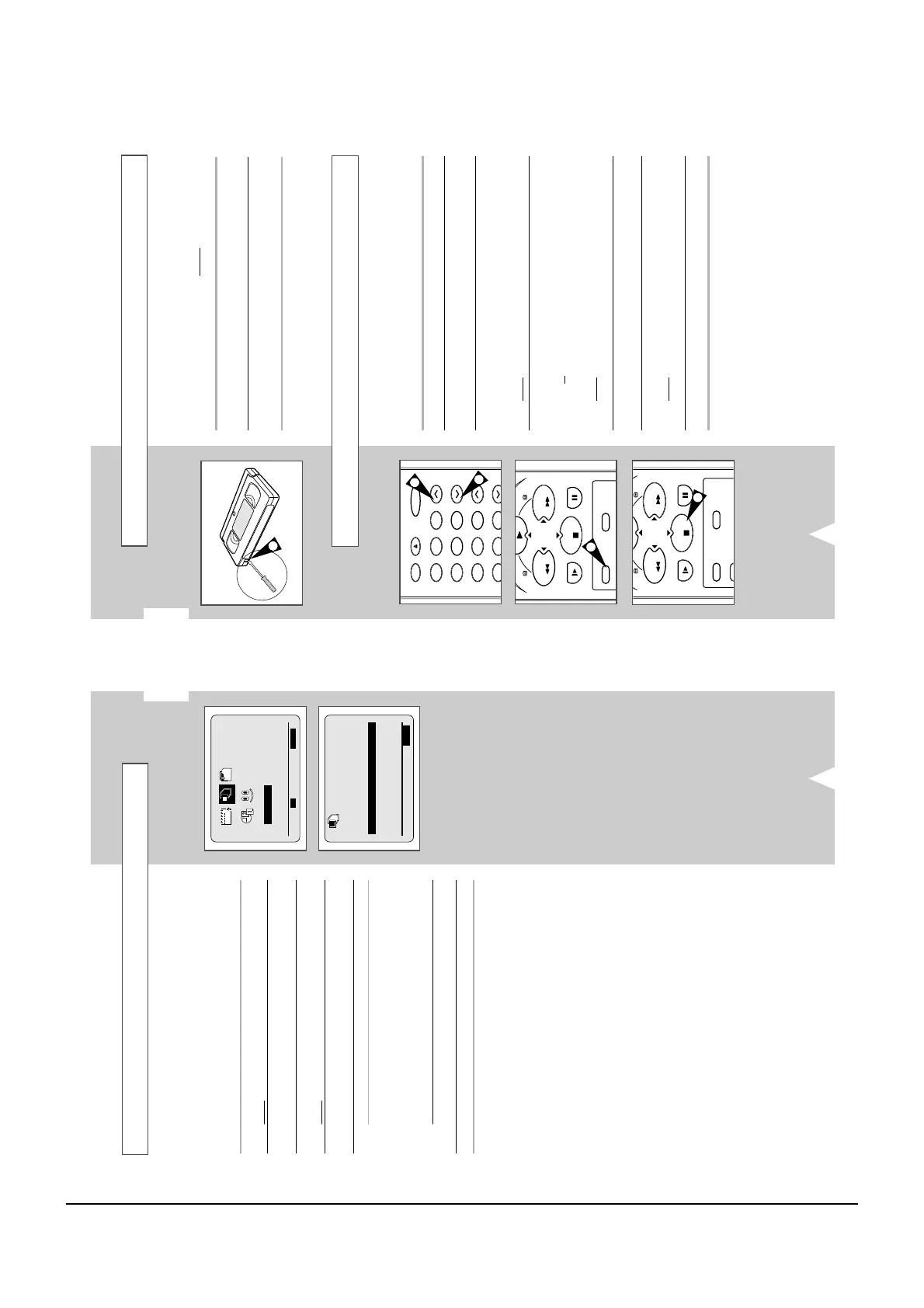
Video cassettes have a safety tab to prevent accidental erasure.
When this tab has been removed, you cannot
record on the tape.
1 If you wish to protect a cassette, break off the tab using a small
screwdriver.
2 To re-record over a protected cassette (safety tab broken), cover
the hole with adhesive tape.
1
4
4
Before recording a programme, you must have preset the corres-
ponding station (unless you are recording via an external video
source). If you have not done so, refer to pages 16 and 17.
1 Switch on the television.
2 To monitor the programme being recorded, select the television
channel reserved for use with your VCR (or the AV input if used).
3 Insert the cassette on which the programme is to be recorded,
with the window visible and the safety tab intact or the opening
covered with adhesive tape.
Result
: The VCR is switched on automatically.
4 Select:
◆
The station to be recorded using the CH
(
i
or
j
)
buttons
or
◆
The LINE IN 1 or LINE IN 2 source using the I.SELECT
button for a satellite tuner or external video source
Result
: The station number is displayed and the programme
can be seen on the television.
5 Select the recording speed (SP/LP) by pressing the SP/LP button
as many times as required (see page 20).
6 Hold REC down for a while to start recording.
Result
:
The record indicator appears on the television and VCR
display. An index is recorded on the tape (see page 30).
7 To stop recording, press
■
once.
➢
◆ If the cassette is ejected when you start recording,
check that the safety tab is intact or the opening is
covered with adhesive tape.
◆ If you reach the end of the tape while recording, the
cassette rewinds automatically.
GB
21
NICAM
NICAM programmes are divided into 3 types. NICAM Stereo,
NICAM Mono and Bilingual (transmission in another language).
NICAM programmes are always accompanied by a standard mono
sound broadcast and you can select the desired sound.
Please refer to page 27.
1 Press MENU on the remote control.
Result
: The programming menu is displayed.
2 Press the corresponding
,
or
¥
,
buttons to select the
USER SET option.
3 Press the OK button to select this option.
Result
: The USER SET menu is displayed.
4 Press the corresponding
or
buttons, until the NICAM option
is selected.
5 To... Press
¥
or
, until...
Mono mode OFF is displayed.
OFF: Only set at this position to record the
standard mono sound during a
NICAM broadcast if the stereo
sound is distorted due to inferior
reception conditions.
NICAM mode ON is displayed.
ON: Normally set at this position.
6 On completion, press MENU twice to exit the menu.



 To Next Page