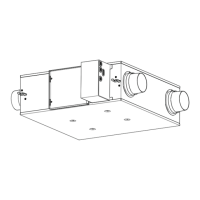
This document describes the Toshiba Heat Recovery Ventilation Unit, a concealed microcomputer-controlled system designed for commercial use. It functions to provide efficient and comfortable ventilation while minimizing energy loss and maintaining indoor air quality.
Function Description
The Heat Recovery Ventilation Unit operates by exchanging heat between incoming outdoor air and outgoing indoor air. This process, known as "Heat exchange mode," helps to bring the temperature and humidity of the outdoor air closer to that of the indoor air before it is supplied into the room, thereby reducing the energy load on air conditioning systems.
In addition to heat exchange, the unit offers a "Bypass mode," which directly introduces outdoor air into the room without heat exchange. This mode is primarily recommended for use during spring and summer when outdoor temperatures are mild. An "Automatic mode" intelligently switches between heat exchange and bypass modes based on indoor and outdoor temperature sensor data. When linked with air conditioners, the automatic mode also considers the air conditioner's operation status (cooling, heating, dry, or fan) to optimize ventilation.
The unit incorporates "Constant input power control" (or "Constant air flow control") for its fan, which helps maintain consistent airflow even when pressure loss increases, such as when filters accumulate dust. This feature ensures stable ventilation performance.
Humidity control is another key function. During cooling, highly humid outdoor air is conditioned to match the humidity of the dehumidified indoor air before supply. Conversely, during heating, moisture from the indoor air is transferred to the dry outdoor air before it is supplied, preventing excessive dryness indoors.
The system also provides sound insulation through its air trunks and heat exchange elements, which reduce the ingress of outdoor noise and the outflow of indoor sounds, contributing to a quieter indoor environment.
Usage Features
The Heat Recovery Ventilation Unit is operated via a wired remote controller, such as the RBC-AW(M)SU5*. The main screen of the remote controller displays the current state of the air, including indoor temperature, indoor humidity, supply air temperature, and outdoor temperature, and allows for setting ventilation fan speed and mode.
Users can select from three ventilation modes: Heat exchange, Bypass, and Automatic. Fan speed can be adjusted to High, Medium, or Low for normal ventilation. Additionally, an unbalanced ventilation fan speed can be set: "Supply air > Exhaust air" to reduce inflow of humidity and smells, or "Supply air < Exhaust air" to reduce outflow of smells and floating bacteria.
The unit supports 24-hour ventilation, which can be activated or temporarily stopped via the remote controller. During 24-hour ventilation, the unit typically runs at a low fan speed in heat exchange mode.
A "Nighttime heat purge operation" is available to reduce the room's air conditioning load in the morning during summer. This function exhausts warm indoor air in bypass mode when the air conditioner is stopped at night. It activates automatically under specific temperature conditions and pauses if conditions are no longer met, resuming when appropriate.
Timer operations include an "Off timer" to stop the unit after a specified period, an "On timer" to start it after a specified period, and an "Off reminder timer" to stop it after a set period each time the unit is used. These timers can be set for up to 168 hours (7 days) with various intervals.
The remote controller also provides a "Ventilation menu" with options to control ventilation operation (ON/OFF), fan speed, mode, 24-hour ventilation off, and schedule timer settings. A schedule timer allows users to program daily or weekly ventilation patterns, including start times, fan speeds, and modes.
Maintenance Features
The Heat Recovery Ventilation Unit requires regular maintenance, particularly cleaning of the filters and heat exchange elements. The remote controller displays a "Filter sign reset" indicator ("!") to notify users when filter cleaning is due. If the unit continues to operate with the "!" displayed, a "Filter check." message will appear.
After cleaning the air filters, users must perform a "Filter sign reset" through the remote controller's menu to clear the maintenance notification.
For cleaning the remote controller itself, a dry cloth should be used. Harsh chemicals like benzene, thinner, polishing powder, or similar solvents should be avoided as they can damage or deform the plastic surface.
In case of any trouble, such as abnormal sounds, burning smells, water leakage, or error codes displayed on the remote controller, users are advised to turn off the main power supply and contact a qualified service person. The remote controller can display check codes and unit numbers to assist service personnel in diagnosing issues. The "Information" screen on the remote controller also provides access to model information and service contact details.



 To Next Page


 General