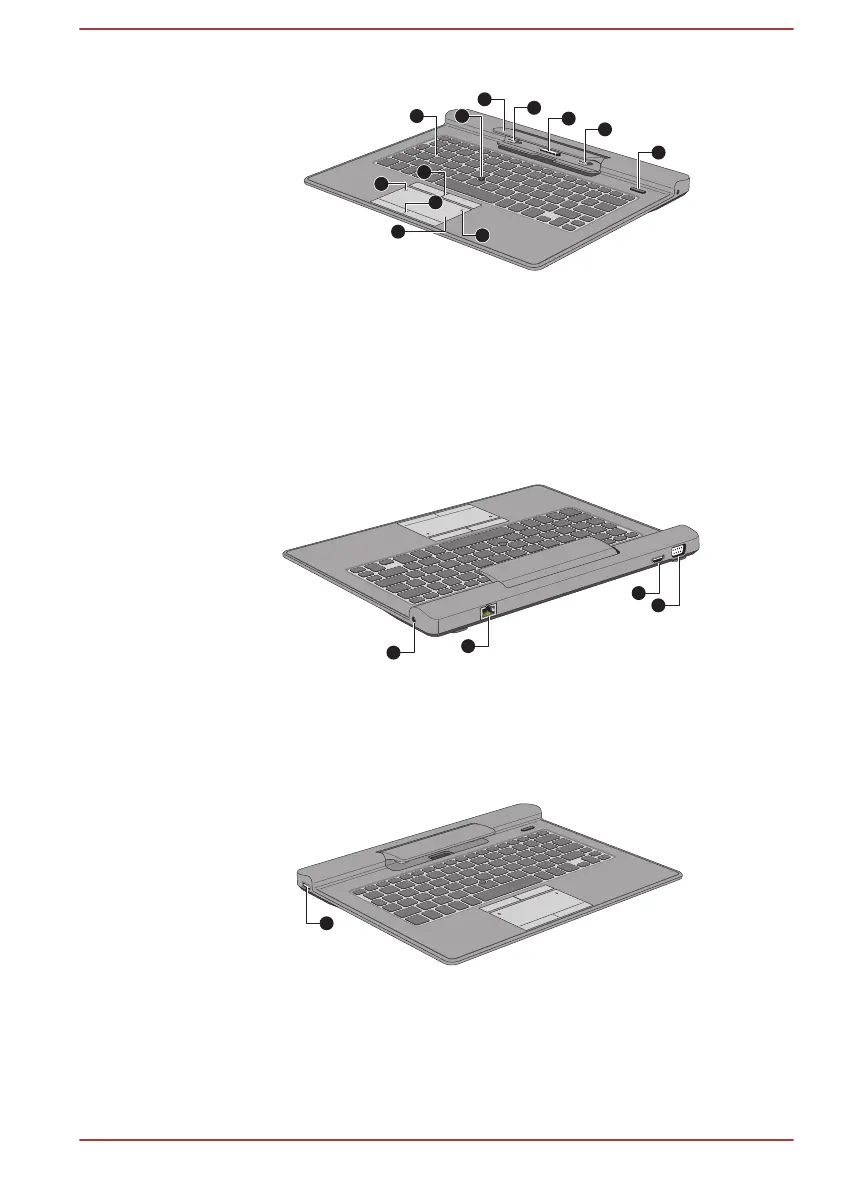
Figure 3-2 Front view of the keyboard dock
1. Touch Pad 7. AccuPoint
2. Touch Pad ON/OFF icon 8. Computer holder
3. TOSHIBA eco icon 9. Hook
4. Touch Pad control buttons 10. Docking connector
5. AccuPoint control buttons 11. Hook
6. Keyboard 12. Eject button
Product appearance depends on the model you purchased.
Figure 3-3 Back view of the keyboard dock
13. DC IN 19V jack 15. HDMI port
14. LAN jack 16. External RGB monitor port
Product appearance depends on the model you purchased.
Figure 3-4 Left view of the keyboard dock
17. Universal Serial Bus (USB 2.0) port
Product appearance depends on the model you purchased.
User's Manual
3-7







 To Next Page