9
Low pressure and high pressure switch
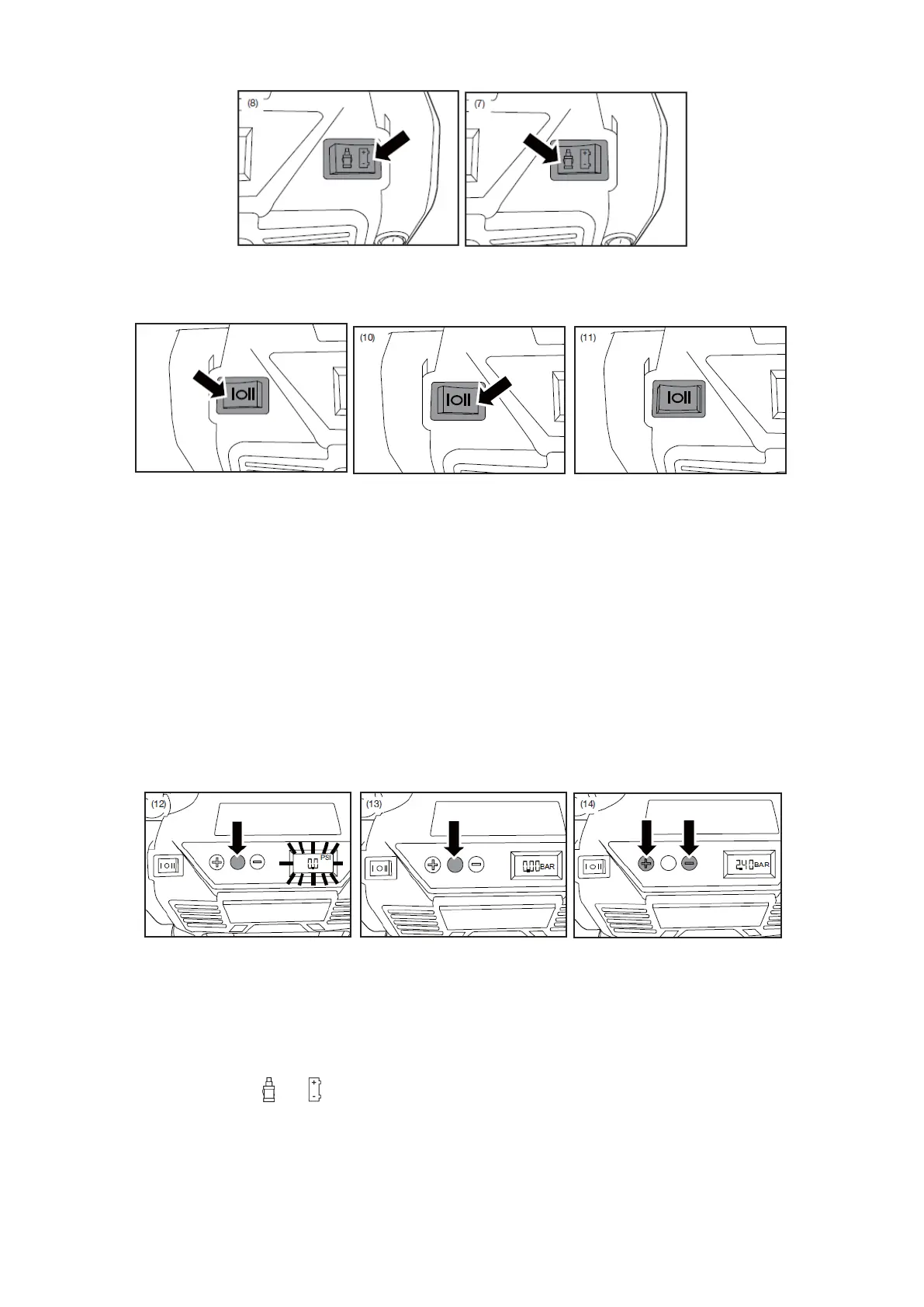
This three position switch operates the high and low pressure pumps.
• High pressure pump: Place the switch in position (I) to turn on the high pressure
pump (Fig. 9).
• Low pressure pump: Place the switch in position (II) to turn on the low pressure
pump (Fig.10).
Digital meter
Your inflator is equipped with a built-in digital gauge that will automatically shut off when
a preset air pressure is reached.
The digital pressure gauge is multifunctional and serves as a pressure gauge, monitoring
the amount of pressure being applied to the item being inflated, pressure is indicated in
PSI, BAR or KPA.
• Press the mode button to turn on the digital indicator (Fig. 12).
• Press the mode button to switch between the different units (PSI, BAR or KPA)
(Fig.13).
Note: If the switch or is off, the digital gauge will turn off, all pressure settings will be lost
and will need to be re-entered.
Note: The digital gauge will only display inflation pressures when the inflator is in use.


 To Next Page