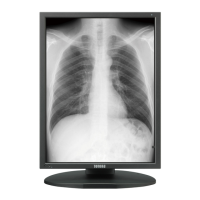
This document is the MQSA Quality Control Manual for Totoku Monochrome Monitors for Mammography, Version 3.1. It outlines procedures for maintaining the optimal quality and performance of diagnostic display monitors used for reading digital mammographic images, in accordance with the Mammography Quality Standards Act (MQSA) guidelines and regulations.
Function Description:
The Totoku Monochrome Monitors for Mammography are diagnostic display monitors designed for the accurate viewing and interpretation of digital mammographic images. The manual provides a framework for Quality Control (QC) tests to ensure these monitors consistently meet the high standards required for mammography, preventing any deterioration in image quality or viewing performance. The QC tests are divided into two main categories: those performed by a Radiologic Technologist and those performed by a Medical Physicist, reflecting different levels of technical expertise and frequency of checks.
Important Technical Specifications:
The manual applies to several Totoku monitor models: ME511L, ME551i2, MS31i2, MS33i2, MS51i2, and MS53i2. While specific technical specifications for each model are not detailed within this manual, the QC procedures focus on maintaining key performance parameters critical for diagnostic imaging. These include:
- Luminance: The manual specifies target maximum luminance values (e.g., 410 cd/m² or 500 cd/m²) and a minimum luminance value (0.8 cd/m²). It also notes that maximum luminance is settable within a specified range, but degradation due to backlight deterioration may cause it to fall short of the target.
- Gamma Setting: DICOM GSDF (Grayscale Standard Display Function) is the recommended gamma setting, which is crucial for consistent grayscale reproduction in medical imaging.
- Ambient Light: The manual emphasizes the importance of controlling ambient light, with a strict limit of 20 lux for the reading room environment.
- Image Quality Parameters: The SMPTE (Society of Motion Picture and Television Engineers) pattern is used to evaluate various image quality aspects, including:
- 0-5% and 95-100% contrast patterns.
- Visibility of each gray level step (0-10% and 90-100% squares).
- Straightness of borders and lines, and proper centering within the active display area.
- Linearity (no distortion or misalignment using grids).
- Sharpness and focus of alphanumeric characters.
- Visibility of high contrast line-pair images (vertical and horizontal stripes) at the center and corners without magnification.
- Absence of streaking around white and black rectangles (Video Characteristic).
Usage Features:
The monitors are used in a diagnostic setting for reading digital mammographic images. The manual outlines procedures that ensure the monitors are always in optimal condition for this critical task.
- Calibration Software: The "Medivisor Nx" calibration software is essential for performing display calibration and image quality checks.
- Calibration Sensor: A calibration sensor (e.g., Chroma5) is required for accurate display calibration, which involves measuring luminance and adjusting settings.
- Connectivity: Serial cables (for ME511L) or USB cables (for other models) are used for communication between the PC and the display monitor, enabling the calibration software to interact with the display.
- Viewing Conditions: The manual stresses the importance of maintaining optimal viewing conditions in the reading room, including controlling ambient light and room configuration (e.g., turning off desk lights, closing curtains).
Maintenance Features:
The manual details a comprehensive set of maintenance procedures to ensure the longevity and performance of the monitors.
- Cleaning Display (Daily, Radiologic Technologist):
- Objective: Keep the display screen free from dust, fingerprints, and other objects.
- Procedure: Disconnect AC power, dampen a soft cloth with a cleaning agent, gently wipe the screen and surface, and finish with a dry cloth.
- Caution: Avoid using thinner, benzene, or alcohol, as they can damage the plastic or coating. Do not rub, hit with sharp objects, or press on the LCD panel to prevent uneven luminance or damage.
- Viewing Conditions Check (Daily, Radiologic Technologist):
- Objective: Maintain optimal viewing conditions.
- Procedure: Review the "Form 3: Viewing Conditions Check and Setting" (completed by the Medical Physicist) posted in the reading room, match the room configuration, and adjust as necessary.
- Image Quality Check - SMPTE pattern (Daily, Radiologic Technologist):
- Objective: Calibrate display monitors for accurate reading of mammographic images.
- Procedure: Use "Medivisor Nx" software to display the SMPTE pattern. Visually inspect various features of the pattern from at least 50cm away, checking for contrast, gray level steps, linearity, sharpness, line-pair images, and video characteristics.
- Viewing Conditions Check and Setting (Annually, Medical Physicist):
- Objective: Keep and maintain optimal viewing conditions.
- Procedure: Turn on monitors for at least 30 minutes (preferably 60), minimize ambient lighting, measure illuminance with a photometer (facing away from the screen), ensure it does not exceed 20 lux, and adjust room configuration if needed. Record findings on "Form 3" and post it in the reading room.
- Display Calibration (Annually, Medical Physicist):
- Objective: Ensure accurate evaluation and calibration for mammographic image reading.
- Procedure: Use "Medivisor Nx" software and a calibration sensor (Chroma5). Attach the sensor to the monitor, select "Calibration," and start the process. Settings for maximum luminance, minimum luminance, ambient light, and gamma (DICOM GSDF recommended) can be reviewed and adjusted if necessary. The software provides graphical outputs of the calibration results.
- Image Quality Check - SMPTE pattern (Annually, Medical Physicist):
- This is a more thorough check performed by the Medical Physicist, similar to the daily check but as part of the annual comprehensive evaluation.
The manual emphasizes the mandatory nature of these procedures for MQSA-regulated facilities and recommends them for those under MQSA guidelines, noting that failure to comply can result in loss of MQSA certification.

 Need help?

 To Next Page
 General