EasyManua.ls Logo

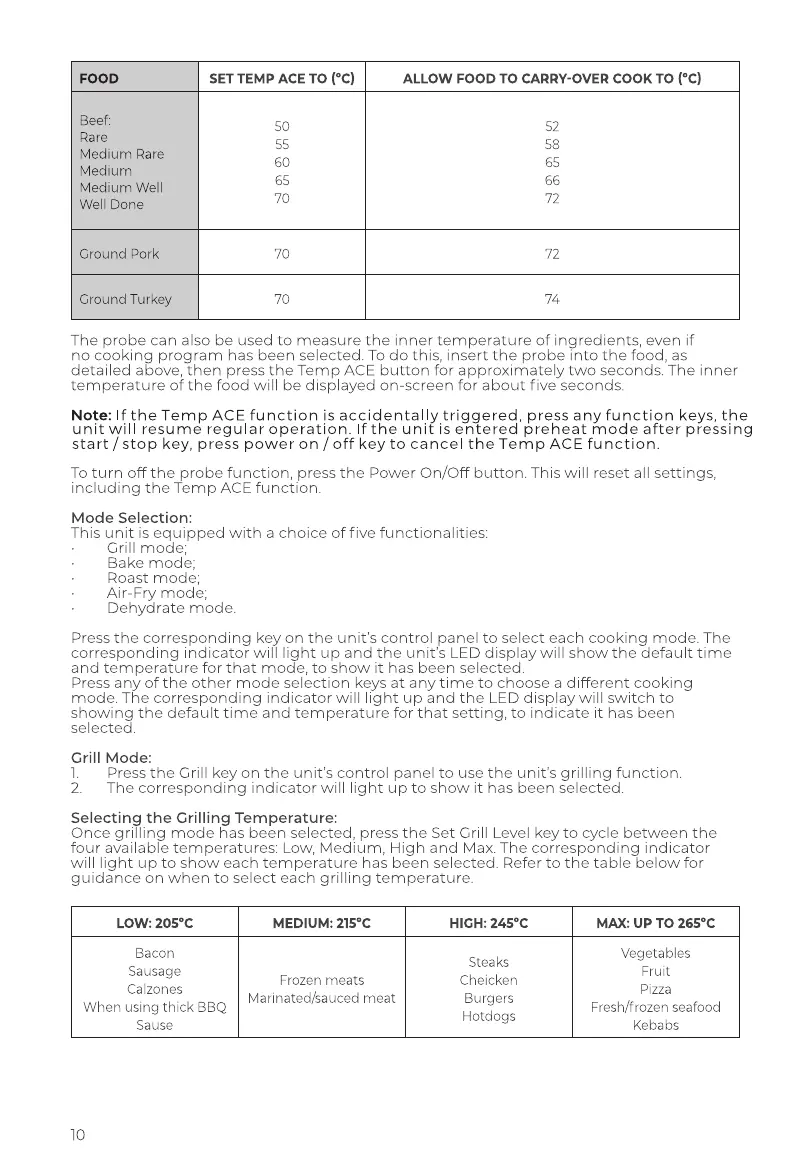
Tower Hobbies T17086 - Cooking Modes and Settings; Ingredient Settings Reference Table; Grill Mode and Temperature Selection

Tower Hobbies T17086
18 pages
Print Icon
To Next Page IconTo Next Page
To Previous Page IconTo Previous Page
Loading...
FOOD
SET
TEMP
ACE
TO
(°C)
ALLOW
FOOD
TO
CARRY-OVER
COOK
TO
(°C)
Beef:
50
52
Rare
.
55
58
Medium
Rare
60
65
Medium
Medium
Well
6s
66
Well
Done
70
72
Ground
Pork
70
72
Ground
Turkey
70
74,
The
probe
can
also
be
used
to
measure
the
inner
temperature
of
ingredients,
even
if
no
cooking
program
has
been
selected.
To
do
this,
insert
the
probe
into
the
food,
as
detailed
above,
then
press
the
Temp
ACE
button
for
approximately
two
seconds.
The
inner
temperature
of
the
food
will
be
displayed
on-screen
for
about
five
seconds.
Note:
If
the
Temp
ACE
function
is
accidentally
triggered,
press
any
function
keys,
the
unit
will
resume
regular
operation.
If
the
unit
is
entered
preheat
mode
after
pressing
start
/stop
key,
press
power
on/off
key
to
cancel
the
Temp
ACE
function.
To
turn
off
the
probe
function,
press
the
Power
On/Off
button.
This
will
reset
all
settings,
including
the
Temp
ACE
function.
Mode
Selection:
This
unit
is
equipped
with
a
choice
of
five
functionalities:
:
Grill
mode;
Bake
mode;
Roast
mode;
Air-Fry
mode;
Dehydrate
mode.
Press
the
corresponding
key
on
the
unit's
control
panel
to
select
each
cooking
mode.
The
corresponding
indicator
will
light
up
and
the
unit's
LED
display
will
show
the
default
time
and
temperature
for
that
mode,
to
show
it
has
been
selected.
Press
any
of
the
other
mode
selection
keys
at
any
time
to
choose
a
different
cooking
mode.
The
corresponding
indicator
will
light
up
and
the
LED
display
will
switch
to
showing
the
default
time
and
temperature
for
that
setting,
to
indicate
it
has
been
selected.
Grill
Mode:
1.
Press
the
Grill
key on
the
unit's
contro!
panel
to
use the
unit's
grilling
function.
2.
The
corresponding
indicator
will
light
up
to
show
it
has
been
selected.
Selecting
the
Grilling
Temperature:
Once
grilling
mode
has
been
selected,
press
the
Set
Grill
Level
key
to
cycle
between
the
four
available
temperatures:
Low,
Medium,
High
and
Max.
The
corresponding
indicator
will
light
up
to
show
each
temperature
has
been
selected.
Refer
to
the
table
below
for
guidance
on
when
to
select
each
grilling
temperature.
LOW:
205°C
MEDIUM:
215°C
HIGH:
245°C
MAX:
UP
TO
265°C
Bacon
Sausage
Calzones
When
using
thick
BBQ
Sause
Frozen
meats
Marinated/sauced
meat
Steaks
Cheicken
Burgers
Hotdogs
Vegetables
Fruit
Pizza
Fresh/frozen
seafood
Kebabs