EasyManua.ls Logo

Tower Hobbies T17086 - Advanced Cooking Functions; Temp ACE Automatic Temperature; Using the Temperature Probe Correctly

Tower Hobbies T17086
18 pages
Print Icon
To Next Page IconTo Next Page
To Previous Page IconTo Previous Page
Loading...
When
the
unit
has
finished
pre-heating,
the
LED
screen
will
display
‘ADD
FOOD’,
to
indicate
the
unit
is
ready
to
cook.
Lift
the
lid,
insert
the
required
food
into
the
unit,
close the
lid,
and
press
the
relevant
setting
button
on
the
unit
contro!
panel
to
choose
the
desired
cooking
mode.
The
corresponding
indicator
will
light
up
and
the
cooking
time
will
begin
counting
down
on
the
unit's
LED
display,
to
show
the
cooking
process
has
been
started.
Press
the
Start/Stop
key
again
while
the
cooking
process
is
under
way
to
pause
it,
and
again
when
cooking
is
paused
to
resume
it.
The
Temp
ACE
Functionality:
This
unit
is
equipped
with
a
smart
Temp
ACE
functionality,
which
automatically
detects
the
ideal
cooking
temperature
for
each
ingredient
with
the
help
of
a
temperature
probe.
1.
To
use the
Temp
ACE
functionality,
begin
by
pressing
the
corresponding
key
on
the
unit's
control
panel.
The
corresponding
indicator
will
light
up
to
show
this
function
has
been
activated.
Using
the
Temperature
Probe:
The
unit
comes
complete
with
a
temperature
probe,
to
be
used
in
conjunction
with
the
Temp
ACE
functionality.
1.
To
use the
temperature
probe,
begin
by
choosing
the
desired
cooking
mode
and
setting
the
cooking
time
and
temperature,
as
detailed
in
the
relevant
sections
below.
2.
Once
the
correct
settings
have
been
programmed,
plug
the
temperature
probe
into
the
corresponding
socket
on
the
right-hand
side
of
the
control
panel,
taking
care
to
ensure
the
cord
is
not
kinked
With
the
probe
in
place,
open
the
unit's
lid
and
place
the
relevant
ingredients
inside,
ready
for
cooking.
Once
the
ingredients
are
in
place,
press
the
Start/Stop
key
to
begin
the
pre-heating
process,
as
described
above.
While
the
unit
is
pre-heating,
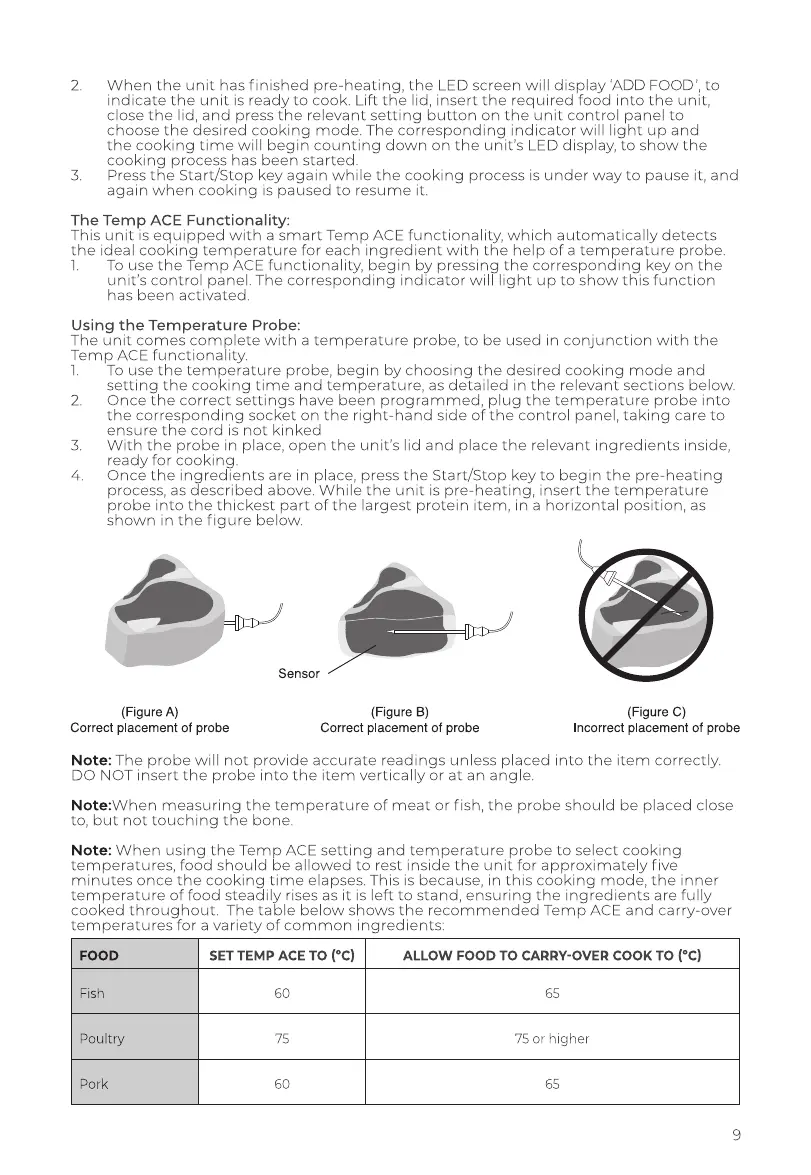
insert
the
temperature
probe
into
the
thickest
part
of
the
largest
protein
item,
in
a
horizontal
position,
as
shown
in
the
figure
below.
a
@
(Figure
A)
(Figure
B)
(Figure
C)
Correct
placement
of
probe
Correct
placement
of
probe
Incorrect
placement
of
probe
Note:
The
probe
will
not
provide
accurate readings
unless
placed
into
the
item
correctly.
DO
NOT
insert
the
probe
into
the
item
vertically
or
at
an
angle.
Note:VWhen
measuring
the
temperature
of
meat
or
fish,
the
probe
should
be
placed
close
to,
but
not
touching
the
bone.
Note:
When
using
the
Temp
ACE
setting
and
temperature
probe
to
select
cooking
temperatures,
food
should
be
allowed
to
rest
inside
the
unit
for
approximately
five
minutes
once
the
cooking
time
elapses.
This
is
because,
in
this
cooking
mode,
the
inner
temperature
of
food
steadily
rises
as
it
is
left
to
stand,
ensuring
the
ingredients
are
fully
cooked
throughout.
The
table
below
shows
the
recommended
Temp
ACE
and
carry-over
temperatures
for
a
variety
of
common
ingredients:
FOOD
SET
TEMP
ACE
TO
(°C)
ALLOW
FOOD
TO
CARRY-OVER
COOK
TO
(°C)
Fish
60
65
Poultry
75
75
or
higher
Pork
65

Related product manuals