EasyManua.ls Logo

Tower Hobbies T17086 - Appliance Operation Guide; Splash Guard and Inner Pot Installation; Powering On;Off and Starting Cooking

Tower Hobbies T17086
18 pages
Print Icon
To Next Page IconTo Next Page
To Previous Page IconTo Previous Page
Loading...
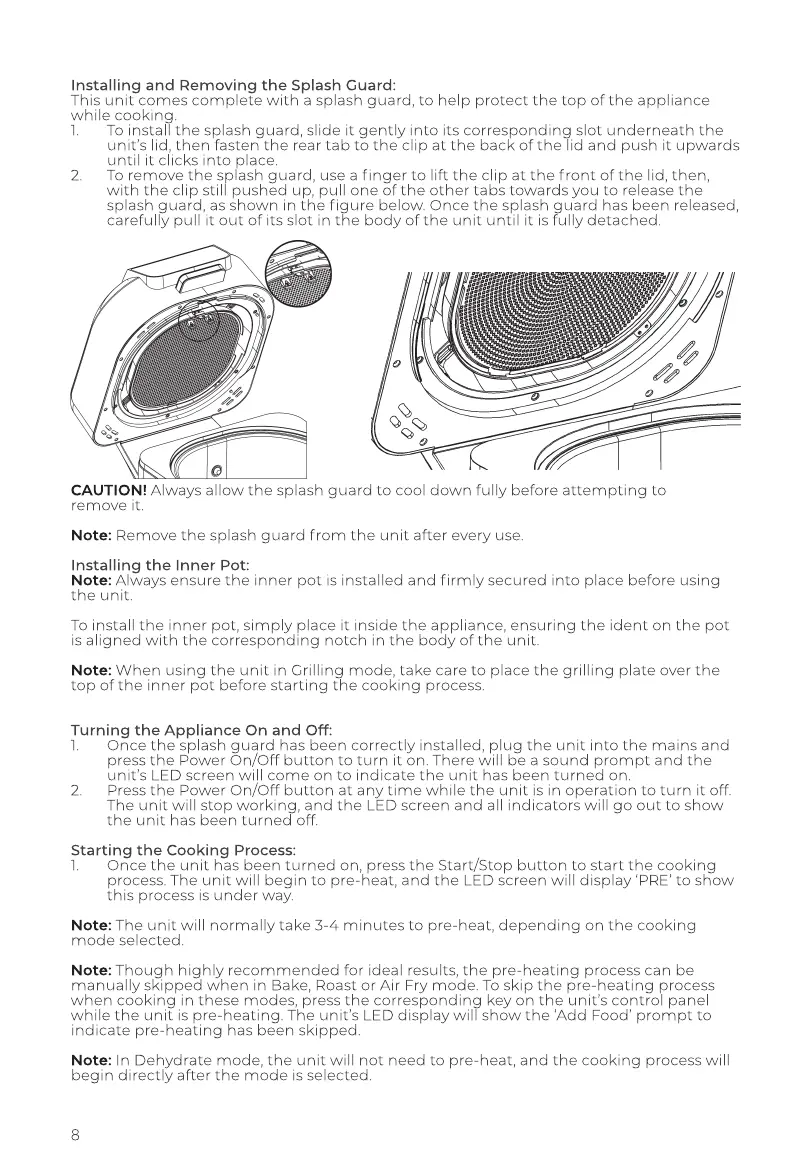
Installing
and
Removing
the
Splash Guard:
This
unit
comes
complete
with
a
splash
guard,
to
help
protect
the top
of
the
appliance
while
cooking.
1.
To
install
the
splash
guard,
slide
it
gently
into
its
corresponding
slot
underneath
the
unit's
lid,
then
fasten
the
rear
tab
to
the
clip
at
the
back
of
the
lid
and
push
it
upwards
until
it
clicks
into
place.
To
remove
the
splash
guard,
use
a
finger
to
lift
the
clip
at
the
front
of
the
lid,
then,
with
the
clip
still
pushed
up,
pull
one
of
the
other
tabs
towards
you
to
release
the
splash
guard,
as
shown
in
the
figure
below.
Once
the
splash
guard
has
been
released,
carefully
pull
it
out
of
its
slot
in
the
body
of
the
unit
until
it
is
fully
detached.
CAUTION!
Always
allow
the
splash
guard
to
cool
down
fully
before
attempting
to
remove
it.
Note:
Remove
the
splash
guard
from
the
unit
after
every
use.
Installing
the
Inner
Pot:
Note:
Always
ensure
the
inner
pot
is
installed
and
firmly
secured
into
place
before
using
the
unit.
To
install
the
inner
pot,
simply
place
it
inside
the
appliance,
ensuring
the
ident
on
the
pot
is
aligned
with
the
corresponding
notch
in
the
body
of
the
unit.
Note:
When
using
the
unit
in
Grilling
mode,
take
care
to
place
the
grilling
plate
over
the
top
of
the
inner
pot
before
starting
the
cooking
process.
Turning
the
Appliance
On
and
Off:
1.
Once
the
splash
guard
has
been
correctly
installed,
plug
the
unit
into
the
mains
and
press
the
Power
On/Off
button
to
turn
it
on.
There
will
be
a
sound
prompt
and
the
unit's
LED
screen
will
come
on
to
indicate
the
unit
has
been
turned
on.
Press
the
Power
On/Off
button
at
any
time
while
the
unit
is
in
operation
to
turn
it
off.
The
unit
will
stop
working,
and
the
LED
screen
and
all
indicators
will
go
out
to
show
the
unit
has
been
turned
off.
Starting
the
Cooking
Process:
1.
Once
the
unit
has
been
turned
on,
press
the
Start/Stop
button
to
start
the
cooking
process.
The
unit
will
begin
to
pre-heat,
and
the
LED
screen
will
display
‘PRE’
to
show
this
process
is
under
way.
Note:
The
unit
will
normally
take
3-4
minutes
to
pre-heat,
depending
on
the
cooking
mode
selected.
Note:
Though
highly
recommended
for
ideal
results,
the
pre-heating
process
can
be
manually
skipped
when
in
Bake,
Roast
or
Air
Fry
mode.
To
skip
the
pre-heating
process
when
cooking
in
these
modes,
press
the
corresponding
key
on
the
unit's
control
panel
while
the
unit
is
pre-heating.
The
unit's
LED
display
will
show
the
‘Add
Food’
prompt
to
indicate
pre-heating
has
been
skipped.
Note:
In
Dehydrate
mode,
the
unit
will
not
need
to
pre-heat,
and
the
cooking
process
will
begin
directly
after
the
mode
is
selected.

Related product manuals