91
2. Instrument cluster
2
Instrument cluster
4RUNNER (U)
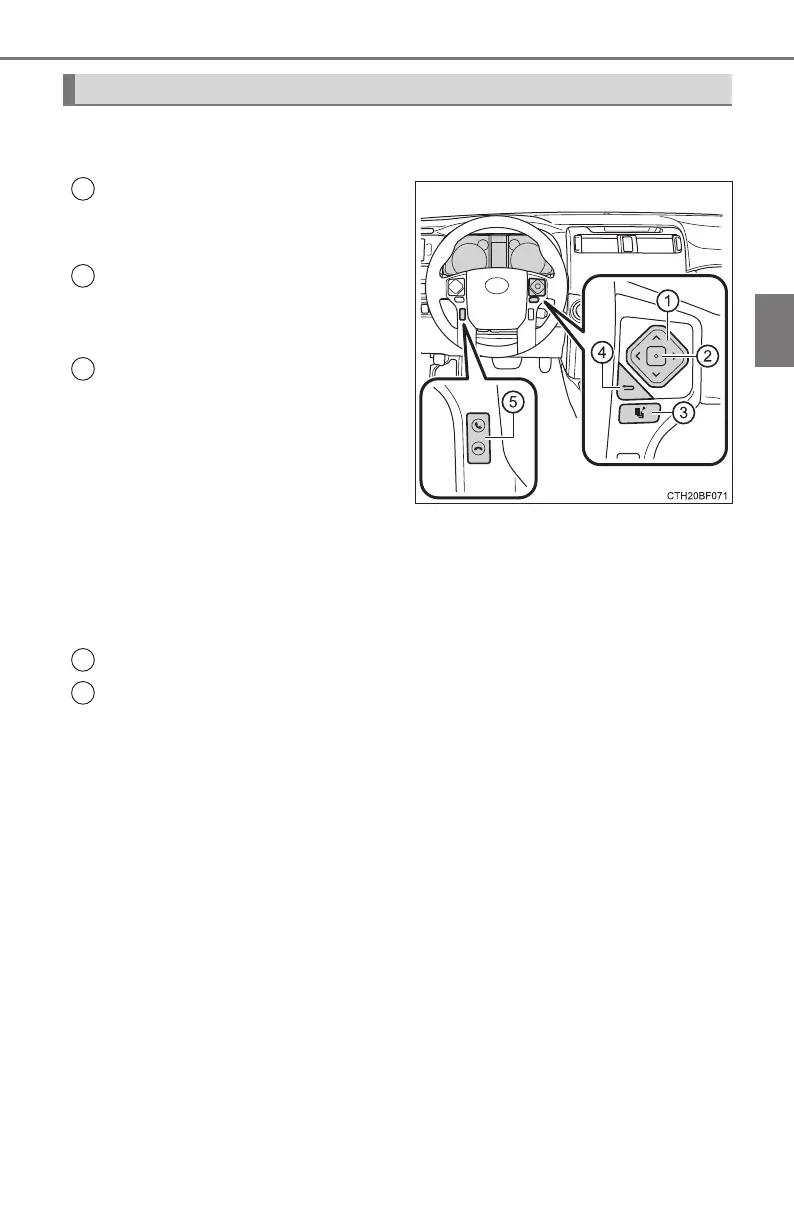
The multi-information display is operated using the meter control
switches.
Scroll screens
*
, change the
displayed content
*
and move
the cursor
Press: Enter/Set
Press and hold:
Reset/Display the next screen
Press: Displays the screen reg-
istered as the top screen
When no screen has been regis-
tered, the drive information screen
will be displayed.
Press and hold: Registers the
currently displayed screen as
the top screen
When the confirmation screen is displayed, select yes to register the
screen. If the selected screen cannot be registered, a registration failure
message will be shown.
Return to the previous screen
Call sending/receiving display
Linked with the hands-free system, sending or receiving call is displayed.
For details regarding the hands-free system, refer to the “Navigation sys-
tem owner's manual”.
*
: When the screen can be scrolled or different content can be displayed, a
mark, such as an arrow, will be displayed to suggest which switch to oper-
ate.
Operating the meter control switches
1
2
3
4
5












 To Next Page