The Toyota Avensis TNS700 is a Right-Hand Drive (RHD) navigation system designed for the 2006 model year Avensis (T25) vehicles. This manual provides detailed installation instructions for the navigation system, including component identification, connection procedures, vehicle disassembly, GPS antenna installation, wire harness installation, navigation disc installation, post-installation inspection, and reassembly.
Function Description
The TNS700 system integrates navigation, audio, and display functionalities into the vehicle's dashboard. Its primary function is to provide turn-by-turn navigation guidance using GPS data and pre-loaded map information from a navigation disc. The system also includes audio controls, allowing users to manage radio (AM/FM), disc playback, and potentially other audio sources. The display serves as the interface for both navigation and audio functions, showing maps, directions, and audio information.
Important Technical Specifications
- Model Year Compatibility: 2006 Toyota Avensis (T25)
- Vehicle Code: **T25*R-*****W
- Part Numbers:
- Navigation System: 08545-00950
- Audio Frame: 55405-05160
- Components: The system comprises several key components:
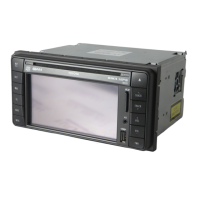
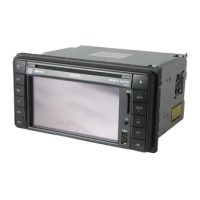
- TNS700 Unit (1): The main head unit integrating the display, navigation computer, and audio controls.
- Wire Harness (2): Connects the TNS700 unit to the vehicle's electrical system, including power, audio, and sensor inputs.
- GPS Antenna (3): Receives satellite signals for positioning and navigation.
- Navigation Disc (4): Contains map data and navigation software.
- Wire Clamp (5): Used for securing wiring.
- Foam Tape (6): Used for securing antenna wires and other components, and for insulation.
- Wire Tie (7): Used for bundling and securing wire harnesses.
- Earth Plate (8): A metallic plate used to mount the GPS antenna and ensure proper grounding.
- Connectors: The installation involves various connectors, including:
- Splicing connectors for reverse sensor wire and speed sensor wire.
- 18P (White) connector for vehicle wire harness.
- 20P (White) connector for speed sensor wire.
- Power Supply: The system connects to the vehicle's battery and ignition switch (ACC position).
Usage Features
- Navigation: Provides voice-guided navigation based on the inserted navigation disc. Features include destination input, map display, and route guidance.
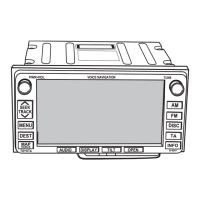
- Audio Control: Includes controls for AM/FM radio, disc playback, and potentially other audio sources. Buttons for TUNE, SEEK, TRACK, MENU, DEST, MAP, INFO, AUDIO DISPLAY, TILT, and OPEN are present on the head unit.
- Display: An integrated LCD display serves as the primary interface for all system functions.
- User Interface: The head unit features physical buttons and potentially a touchscreen for interaction.
- Volume Adjustment: Guide voice volume can be adjusted through the system settings.
Maintenance Features
- Installation Precautions: The manual emphasizes several precautions for installation to ensure safety and proper functioning:
- Disconnecting the negative (-) lead from the battery.
- Protecting vehicle surfaces (fender covers, seat).
- Avoiding pinching wires or harnesses.
- Using correct tools for tightening bolts/nuts.
- Ensuring waterproofing with grommets and tape when passing wires through panels.
- Gripping connector bodies when disconnecting.
- Avoiding forcible pulling of wiring harnesses.
- Checking for clear space behind mounting walls before drilling.
- Firmly tightening connectors and terminals.
- Securing power wiring connections before connecting to the battery.
- Checking for dirt or scratches after installation.
- Post-Installation Inspection: A thorough inspection is required after installation:
- Checking wiring and installation for abnormalities (pinching, pulling, excessive force).
- Confirming clamps and bands are in position and all parts are tightened.
- Operation Check:
- Connecting the battery and turning the ignition to ACC or ON.
- Confirming the navigation screen displays by pressing the NAVI switch.
- Adjusting guide voice volume and confirming sound changes.
- Performing the "auto-compensation" procedure (as per "When Tires are Replaced" section in the Owner's Manual).
- Troubleshooting: In case of abnormalities, refer to the "Toyota Genuine Navigation System Service Manual."
- Reassembly: All removed vehicle parts must be returned to their original locations, ensuring proper attachment of trim and interior materials to avoid detrimental effects on vehicle function. Wires must not be pinched, and all bolts and screws must be tightened.
- Navigation Disc Handling: The manual provides instructions for inserting the navigation disc, emphasizing correct orientation (label side up) and caution against placing objects on the panel or leaving it open.
The TNS700 system is designed for professional installation, requiring careful attention to detail and adherence to the provided instructions to ensure optimal performance and safety.

 Need help?
 General






 To Next Page