134
2. Instrument cluster
CAMRY_GE
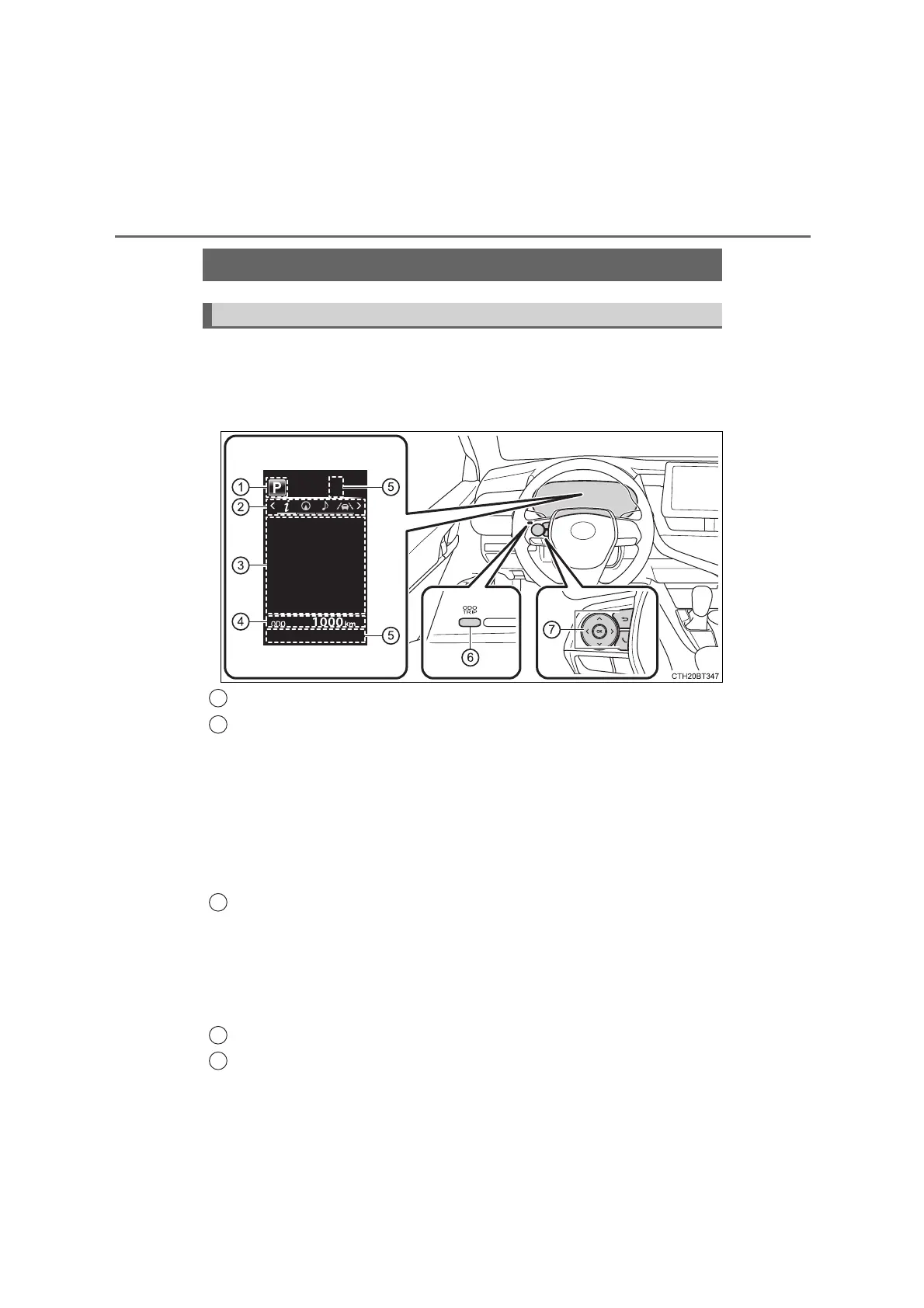
The multi-information display presents the driver with a variety of driv-
ing-related data, such as the current outside temperature. The multi-
information display can also be used to change the display settings
and other settings.
Shift position (P. 261, 266)
Menu icon display area
Displays the following items.
When a menu icon is not selected, the outside temperature and clock are
displayed.
• Menu icons (P. 136)
• Outside temperature (P. 130)
•Clock
*
(P. 142)
*
: Vehicles with a navigation or multimedia system: For clock setting, refer
to “Navigation and Multimedia System Owner’s Manual”.
Content display area
A variety of information can be displayed by selecting a menu icon. Addi-
tionally, warning or suggestion/advice pop-up displays will be displayed in
some situations.
• Menu icon content (P. 136)
• Suggestion function (P. 144)
• Warning message (P. 597)
Odometer/trip meter (P. 143)
Indicators (P. 124)
Multi-information display (4.2-inch display)
Summary of functions
1
2
3
4
5
CAMRY_OM_General_OM33F01E










 To Next Page