410
4-5. Using the driving support systems
CAMRY_GE
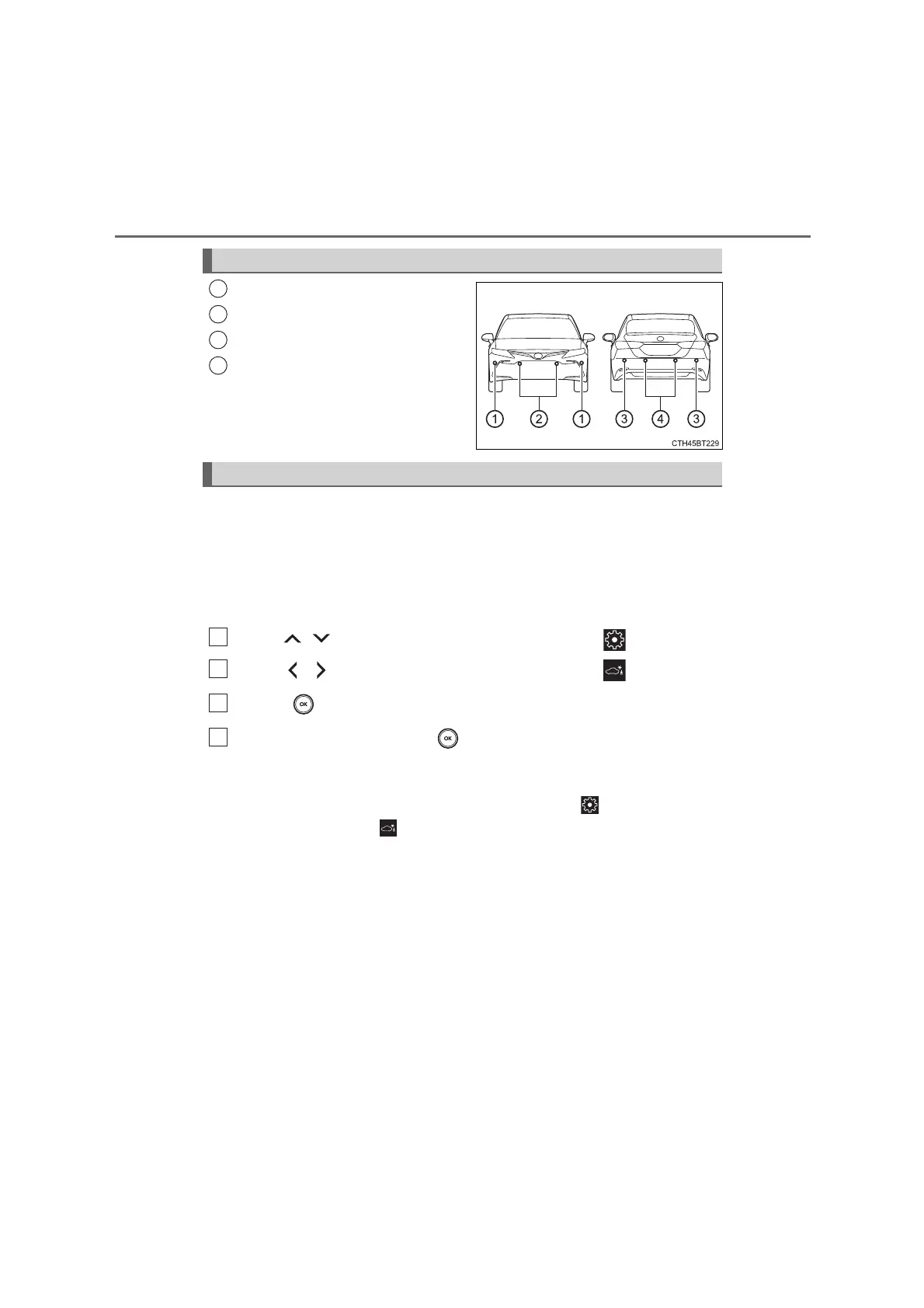
Front corner sensors
Front center sensors
Rear corner sensors
Rear center sensors
The Parking Support Brake can be enabled/disabled on the multi-
information display. All of the Parking Support Brake functions (static
objects and rear-crossing vehicles) are enabled/disabled simultane-
ously.
Use the meter control switches to enable/disable the parking support
brake. (P. 139, 154)
Press
/
of the meter control switches, select .
Press
/
of the meter control switches, select .
Press of the meter control switch.
Select the “Yes” and push .
When the Parking Support Brake is disabled, the PKSB OFF indicator illu-
minates.
To re-enable the system when it was disabled, select on the multi-infor-
mation display, select and then “On”. If disabled using this method, the
system will not be re-enabled by turning the engine switch off and then to
IGNITION ON mode.
Types of sensors
1
2
3
4
Turning the Parking Support Brake on/off
1
2
3
4
CAMRY_OM_General_OM33F01E















 To Next Page