42
Pairing your phone is the first step in connecting with your Toyota for hands-free
calling and for audio streaming via Bluetooth. This pairing process is quick and
easy: all iPhone mobile digital devices have Bluetooth integrated; all you have to
do is setup the phone and multimedia system to “talk” to each other and form a
connection.
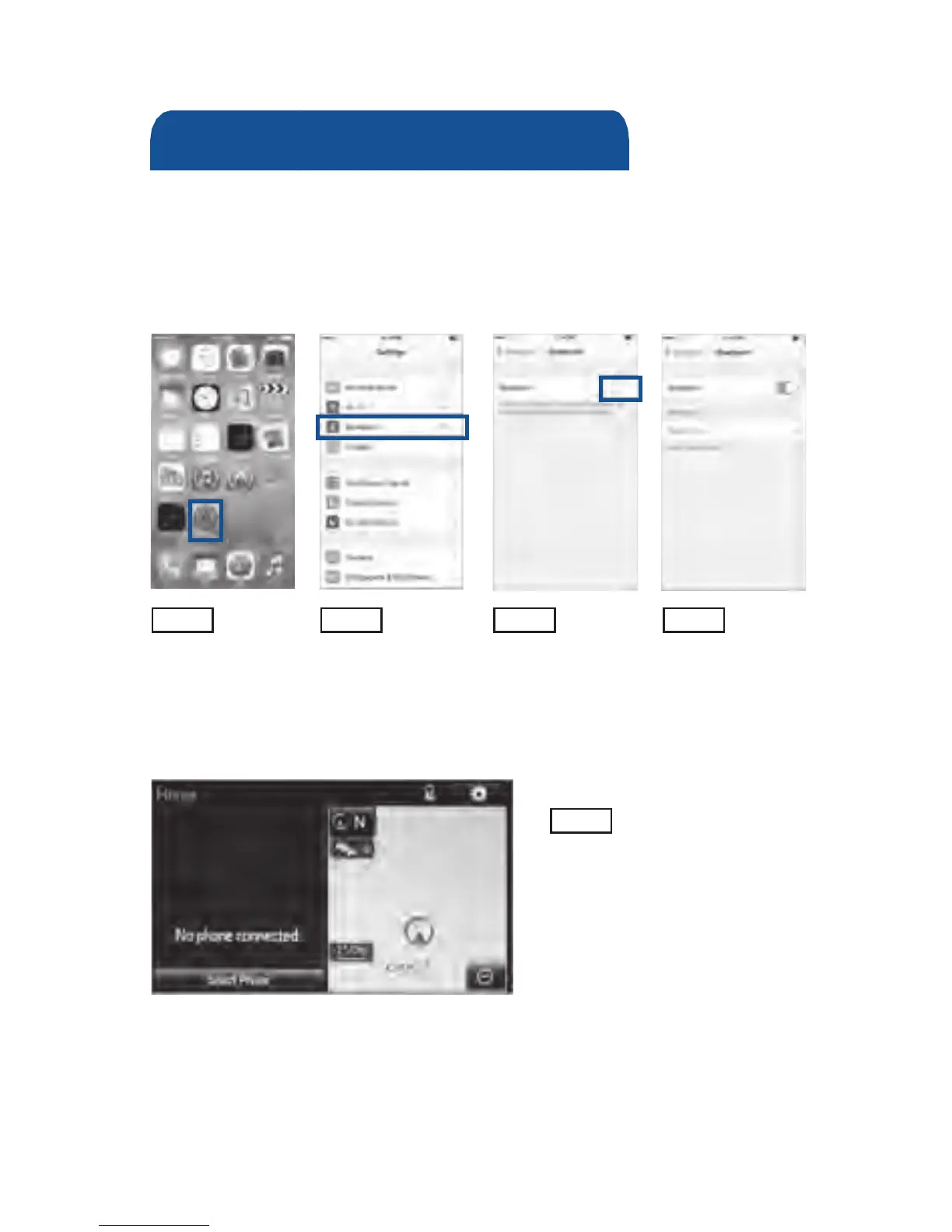
Initiate Bluetooth
®
on your iPhone
®
STEP 1 STEP 2 STEP 3 STEP 4
From the HOME
SCREEN, select
SETTINGS.
Select BLUETOOTH.
Ensure
BLUETOOTH
is ON.
Your iPhone will seek
out Bluetooth devices
while remaining
discoverable.
STEP 5
While your iPhone device is seeking
out Bluetooth devices, proceed to
your Entune Multimedia Head Unit on
your Toyota vehicle.
Bluetooth
®
Pairing for iPhone
®
and
Entune™ touch screen system
BLUETOOTH
®
DEVICE PAIRING











 To Next Page