Need help?
Do you have a question about the TOZO S2 and is the answer not in the manual?
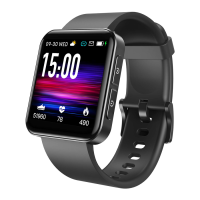
Description of the front and back sides of the TOZO S2 smartwatch, highlighting key areas like the screen and sensor.
Instructions for charging the watch, checking package contents, and downloading the TOZO FIT mobile application.
Steps to bind the TOZO FIT app with the watch, including enabling Bluetooth and GPS positioning permissions.
Explanation of how the watch records heart rate, SpO2, stress levels, and sleep data for daily tracking.
Guidance on correct watch wearing for sensor contact and explanation of touch screen and button controls.
Instructions on how to switch between, download, and install different watch faces from the Dial Market.
Introduction to the 14 available sports modes and the intelligent sports detection feature.
How to navigate and select icons for various applications available on the watch interface.
Steps for linking the watch with Alexa through the TOZO FIT app and Amazon account authorization.
Description of how the watch interacts with Alexa for voice commands and available services.
Viewing daily activity accomplishments, including steps, calories, distance, and overall activity.
Instructions for measuring heart rate anytime and viewing daily monitoring data via the watch.
Guidance for stress measurement, emphasizing the need to keep arms and wrists still during the process.
Details on Blood Oxygen (SpO2) measurement, requiring stable posture for accurate readings.
How to view recent sleep records and analyze sleep status at different stages.
Using the Relax app for guided breathing exercises with vibration frequency and animation instructions.
Information on the stopwatch functionality provided by the watch for timing activities.
How to set, delete, turn on/off, and label alarms on the watch and through the companion app.
Instructions for setting a preset duration timer on the watch, which provides reminders upon expiration.
Display of current weather conditions and highest/lowest values for today and the next two days.
How to control mobile music playback, switch songs, and adjust volume directly from the watch.
Viewing recent exercise records and detailed data on the watch and within the companion app.
Functionality to make the connected phone ring from the watch; can be displayed or hidden in app settings.
Adjusting screen-on time, brightness, do not disturb, watch faces, and managing device restart/shutdown.
Display of incoming calls, messages, and step count reminders on the watch interface.
Information on checking for watch/app updates and providing feedback or seeking customer support.
This document describes the TOZO S2 Smart Watch, a device designed to monitor various health metrics and provide convenient access to notifications and controls. The manual outlines the watch's functions, usage features, and some maintenance aspects.
The TOZO S2 Smart Watch features a screen display area on the front and a heart rate sensor on the back. A function button is located on the side for interaction. For initial use, the watch must be charged with its magnetic charging cable to activate and turn it on. Users can customize the screen-on time from 5 to 20 seconds via the Settings > Brightness > Screen-on time menu.
The package includes the TOZO S2 Smart Watch with a built-in lithium battery, a user guide, and a charging cable. To set up the device, connect the magnetic charging cable to the watch's contact points for charging and activation. The companion app, "TOZO FIT," can be downloaded from mobile app stores or by scanning the provided QR code.
To bind the watch with the "TOZO FIT" app:
The app also allows for linking the device by tapping the "More" icon in the upper right corner, selecting "Add Device," choosing the device category, and selecting the desired device from the search list. Alternatively, the device's QR code can be scanned directly using the app's scan function.
The TOZO S2 Smart Watch records various health data, including heart rate, blood oxygen (SpO2), and stress levels. It continuously monitors heart rate and sleep patterns throughout the day and night.
The watch also supports starting exercises. Users can initiate a sports activity by opening the sports app on the watch, clicking the icon of the desired sport type, and setting a goal for the exercise.
For accurate readings, wear the watch correctly, ensuring the bottom sensor is properly attached to the skin and the strap is positioned one finger away from the wrist.
The TOZO S2 supports full-screen touch operations. A single click selects an item, while a long press enters or confirms an action. The watch also features a touch key, which can be short-pressed to return to the previous screen or close a notification.
Users can switch between different watch faces in the "Dial Settings" menu. Additional watch faces can be downloaded and installed from the "Dial Market" within the app.
The TOZO S2 offers 14 sports modes, including:
Users can choose to show or hide any of these sports modes within the "TOZO FIT" app. The app also features an Intelligent Sports Detection function, which can detect if the user is running or walking. This function can be enabled or disabled in the app. The Sports Summary on the TOZO S2 provides various sports data, with detailed information available in the "TOZO FIT" app.
The movement distance is calculated based on the step count. It is crucial to accurately fill in personal information parameters (height, weight, age) when setting up the watch to ensure precise data. For outdoor sports without continuous arm swing, such as cycling, it is recommended to turn on the exercise interface in the app to record exercise data more accurately.
Swiping up or down on the watch allows users to select various icons, which include:
The TOZO S2 integrates with Amazon Alexa.
The watch is Alexa-enabled. On the Listening interface, asking a question or giving a voice command will transition to the Thinking interface, followed by an answer or execution of the command. Alexa can currently be used to activate the stopwatch, alarm clock, countdown, and event reminder services on the watch. If a request times out, the voice is not recognized, the account is not logged in, the network connection is unstable, or Bluetooth is not connected, a corresponding prompt will be displayed.
The watch supports viewing daily accomplishments for steps, calories, distance, and activity.
The TOZO S2 supports measuring heart rate at any time and viewing daily monitoring data. Users can also set the measurement frequency in the app settings. During heart rate measurement, it is important to keep arms and wrists still.
Similar to heart rate, the watch can measure stress levels. Users should keep their arms and wrists still during stress measurement.
The blood oxygen function operates as an active test, meaning measurement data is displayed on the watch and app only after manual activation. During SpO2 measurement, users should keep their arms and wrists still.
The watch records sleep duration and patterns. Users can view their most recent sleep records and sleep status at each stage.
The Relax App helps users adjust their breathing to relax.
The watch provides both a stopwatch and a timer function.
The watch allows users to add, delete, and turn alarms on/off directly on the device or through the app. Labels can be set for alarms to identify them. The alarm delay time and number of delays can also be customized in the app.
Users can set a timer with a preset duration on the watch, which will provide a reminder when it expires. The timer duration can also be customized.
The watch supports a three-day weather forecast, displaying current weather, highest and lowest temperatures for today, and the highest and lowest temperatures for the next two days. To ensure accurate weather data, the watch should remain connected to the TOZO FIT app.
The device can control music applications on a mobile phone, allowing users to switch songs and adjust the volume.
Users can view recent exercise records on the watch, including detailed data, and also access these records in the app.
When the watch is connected to the app, users can make their phone ring. Clicking the icon on the watch will end the ringing. This function can be displayed or hidden in the app settings.
The watch offers various settings:
The watch supports multiple reminder modes, including:
Users should pay attention to new version updates for both the watch and the app (found in My > Check for updates). Watch update information will be prompted in a pop-up mode. For assistance, users can provide feedback to the customer service team via the "My > Problems and suggestions" section in the app, and support will be provided promptly.
 General
| Bluetooth Version | Bluetooth 5.0 |
|---|---|
| Strap Material | Silicone |
| Charging Time | Approximately 2 hours |
| Compatibility | Android and iOS |
| Sensors | Heart rate sensor, accelerometer |
| Colors | Black, Pink, Green, Blue |

 To Next Page