EasyManua.ls Logo

TOZO S2 - 4.3.12 Music Control

TOZO S2
18 pages
Print Icon
To Next Page IconTo Next Page
To Previous Page IconTo Previous Page
Loading...
TOzO
EN
1.
Supports
three-day
weather
viewing,
you
can
view
today's
"current
weather,
highest
andlowest
weather
values"
and
the
"highest
and
lowest
weather
values"
for
the
next
two
days.
2.
To
ensure
the
accuracy
of
weather
data,
please
try
to
keep
the
watch
connected
to
the
TOZO
FIT
app.
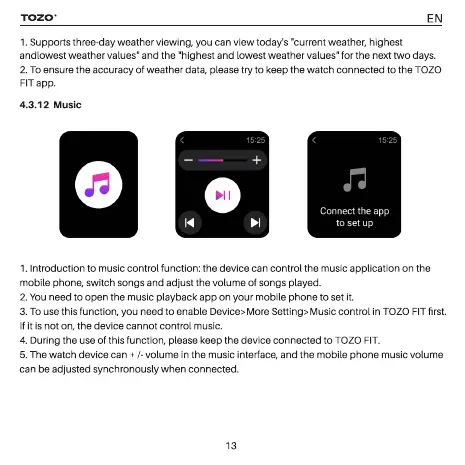
4.3.12
Music
Connect
the
app
to
set
up
1.
Introduction
to
music
control
function:
the
device
can
control
the
music
application
on
the
mobile phone,
switch
songs
and
adjust
the
volume
of
songs
played.
2.
You
need
to
open
the
music
playback
app
on
your
mobile
phone
to
set
it.
3.
To
use
this
function,
you
need
to
enable Device> More
Setting>
Music
control
in
TOZO
FIT
first.
If it
is
not
on,
the
device
cannot
control
music.
4.
During
the
use
of
this
function,
please
keep
the
device
connected
to
TOZO
FIT.
5.
The
watch
device
can
+
/-
volume
in
the
music
interface,
and
the
mobile
phone
music
volume
can
be
adjusted
synchronously
when
connected.

Related product manuals