Reset
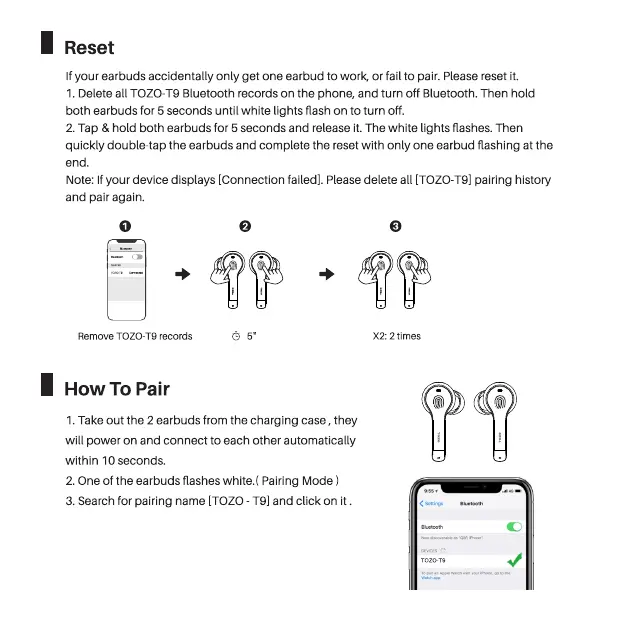
If your earbuds accidentally only get one earbud to work, or fail to pair. Please reset it.
1. Delete all TOZO-T9 Bluetooth records on the phone, and turn off Bluetooth. Then hold
both earbuds for 5 seconds until white lights flash on to turn off.
2. Tap & hold both earbuds for 5 seconds and release it. The white lights flashes. Then
quickly double-tap the earbuds and complete the reset with only one earbud flashing at the
end.
Note:If your device displays [Connection failed]. Pleasedelete all (TOZO-T9]pairing history
and pair again.
O
Remove TOZO-T9 records
How To Pair
O O
X2: 2 times
i
TO ZCTg
i
1. Take out the 2 earbuds from the charging case , they
will power on and connect to each other automatically
within 10 seconds.
2. One Ofthe earbuds flashes white.( Pairing Mode )
3. Search for pairing name [TOZO- T91and click on it .


 To Next Page