
 Need help?
Do you have a question about the TP-Link Archer AX10000 and is the answer not in the manual?
Connect the modem to the router using an Ethernet cable and power on the devices.
Set up the router using the TP-Link Tether app or a web browser for internet access.
Explains the meaning of different LED light patterns and colors on the router.
Describes the operational functions of the WPS, Wi-Fi, and LED buttons.
Steps to resolve issues when the router's web management page is inaccessible.
Troubleshooting steps for resolving internet connectivity problems.
Guidance on positioning the router for the best wireless performance.
This document serves as a Quick Installation Guide for the TP-Link Archer AX10000 Tri-Band Wi-Fi 6 Gaming Router, providing instructions for hardware connection, router configuration, and troubleshooting.
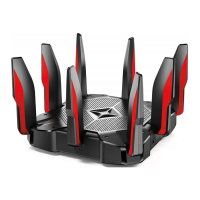
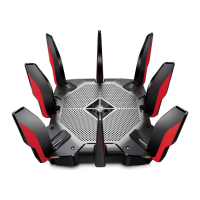
The TP-Link Archer AX10000 is a high-performance Tri-Band Wi-Fi 6 Gaming Router designed to provide robust and fast internet connectivity, particularly optimized for gaming. It functions as a central hub for your home network, distributing internet access to various devices wirelessly or via Ethernet cables. The router supports Wi-Fi 6 technology, offering improved speeds, capacity, and reduced latency compared to previous Wi-Fi standards. Its tri-band capability allows for dedicated bandwidth for different types of traffic, enhancing overall network efficiency. The device can be configured either through a dedicated mobile application (TP-Link Tether App) or via a web browser, offering flexibility in setup. It also includes features like WPS (Wi-Fi Protected Setup) for easy connection of devices and an LED button to control the router's indicator lights.
http://tplinkwifi.net or http://192.168.0.1 in the address bar.http://tplinkwifi.net or http://192.168.0.1 (or http://192.168.1.1) is correctly entered in the web browser.https://community.tp-link.com to interact with TP-Link users and engineers.https://www.tp-link.com/support for technical support, replacement services, user guides, and more information.techwriter@tp-link.com.cn. General
| DSL WAN | No |
|---|---|
| Ethernet WAN | Yes |
| WAN connection type | RJ-45 |
| Modulation | OFDM |
| Wi-Fi band | Tri-band (2.4 GHz / 5 GHz / 6 GHz) |
| Wi-Fi standards | 802.11a, 802.11b, 802.11g, Wi-Fi 4 (802.11n), Wi-Fi 5 (802.11ac), Wi-Fi 6 (802.11ax) |
| Top Wi-Fi standard | Wi-Fi 6 (802.11ax) |
| WLAN data transfer rate (max) | 4804 Mbit/s |
| WLAN data transfer rate (first band) | 918 Mbit/s |
| VPN server | OpenVPN, PPTP |
| Cabling technology | 10/100/1000Base-T(X) |
| Networking standards | IEEE 802.11a, IEEE 802.11ac, IEEE 802.11ax, IEEE 802.11b, IEEE 802.11g, IEEE 802.11n |
| Ethernet LAN data rates | 10, 100, 1000, 2500 Mbit/s |
| Ethernet LAN interface type | Gigabit Ethernet |
| Number of guest networks (2.4 GHz) | 1 |
| Mobile network generation | - |
| Ethernet LAN (RJ-45) ports | 8 |
| Security algorithms | WPA, WPA2, WPA2-Enterprise, WPA3 |
| Product type | Tabletop router |
| Product color | Black, Red |
| LED indicators | Power, Status |
| Transmit power | \u003C30dBm(2.4GHz & 5.15GHz~5.25GHz & 5.725GHz~5.825GHz), \u003C24dBm(5.25GHz-5.35GHz & 5.47GHz-5.725 GHz) dBmW |
| Processor cores | 4 |
| Processor frequency | 1800 MHz |
| Output current | 5 A |
| Output voltage | 12 V |
| Power source type | DC |
| Storage temperature (T-T) | -40 - 70 °C |
| Operating temperature (T-T) | 0 - 40 °C |
| Storage relative humidity (H-H) | 5 - 90 % |
| Operating relative humidity (H-H) | 10 - 90 % |
| Browser supported | Internet Explorer 11+, Firefox 12.0+, Chrome 20.0+, Safari 4.0+, or other JavaScript-enabled |
| Cables included | LAN (RJ-45) |
| Sustainability certificates | RoHS |
 Weight and Dimensions
| Width | 288 mm |
|---|---|
| Height | 184 mm |





 To Next Page