
 Need help?
Do you have a question about the TP-Link deco AX7800 and is the answer not in the manual?
Explains terms used in the guide, like Deco, Underline, and Teal formatting.
Provides links to product pages, community, support, and setup videos.
Covers disclaimers on speed, coverage, MU-MIMO, IoT, roaming, and HomeShield.
Explains the meaning of LED colors and states on the Deco unit.
Describes the RJ-45 Ethernet ports, power slot, and reset button.
Guides users to download and install the Deco app from app stores.
Instructions for logging in or creating a TP-Link ID to use the app.
Steps to connect the Deco unit to the modem and power them on.
Users select or create a location for the Deco unit in the app.
Guides users to select their internet connection type and enter details.
Users set up the Wi-Fi network name and password.
Connect devices to the new Deco Wi-Fi network to continue setup.
Indicates the Deco network is ready and devices can connect.
Step for adding additional Deco units to expand coverage.
Users select the specific Deco model they are adding from a list.
Explains how to locate and view added Deco units in the app.
Access the dashboard to see an overview of the network status.
Access HomeShield for enhanced security features.
Access advanced settings and features from the dashboard.
Tap to view the working status of all Deco units in the app.
Tap a Deco unit to view its specific details and configuration.
Tap a Deco unit to change or customize its assigned location.
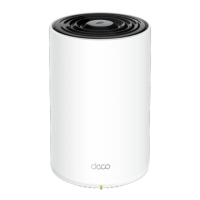
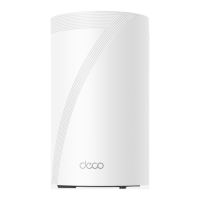
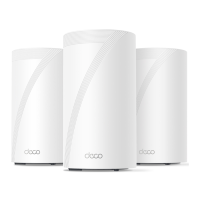
The TP-Link Deco X95 is a Whole Home Mesh Wi-Fi 6 System designed to provide seamless and superior mesh Wi-Fi coverage throughout your entire home. This AX7800 Tri-Band Mesh Wi-Fi 6 System is built to eliminate Wi-Fi dead zones and deliver a robust, high-speed internet experience to all your connected devices, everywhere.
The Deco X95 system functions as a comprehensive home networking solution, leveraging Wi-Fi 6 technology to deliver faster speeds, greater capacity, and reduced network congestion compared to previous Wi-Fi standards. It operates on a tri-band architecture, which means it utilizes three distinct Wi-Fi bands to optimize performance and dedicated backhaul for communication between Deco units, ensuring stable and efficient data transmission. This setup is crucial for maintaining high speeds even when multiple devices are streaming, gaming, or engaging in other bandwidth-intensive activities simultaneously.
At its core, the Deco X95 creates a unified mesh network, meaning all Deco units work together under a single Wi-Fi name and password. This allows your devices to automatically switch to the Deco unit with the strongest signal as you move around your home, ensuring a truly seamless roaming experience without interruptions. This intelligent handoff is particularly beneficial for applications like video calls or online gaming, where even a brief disconnection can be disruptive. The system is designed to be scalable, allowing users to add more Deco units to expand coverage further, making it suitable for homes of any size and layout.
The Deco X95 also integrates advanced security features through TP-Link HomeShield, which provides real-time network protection against cyber threats, malicious sites, and potential vulnerabilities. HomeShield offers a suite of tools to manage your network's security, including IoT protection, robust parental controls, and quality of service (QoS) settings to prioritize traffic for specific devices or applications. This ensures a safe and optimized online environment for all family members and connected smart devices.
Furthermore, the Deco X95 supports MU-MIMO (Multi-User, Multiple-Input, Multiple-Output) technology, which enables the system to communicate with multiple devices simultaneously, rather than sequentially. This significantly improves network efficiency and reduces latency, especially in environments with many connected devices. The system also features multiple Ethernet ports on each unit, including a 2.5Gbps port, allowing for high-speed wired connections to devices like gaming consoles, PCs, or network-attached storage (NAS) drives, further enhancing its versatility as a central networking hub.
Setting up and managing the Deco X95 system is designed to be straightforward and user-friendly, primarily through the intuitive Deco app. The app guides you step-by-step through the initial installation process, from connecting the main Deco unit to your modem to adding additional Deco units to expand your network. The app simplifies complex networking tasks, making them accessible even for users without extensive technical knowledge.
Once the network is established, the Deco app serves as your central control panel. The dashboard provides an overview of your network status, including connected devices, network speed, and security alerts. You can easily check the status of individual Deco units, change their locations, and monitor their performance. The app allows you to manage all connected devices, view their network activity, and even prioritize specific devices for optimal performance. For instance, you can ensure that your streaming device or gaming console receives maximum bandwidth when needed.
The Deco app also facilitates the creation of new networks, such as a guest network, which allows visitors to access the internet without compromising the security of your main network. You can easily enable or disable this network and set a separate password. The app provides comprehensive Wi-Fi settings, allowing you to customize your network name, password, and other advanced configurations.
HomeShield features within the app offer robust parental controls, enabling you to manage internet access for children, set time limits, block inappropriate content, and view usage reports. The real-time protection continuously scans for threats and provides alerts, ensuring your network remains secure. The QoS settings allow you to allocate bandwidth based on application type or device, ensuring critical services run smoothly.
Adding more Deco units to your existing network is a simple process through the app. The system automatically detects new units and integrates them into the mesh, seamlessly extending your Wi-Fi coverage. This modular approach allows you to customize your network's reach as your needs evolve. The LED indicator on each Deco unit provides visual feedback on its status, making it easy to identify if a unit is starting up, ready for setup, connected, or experiencing an issue.
Maintaining the Deco X95 system is largely automated and simplified through the Deco app, ensuring optimal performance and security with minimal user intervention. The system supports online firmware updates, which can be initiated directly from the app. These updates are crucial for enhancing performance, adding new features, and patching security vulnerabilities, ensuring your network remains up-to-date and protected against emerging threats. The app will notify you when new firmware is available, and the update process is typically quick and seamless.
The Deco app provides weekly and monthly reports, offering insights into your network's performance, security events, and device usage. These reports can help you understand your network's health, identify potential issues, and make informed decisions about managing your connected devices and security settings. For example, you might see a report on blocked threats or a summary of internet usage by different family members.
Should you encounter any issues with a Deco unit, the app allows you to remove or reboot individual units remotely. This can be useful for troubleshooting minor connectivity problems or refreshing a unit's performance without physically accessing it. Each Deco unit also features a physical reset button, which can be pressed for a short duration to restore the unit to its factory default settings. This is a useful last resort for resolving persistent issues or when reconfiguring the unit from scratch.
The system's self-healing capabilities are a key maintenance feature. If one Deco unit goes offline, the other units in the mesh network automatically reconfigure themselves to maintain coverage and connectivity, minimizing disruptions to your internet service. This redundancy ensures a more resilient and reliable network.
For further assistance, the Deco app provides access to TP-Link's technical support resources, including FAQs, troubleshooting guides, and contact information for customer service. This integrated support ensures that help is readily available if you encounter any problems that cannot be resolved through the app's self-help features. The online community and setup videos also offer additional resources for users seeking more information or peer support.
 General
| Model | Deco AX7800 |
|---|---|
| Wi-Fi Standard | Wi-Fi 6 |
| Wi-Fi Technology | Tri-Band |
| Total Speed | 7800 Mbps |
| 2.4GHz Speed | 574 Mbps |
| 5GHz Speed (1st Band) | Up to 4804 Mbps |
| 5GHz Speed (2nd Band) | Up to 4804 Mbps |
| Memory | 512 MB RAM |
| Storage | 128 MB Flash |
| MU-MIMO | Yes |
| OFDMA | Yes |
| Beamforming | Yes |
| Parental Controls | Yes |
| Quality of Service (QoS) | Yes |
| Operating Humidity | 10% to 90% non-condensing |
| Management App | TP-Link Deco App |
| Maximum Wi-Fi Speed | 7.8 Gbps |
| Frequency Bands | 2.4 GHz, 5 GHz |
| Processor | Quad-core |
| Security Protocols | WPA3, WPA2 |
| Operating Temperature | 0°C to 40°C |
| Wireless Standards | 802.11a/b/g/n/ac/ax |
| USB Ports | No |


 To Next Page