www.tp-link.com
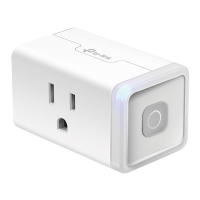
User’s Manual Smart Wi-Fi Plug Mini
14
Troubleshooting
Frequently Asked Questions
1. What devices can I control with the Smart Wi-Fi Plug Mini?
You can control lights, fans, humidiers, portable heaters, and any small appliances in accordance
with the Smart Wi-Fi Plug Mini’s specications.
2. What should I do when I can’t turn the plugged-in devices on or off using Kasa?
• Make sure the device plugged into the Smart Wi-Fi Plug Mini is switched to ON.
• Make sure the Remote Control feature in the app is enabled to control your devices from outside
of your home.
3. What should I do when the LED is lit a solid amber?
A solid amber light indicates no network connection. You can troubleshoot the following:
• Check your network connectivity.
• Avoid placing the Smart Wi-Fi Plug Mini near potential sources of radio signal interference such
as microwave ovens, cordless phones, baby monitors, and motor-driven appliances.
• Repeat the app conguring process.
• Factory reset the Smart Wi-Fi Plug Mini and try to add it to your network again.
4. How do I pair the Smart Wi-Fi Plug Mini with Amazon Alexa?
Visit www.tp-link.com/en/faq-944.html or within the Kasa Help section for pairing instructions, then
you can interact with your plugged-in devices using voice recognition. For example, to command
Alexa to turn on the Smart Wi-Fi Plug Mini named “Bedroom Lights”, simply say, “Alexa, turn on
Bedroom Lights.”
Usage Tips
• Place your Smart Wi-Fi Plug Mini within the range of your Wi-Fi router or access point
(approximately 100 feet).
• Avoid physical obstructions and radio interference in the surrounding area.
Support
• Specications can be found on the product page at http://www.tp-link.com.
• If you encounter any issues with the Smart Wi-Fi Plug Mini or conguration, please visit
www.tp-link.com/support for web support and troubleshooting information.




 To Next Page