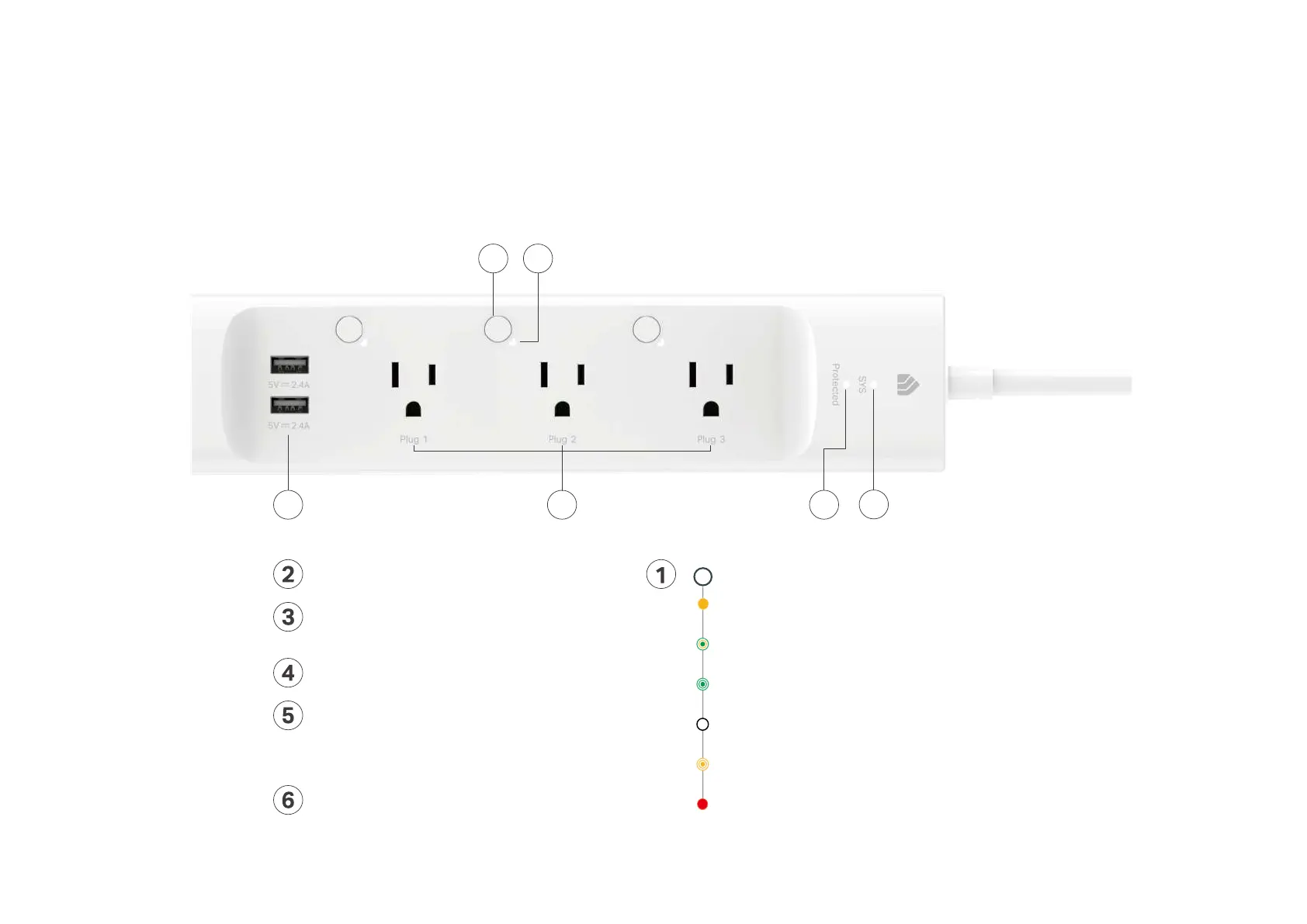
Protected LED
Lit up when it is under surge protection.
Smart Outlet (1-3 from left to right)
Plug in your device and control it from your smartphone.
Each outlet is independent.
LED of Smart Outlet (1-3 from left to right)
Lit up when the corresponding smart outlet is on.
Control Button (1-3 from left to right)
Press the control button to turn on or o the corresponding outlet.
Press and hold a control button for 5s to reenable setup mode.
Press and hold a control button for 10s to restore your Smart
Power Strip to factory default settings.
USB Port
Charge your tablet, smartphone or other devices.
Output: 5V/2.4A each; 5V/2.4A total
Blinking Orange
Resetting.
Blinking Green
Searching for Wi-Fi.
Red
No Wi-Fi connection.
Blinking Orange and Green
Setup mode initiated.
SYS Wi-Fi LED
Orange
Rebooting.
White
Connected to Wi-Fi network successfully.
1
3
45
2
6


 To Next Page