7
Failed to add to Home?
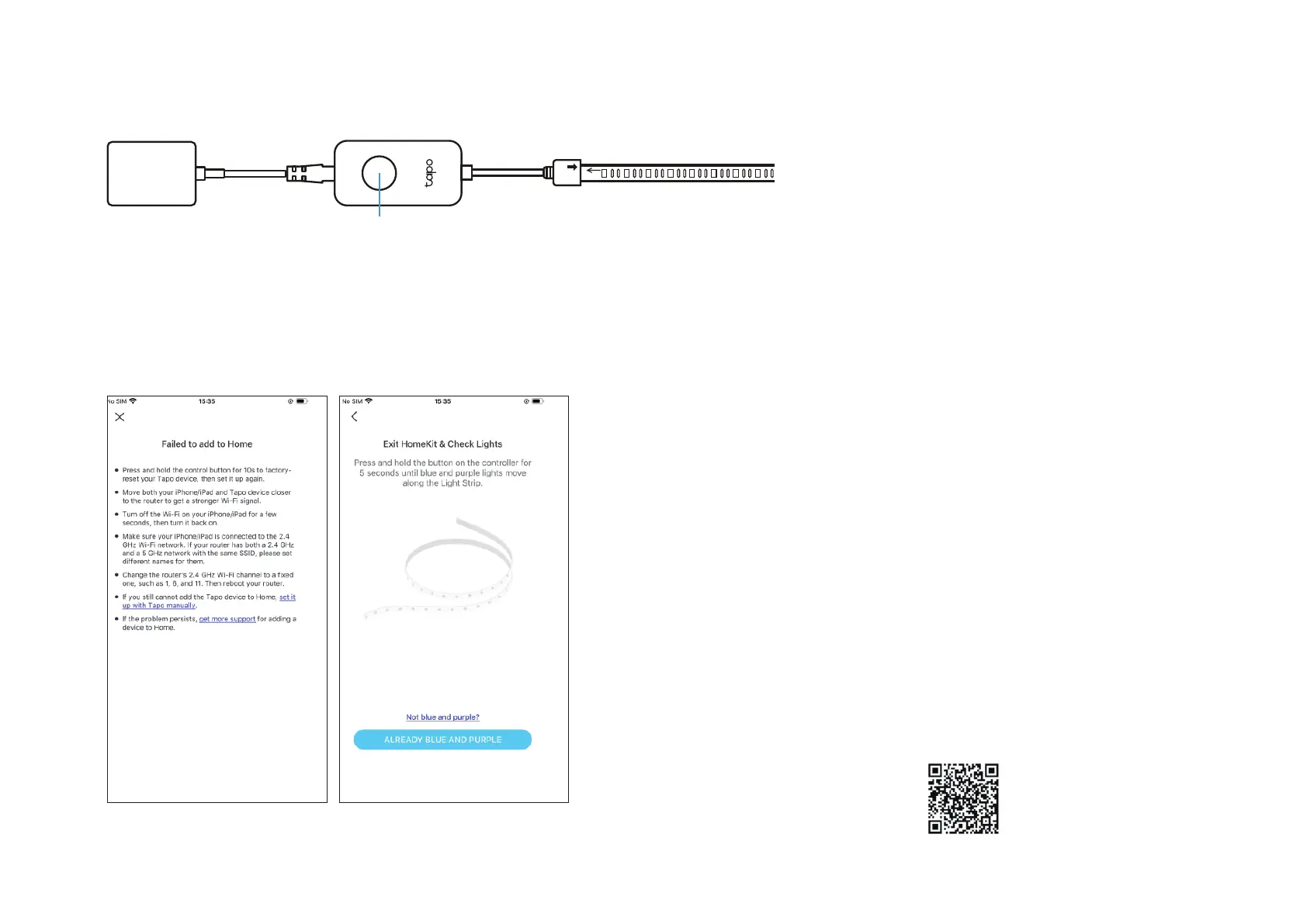
1. Press and hold the control button for 10 seconds to factory reset the light strip.
2. Move both your iPhone/iPad and the light strip closer to the router to get a stronger Wi-Fi signal.
3. Turn o the Wi-Fi on your iPhone/iPad for a few seconds, then turn it back on to clear the cache of the Home app.
4. Make sure your iPhone/iPad is connected to the 2.4 GHz Wi-Fi network. Set dierent names for 2.4 GHz and 5 GHz networks, or temporarily turn o
the router's 5 GHz Wi-Fi until your smart device is successfully added.
5. Change the router's 2.4 GHz Wi-Fi channel to a xed one, such as 1, 6, and 11. Then reboot your router.
6. If you still cannot add the light strip to Home, tap set it up with Tapo manually. Then follow the app instructions to add your light strip.
7. If the problem persists, refer to the FAQ for detailed instructions: https://www.tp-link.com/support/faq/3390/
Control Button


 To Next Page