-78-
Note:
● For the users in the private network and not being set access rule, the default Policy is Allow.
● To specify all IP addresses, type “0.0.0.0 / 32” in the Policy field.
● For detailed setting of subnet mask, please refer to Appendix B FAQ.
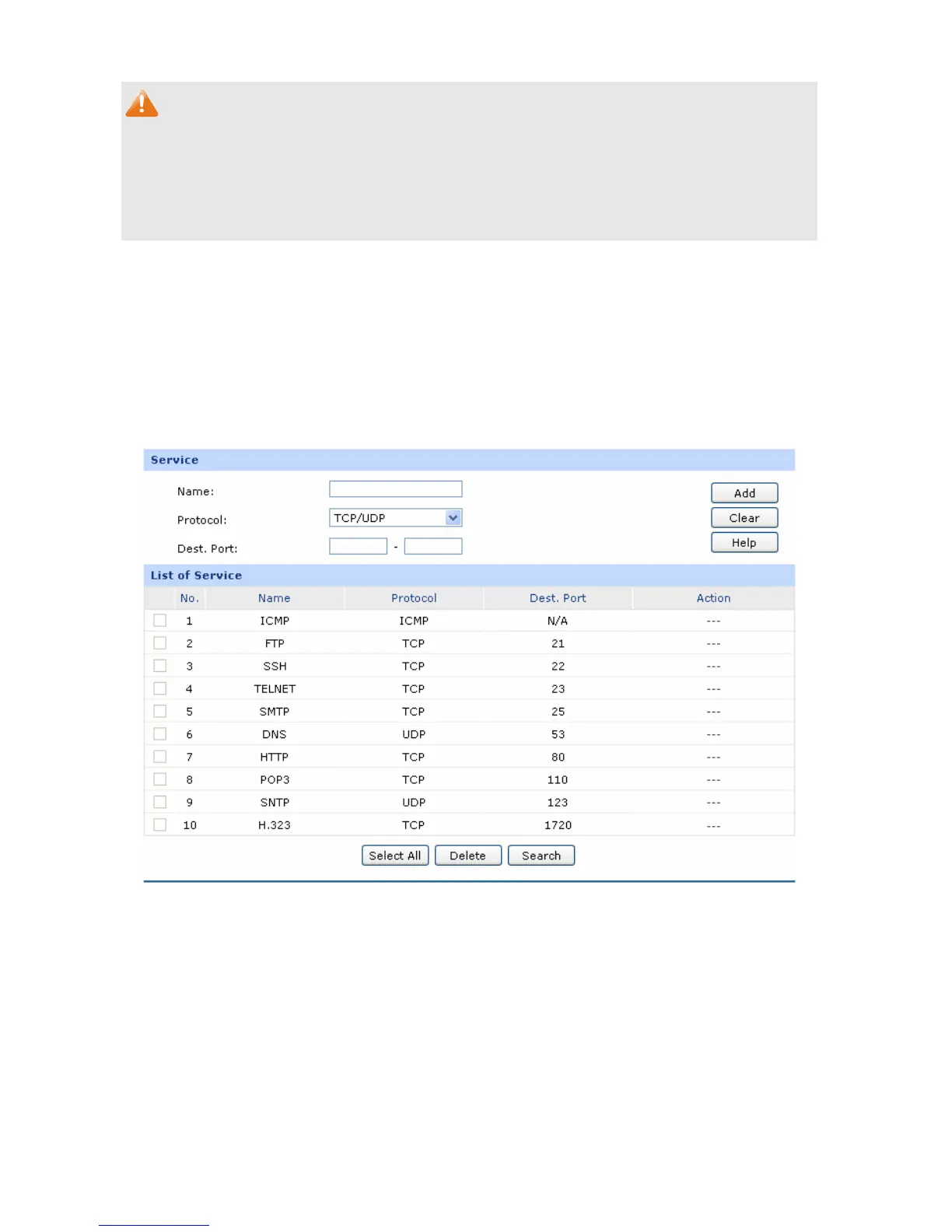
4.6.4.4 Service
The Service function allows you to specify the protocol and port number to be filtered for Firewall
function conveniently. Protocol name and port range constitute a service type. The router predefines
three commonly used services such as HTTP, FTP and TELNET and you can also add customized
services if needed.
Choose the menu Firewall→Access Control→Service to load the following page.
Figure 4-44 Service
The following items are displayed on this screen:
Service
Name:
Enter a name for the service. The name should not be more than 28
characters. The name will display in the drop-down list of Protocol on
Access Rule page.



 To Next Page