22
¾ User Name - Enter the user name for 802.1X authentication provided by your ISP
¾ Password - Enter the password for 802.1X authentication provided by your ISP.
Click Login to start 802.1X authentication.
Click Logout to end 802.1X authentication.
¾ Host Name - This field is required to be filled by some service provider.
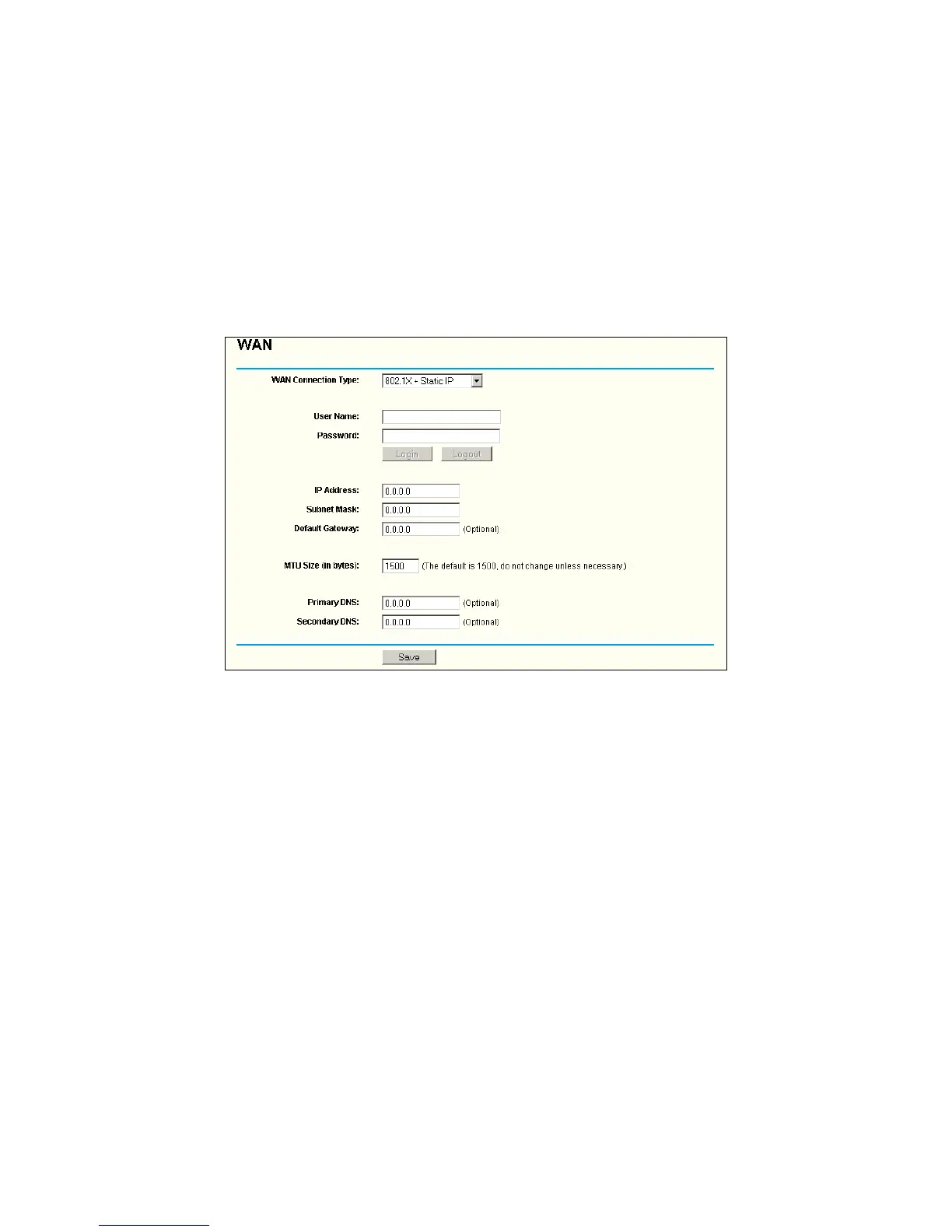
5. If you choose 802.1X + Static IP, you should enter the follow parameters(Figure 4-9) :
Figure 4-9 802.1X + Static IP Settings
¾ User Name - Enter the user name for 802.1X authentication provided by your ISP
¾ Password - Enter the password for 802.1X authentication provided by your ISP.
Click Login to start 802.1X authentication.
Click Logout to end 802.1X authentication.
¾ IP Address - Enter the IP address in dotted-decimal notation provided by your ISP.
¾ Subnet Mask - Enter the subnet Mask in dotted-decimal notation provided by your ISP.
¾ Default Gateway - (Optional) Enter the default gateway IP address in dotted-decimal
notation provided by your ISP.
6. If you choose Big Pond Cable, you should enter the following parameters (
Figure 4-10):


 To Next Page
 Loading...