TL-WR842ND 300Mbps Multi-Function Wireless N Router
- 92 -
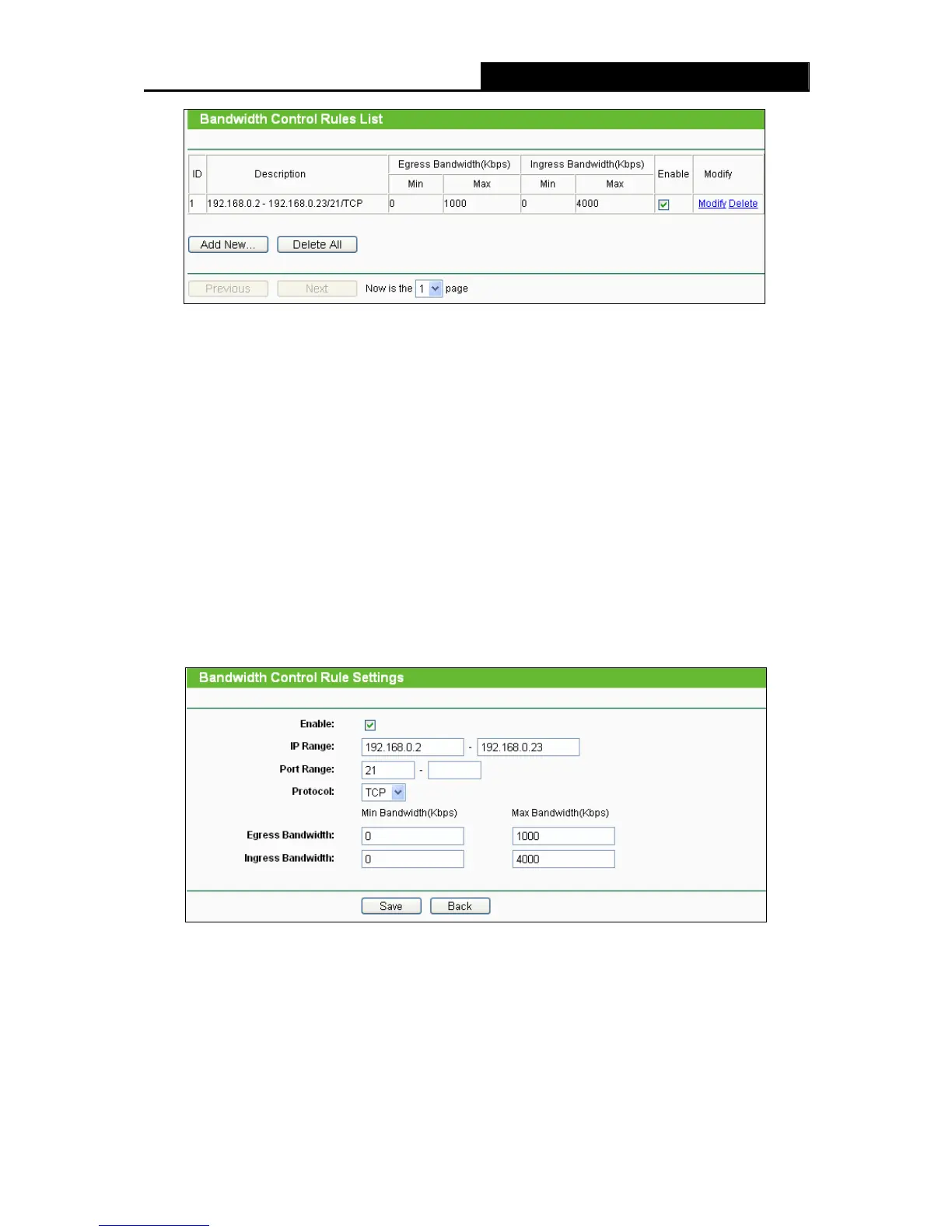
Figure 4-86 Bandwidth Control Rules List
¾ Description - This is the information about the rules such as address range.
¾ Egress bandwidth - This field displays the max and mix upload bandwidth through the WAN
port, the default is 0.
¾ Ingress bandwidth - This field displays the max and mix download bandwidth through the
WAN port, the default is 0.
¾ Enable - This displays the status of the rule.
¾ Modify - Click Modify to edit the rule. Click Delete to delete the rule.
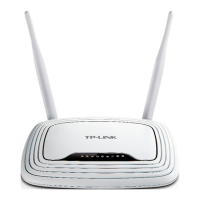
To add/modify a Bandwidth Control rule, follow the steps below.
1. Click Add New… shown in Figure 4-86, you will see a new screen shown in Figure 4-87.
2. Enter the information like the screen shown below.
Figure 4-87 Bandwidth Control Rule Settings
3. Click the Save button.













 To Next Page