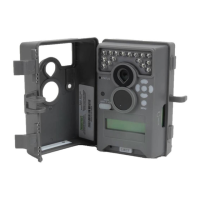
CAPTURE MODES
IV
Page 4
PREMISE Digital Surveillance Camera
1 PHOTO
A single still photo is taken when movement is detected. Photos are stored in the DCIM/100MFCAM
folder on the SD card.
3 PHOTO
Three still photos are taken when movement is detected in a sequential manner with an approximate
1 second interval between images. Photos are stored in the DCIM/100MFCAM folder on the SD card.
VIDEO
Camera records a video when movement is detected by the motion sensor. The video length is
congurable in OPTIONS.
Page 9
PREMISE Digital Surveillance Camera
SETUP AND PROGRAMMING
V
When the camera’s power is turned ON, the display will come on to the Default Screen. Moving
clockwise from the top left, information is displayed for capture type, delay countdown for capture,
image count/remaining capacity, and battery level. If no buttons are pressed within 30 seconds, the
LCD screen will enter sleep mode to conserve battery life and enter capture mode based on current
settings. To wake the camera manually, press and hold the menu button until you see the default
screen on the display.
PHOTO DLY:00:29
B:99% 9999/9999
TRACE PREMISE
<OPTIONS START>
Setup Selection Setting
From the Default Screen, press the Menu button to enter the Main Screen. Press the Left button
to enter OPTIONS or Right button to START and force the camera to countdown and enter capture
mode. In the OPTIONS menu, Press the OK button, the selection will start to ash. Press the Up/Down
buttons to change the settings. Press the OK button again to Iock in selection. Press the Left button to
move to the next setting. Using this method you can customize your camera’s feature settings.
From this Main Screen, press OK to get to the Test Capture screen.
Memory & Storage
Your camera supports external SD memory cards ONLY and will accept up to a 32GB card. Using large
memory cards can slow the camera response. The camera cannot capture any photo or video without
external memory. Please insert an SD memory card to operate camera. Estimates are based on the
most common types of memory cards that can be purchased at electronic stores, office supply stores,
or online. Estimates may vary based on camera settings or environmental conditions.
Important
Always turn the unit o when inserting or removing an SD memory card to avoid damage and ensure
that the camera properly updates the memory information.
Photo Mode
SD Card Size: 2 GB 16 GB
HIGH 3840 x 2160 700 5600
LOW 2688 x 1512 1400 11200
Video Mode
SD Card Size: 2 GB 16 GB
HD 1280 x 720 (based on 10 sec video) 35 280
LOW 640 x 480 (based on 10 sec video) 100 800
Actual capacity will vary based on image properties.
Specications
Operational Mode Photo / Video
Resolution 8.0 MP
Still Resolutions JPEG
Low 2688 x 1512, High 3840 x 2160
Video Resolutions AVI
Low 640 x 480, HD 1280 x 720
SD Memory Card Up to 32 GB SD card (not included)
Format JPEG - Still pictures, AVI - Video clips
Power Supply 8 AA Alkaline or Lithium batteries (not included)
CAMERA SPECIFICATIONS
VI
The PREMISE oers three capture modes as described below. The default capture mode is 3 PHOTO.


 To Next Page
 Loading...