

EasyManua.ls Logo

Tracer Flipper RF - User Manual

Tracer Flipper RF
24 pages
Go to English
Print Icon
To Next Page IconTo Next Page
Loading...
Mysz Tracer Flipper RF
Instrukcja obsługi
Tracer Flipper RF mouse
Instructions for use
Myš Tracer Flipper RF
Návod k obsluze
Myš Tracer Flipper RF
Návod na obsluhu
Мышь Tracer Flipper RF
Руководство по эксплуатации
Tracer Flipper RF egér
Használati útmutató
PL
EN
CZ
SK
RU
HU
Home & Office
Question and Answer IconNeed help?

Do you have a question about the Tracer Flipper RF and is the answer not in the manual?

Summary

Product Information and Requirements

Package Contents

Lists all items included in the product package, such as mouse, receiver, and batteries.

Product Functions

Details the specific buttons and features of the Tracer Flipper RF mouse.

System Requirements

Specifies the necessary computer hardware and operating system for product use.

Quick Installation Guide

Install Batteries

Open the battery compartment and install 2 AAA batteries.

Connect Nano Receiver

Pull out the Nano receiver and insert it into an available USB port.

Pairing Lost ID Code

Procedure to re-pair the mouse and receiver if the ID code is lost.

Troubleshooting and Maintenance

Mouse Pointer Issues

Addresses problems with erratic mouse pointer movement, suggesting battery replacement.

Mouse Not Responding

Provides pairing steps for when the mouse fails to work properly.

Product Maintenance Tips

Offers advice on cleaning, avoiding spills, and battery usage for longevity.
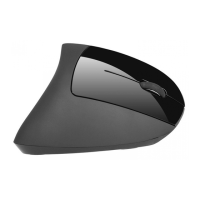
Tracer Flipper RF Specifications

General IconGeneral
BrandTracer
ModelFlipper RF
CategoryMouse
LanguageEnglish