Need help?
Do you have a question about the Tracer MobiDrive and is the answer not in the manual?
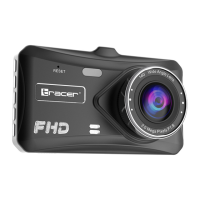
Identifies key physical components of the dashcam, including buttons, display, lens, and ports.
Controls device power, recording start/stop, and data saving through short and long presses.
Manages menu navigation, microphone mute, night light control, and switching between recording modes.
Details how to access and navigate device menus for configuration and operations.
Covers microSD card requirements, installation, removal, and capacity limitations.
Instructions on how to adjust the dashcam's lens position for optimal recording angle.
Explains manual and automatic methods for switching the dashcam on and off.
Describes how to switch between recorder, picture, and playback modes using the mode button.
Guides users on navigating the settings menu using up/down and OK buttons.
Details how to start/stop recording and take pictures in respective modes.
Explains how to enter playback mode and browse recorded files.
Lists shortcuts for night light and microphone control during recording.
Covers viewing files via USB or card reader and using the device as a card reader.
Instructions for using the dashcam as a webcam via USB connection.
Provides solutions for issues like recording failures, blurry images, and device freezing.
Explains the symbol for waste electrical and electronic equipment disposal.
 General
| Brand | Tracer |
|---|---|
| Model | MobiDrive |
| Category | Dash Cameras |
| Language | English |


 To Next Page