Need help?
Do you have a question about the Tracer Roadster 4in1 and is the answer not in the manual?
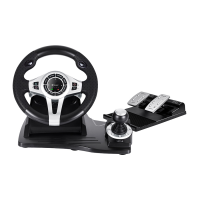
Directional Pad for navigation and control.
Left wing control, also functions as a brake.
Indicator light for program mode status.
Right wing control, also functions as an accelerator.
LED indicator for channel status.
LED indicator for mode status.
Control for gear shifting.
Brake pedal control.
Accelerator pedal control.
Step-by-step guide for setting up programmable buttons and functions.
Instructions for clearing a single programmed button.
Instructions for clearing all programmed buttons and restoring defaults.
Procedure for programming pedals to function as a Y-axis input.
Guide for adjusting the wheel's sensitivity across three levels.
 General
| Brand | Tracer |
|---|---|
| Model | Roadster 4in1 |
| Category | Video Game Controller |
| Language | English |

 To Next Page