9
SOS BUTTON
If the SOS button is pressed (for around 3 seconds), Users who are
logged in to the App will receive an alert saying the SOS button has
been pressed. Assigned ‘Contacts’ will also receive an email alert that
the button has been pressed. You can decide which contacts receive
this alert, or add new ones, by following the steps listed under
“Adding Contacts” on page 7.
GEO-FENCING
A geofence is a virtual boundary that you can set. You will receive a
notification when the tracker goes into or out of this area. To create
a fence, complete the following steps:
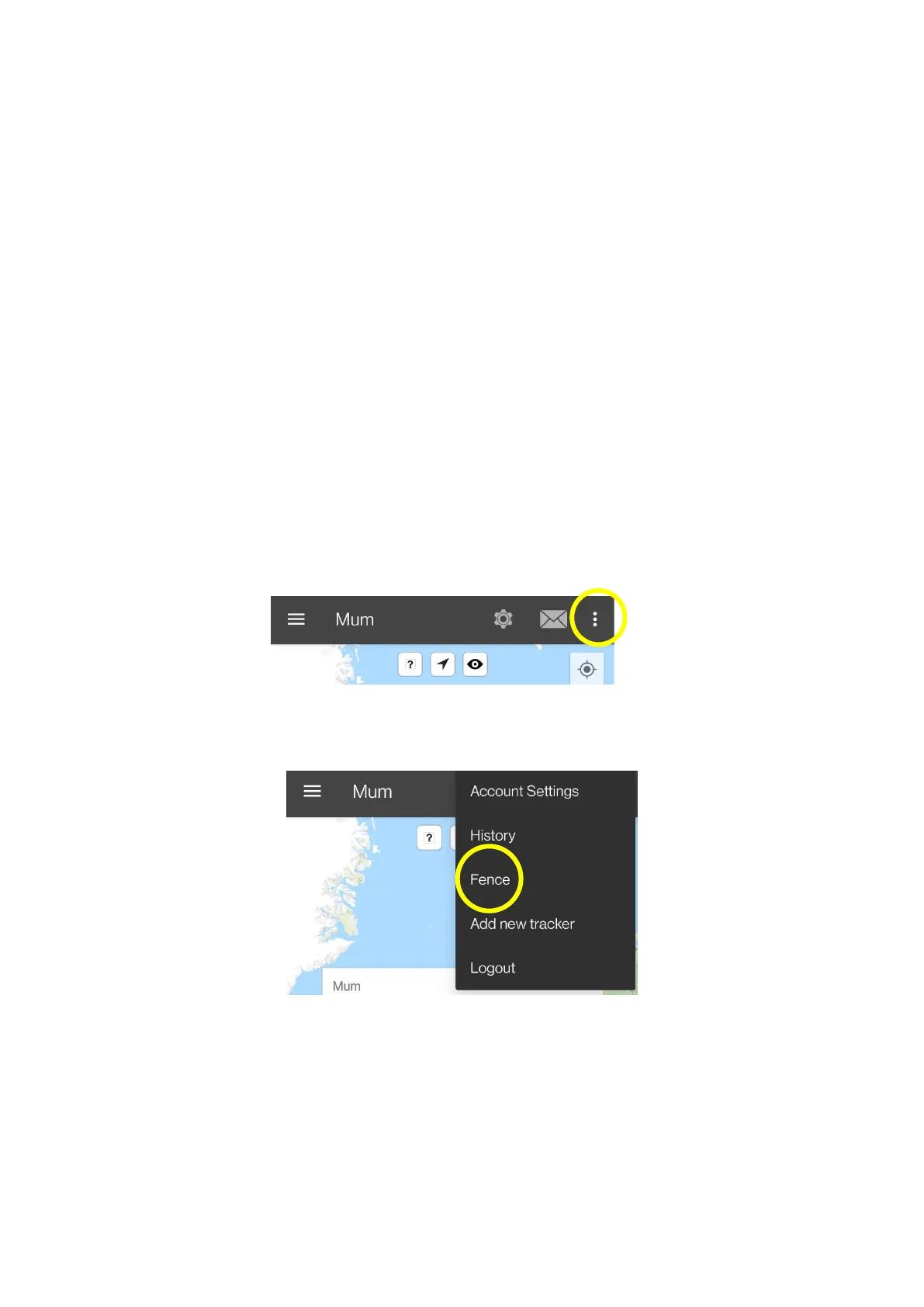
1. In the Trackisafe app select on the “show more” icon, circled
below.
2. From the drop-down list, select “fence”.
3. Click on the “Add fence” button. A square highlighted area will be
created around your device’s current location, this is the fence
boundary.
− You can also enter an address to position a fence.


 To Next Page