9
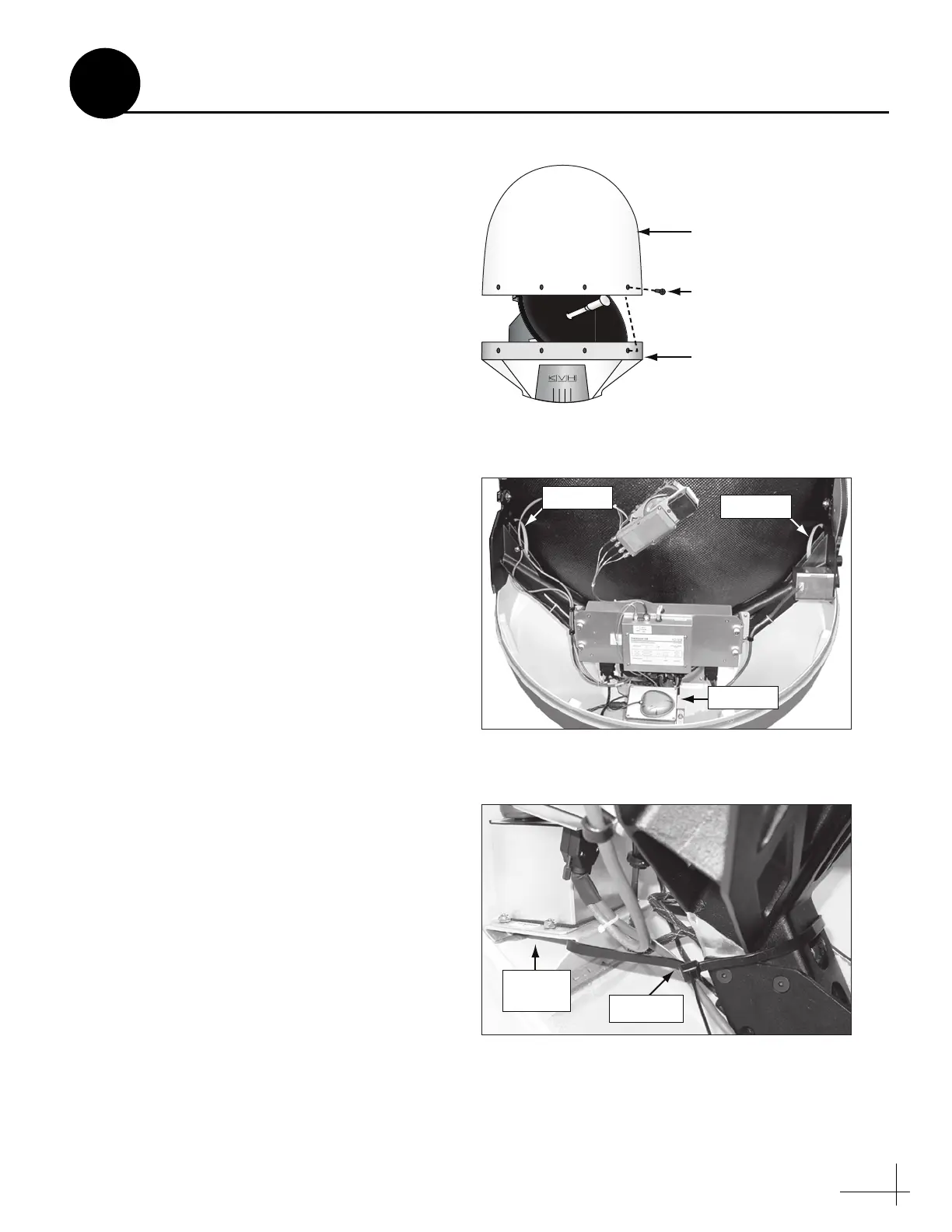
Inside the antenna, three heavy-duty tie-wraps
prevent the antenna assembly from moving
during shipment. Follow these steps to remove
these shipping restraints.
a. Remove the eight #10-32 Phillips-head screws
securing the radome to the baseplate (see
Figure 16). Carefully lift the radome straight
up until clear of the antenna assembly and set
it aside in a safe place.
TIP: If you keep the radome topside, secure it with a
lanyard to prevent it from falling overboard.
b. Unfasten the two tie-wraps securing the
reflector to the antenna frame (see Figure 17).
To unfasten the tie-wraps, release the tab
with a flat-head screwdriver.
c. Unfasten the tie-wrap securing the antenna
frame to the sensor bracket (see Figure 18).
d. Save the tie-wraps for future use; the
customer will need to reinstall them if he/she
needs to relocate or reship the antenna.
e. Reinstall the radome onto the antenna. Secure
in place with the eight #10-32 screws you
removed in Step 7a.
f. Install a protective plastic screw cap
(supplied in the kitpack) over each radome
screw.
Remove the Restraints
Figure 16 Removing the Radome
Figure 17 Locations of Shipping Restraints
Figure 18 Close-up of Antenna Frame Shipping Restraint
Antenna
#10-32 Screw (x8)
Radome
Baseplate
7



 To Next Page