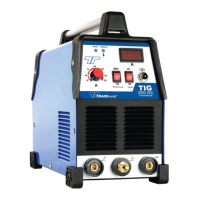
The TRADEweld TIG 200 DC HF Inverter Welder is a sophisticated and versatile welding machine designed for both professional and DIY use. It incorporates advanced inverter and PWM (Pulse Width Modulation) technology, which significantly enhances its performance, reduces its size and weight, and improves overall power efficiency compared to traditional welding equipment. This technology allows the machine to rectify the incoming AC input voltage, invert it, and then filter it into a smooth DC current. This DC current is then processed through power switches (MOSFETs) to convert it back into a high-frequency AC voltage, which is subsequently stepped down by a transformer and rectified back to a smooth DC for welding. This intricate process results in a much stronger, more concentrated, and stable arc, leading to higher quality and more efficient welds.
Function Description
The primary function of the TIG 200 DC is to perform TIG (Tungsten Inert Gas) welding and MMA (Manual Metal Arc) welding. As a constant current DC inverter welder, it is particularly well-suited for TIG welding a variety of materials, including stainless steel, carbon steel, and copper. The inclusion of High Frequency (HF) start and a gas valve simplifies the TIG welding process, making it easier to achieve precise and clean welds without direct contact between the tungsten electrode and the workpiece, thus preventing contamination. For MMA welding, the machine can be used with standard arc electrodes, offering flexibility for different welding applications.
Usage Features
The TIG 200 DC is designed for ease of use, with a clear front panel layout that allows for intuitive operation.
Installation:
- MMA Welding: The electrode holder and earth clamp are connected to the machine using quick connectors. It's crucial to ensure a tight fit and correct polarity. Generally, reverse polarity (electrode holder to positive, earth clamp to negative) is used, but the machine supports both straight and reverse polarity. Incorrect polarity can lead to an unstable arc, spatter, or sticking electrodes.
- TIG Welding: The TIG torch's gas and power cable nut connects to the center connector on the front panel, with the trigger plug also connecting to the front panel. The earth cable connects to the right-side Dinse connector. A gas hose connects the machine's rear to an Argon regulator, which is then fitted to an Argon gas bottle. It is essential to secure the gas bottle to prevent it from falling.
- Power On: After all connections are made, the machine is turned on via the ON/OFF switch at the rear. The digital current meter will illuminate, and the fan will begin to rotate.
- Important Note: When switching between TIG and MMA welding, the unused torch/electrode holder must be disconnected to prevent interference or damage.
Operation:
- MMA Welding:
- Select the MMA process on the front panel.
- Adjust the welding current according to the material thickness.
- Strike an arc by touching the electrode to the workpiece.
- TIG Welding:
- Select the TIG process on the front panel.
- Open the argon gas cylinder valve and set the flow rate to 10–15 LPM (Liters per minute).
- Choose the gas post-flow duration (2 seconds for short/low amperage welds, 5 seconds for long/high amperage welds). This feature protects the weld spot and cools the tungsten after welding.
- Press the torch switch. The gas valve will click, HF will be heard, and argon gas will flow. It's recommended to trigger the torch briefly to purge air from the lines.
- Adjust the welding current based on material thickness.
- Hold the tungsten electrode 2–4mm away from the material. Pressing the torch trigger will initiate an arc from the tungsten to the workpiece, and the HF sound will cease. DC TIG welding is notably quiet.
TIG Welding Tips:
- Sharpen the tungsten point to 1.5 times its thickness.
- Ensure grinding marks are aligned with the tip.
- Weld in the direction of gas flow to avoid smoke marks.
- Dip the filler rod in front of the weld pool.
- Practice on similar materials.
- If tungsten burns too quickly, reduce amperage or use a thicker tungsten.
Operating Precautions:
- Environment: Operate in dry conditions (max 60% humidity), between -10°C and +40°C. Avoid direct sunlight, rain, snow, and environments with high dust or corrosive gas concentrations.
- Ventilation: Proper ventilation is crucial. Ensure the machine's vents are clear and it receives adequate airflow. A minimum clearance of 30cm from objects is recommended. For continuous use or hot weather, supplementary cooling (e.g., a fan) can prolong component life.
- Overvoltage: Adhere to the specified input voltage range. Exceeding the maximum allowed voltage can damage internal components.
- Overloading: Do not exceed the maximum allowable duty cycle. Continuous overloading can burn up the machine and is not covered by warranty. The machine has a protective circuit that cuts off power output if internal temperature rises due to exceeding the duty cycle, resuming only after cooling.
- Electromagnetic Fields: The machine produces electromagnetic fields that may interfere with medical implants. Individuals with implants should consult their physician and implant manufacturer before use.
Maintenance Features
Regular maintenance is essential to ensure the longevity and safe operation of the TIG 200 DC welder.
- Before Maintenance: Always turn off the power and disconnect the machine from electricity before opening the cover for any checks or cleaning.
- Cleaning:
- Regularly remove dust from the machine using dry, compressed air, especially if operated in dusty environments.
- Ensure compressed air pressure does not exceed 5 bars to prevent damage to small components.
- Check inside the welding machine for loose or damaged connections and replace if necessary.
- Avoid water or steam entering the machine. If the welding machine gets wet, dry it thoroughly and check insulation before use.
- Storage: If the welding machine will not be used for long periods, store it in a box or covered in a cool, dry area.
Safety Warnings:
- Electric Shock: Always ensure proper earthing, avoid touching bare electrical parts, and use dry gloves. Ensure you are insulated from the ground.
- Gases and Fumes: Ensure proper ventilation. Use respiratory protection.
- Arc Rays: Wear suitable protective mask, light filter, and protective garment. Protect bystanders.
- Fire: Keep flammable materials away from the welding area.
- Noise: Wear hearing protection.
- Malfunction: If the machine malfunctions, consult the manual or a qualified technician. Do not attempt repairs if you lack the necessary knowledge, as exposed connections may carry life-threatening voltages.
- Circuit Breaker: An earth leakage-circuit breaker should be used.
- Cables: Do not pull out or insert plugs/cables during welding. Ensure connections are firm and the power plug is securely connected.
Troubleshooting:
The manual provides a troubleshooting guide for common issues such as porosity in welds, power indicator not lighting up, unstable output current, and lack of HF sound. It emphasizes that repairs should only be attempted by knowledgeable individuals, especially if the machine is still under warranty, in which case contacting the distributor or service center is recommended.
In summary, the TRADEweld TIG 200 DC HF Inverter Welder is a powerful, efficient, and user-friendly machine suitable for a range of TIG and MMA welding tasks, designed with advanced technology to deliver high-quality results while prioritizing user safety and ease of maintenance.


 To Next Page
 General