13
REMOTE CHARGING & BATTERIES
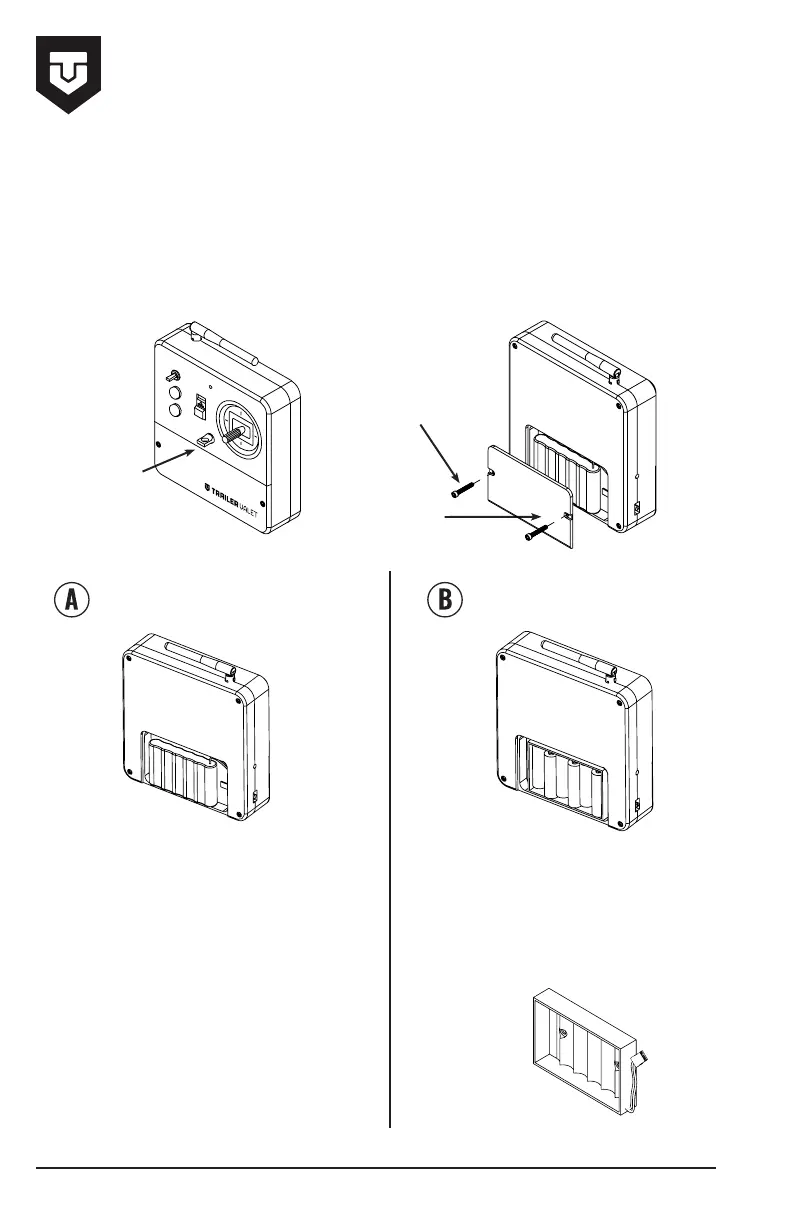
No
Battery
Access
Shrink Wrapped Battery Pack 6 Rechargeable AA’ Lithium Ion
Batteries
Cover
Screws
Back
Cover
REPLACING THE REMOTE CONTROL BATTERIES
1. Remove 4 cover screws from back of Remote Control case.
2. Replace old battery pack with new battery pack.
NOTE: A battery tray is provided with the tug. It can be used with standard AA rechargeable
batteries.
3A. Disconnect the shrink wrapped
battery pack and remove the battery.
4A. Replace the batteries by
purchasing a new shrink wrapped
battery pack or installing the supplied
battery tray and purchasing 6
rechargeable ‘AA’ Lithium Ion batteries.
5A. Reconnect the battery to the
transmitter circuit board.
6A. Re-install back cover and screws.
3B. Remove the 6 batteries and replace
with new rechargeable ‘AA’ Lithium Ion
batteries.
4B. Re-install back cover and screws.
Battery
Tray


 To Next Page
 Loading...