© Copyright Trak Racer 2018
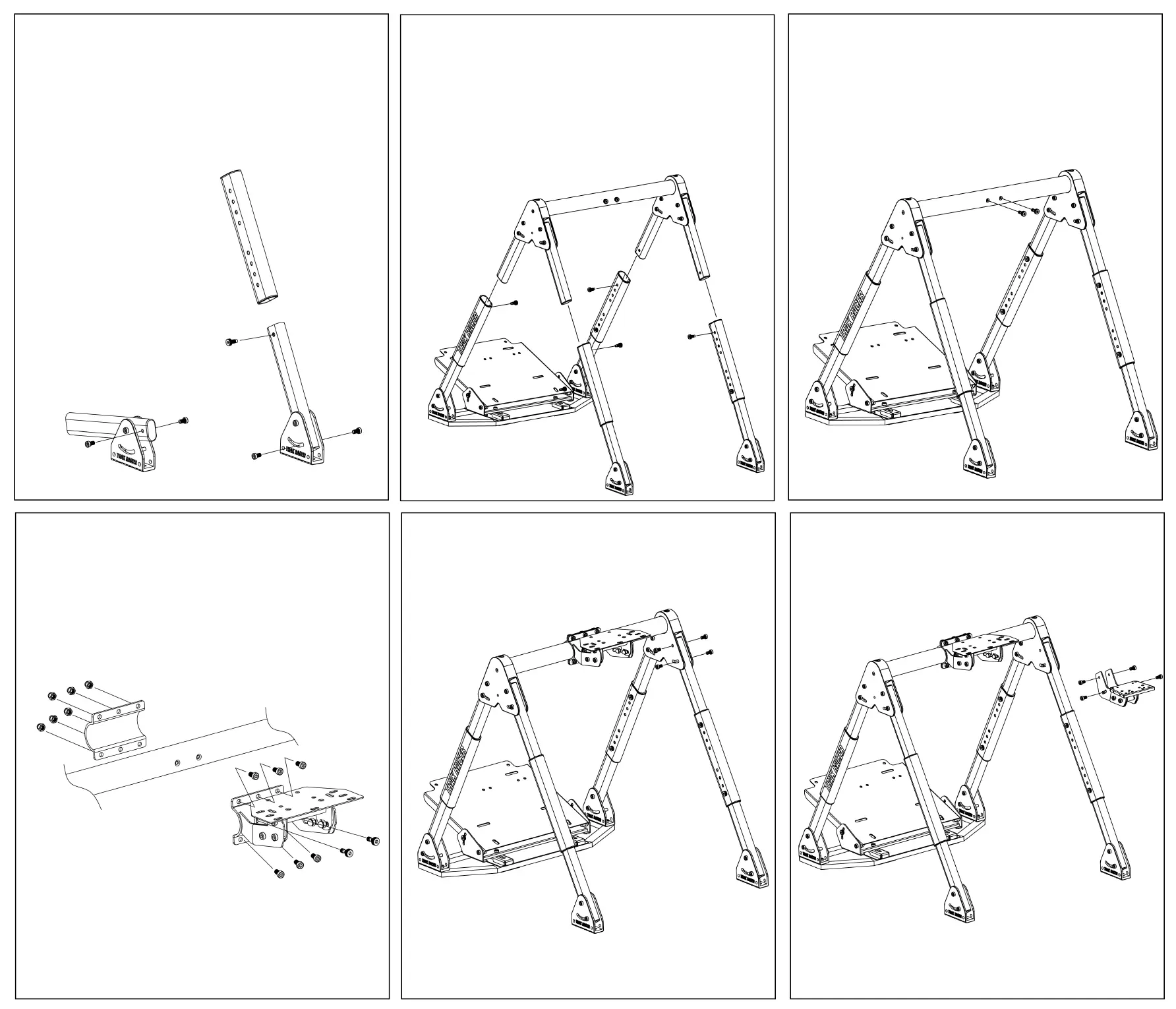
Step 10
To mount the shift mount to the left or right side, remove
the 4 screws screws from the frame on your preferred side.
Step 9
Adjust the wheel mount to the preferred height and position
by adding 2 screws back into the frame then tighten. Use
the inner hexagon spanner to affix 8 screws from the rear of
the stand. Place the wheel support bracket onto the front of
the stand and add the 8 nuts and tighten. Adjust the angle
and slide to your preferred location.
Step 11
Position the shift mount, insert screws and tighten using
the 4 screws that were removed in Step 10.
Step 7
Position and affix the top part of the frame to the lower
legs of Step 5 and Step 6. There are two holes with pre-
installed screws in the center of the top frame which
should face to the rear of the stand. Adjust the stand to
your preferred height and tighten the screws to lock the
height.
Step 6
Use the inner hexagon spanner to remove the 2 screws
from the rear legs. Adjust to your preferred angle and
tighten the screws. Insert the rear legs into the non-Trak
Racer center inserts then add screws.
Step 8
Use the inner hexagon spanner to remove the 2 screws
from the center of top frame. These screws are used to
adjust the wheel mount height.


 To Previous Page